Kasparaitis
Members
-
Joined
-
Last visited
Everything posted by Kasparaitis
-
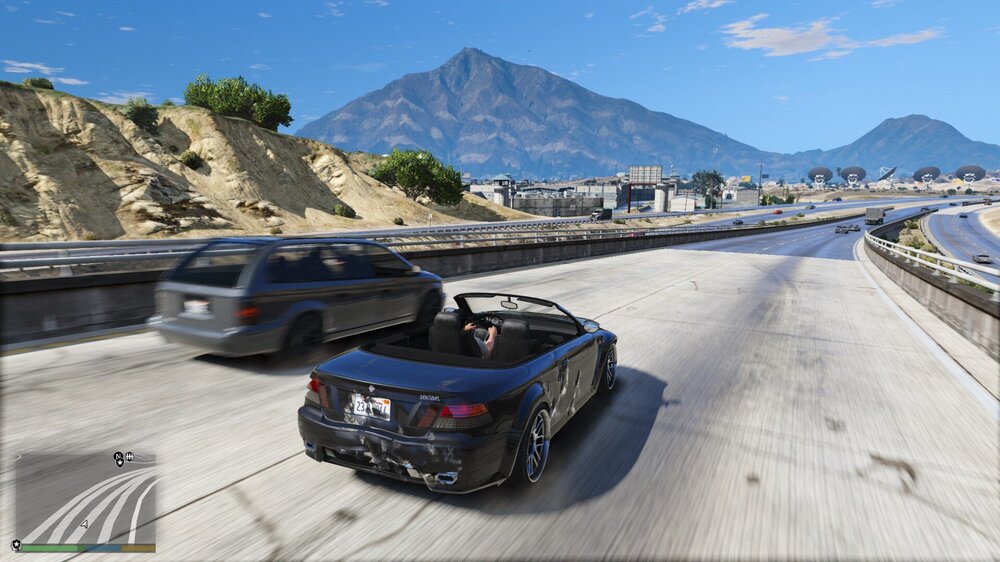
Issue solved. I found Postfx_motionblur setting in timecycle xml and changed the value to 0.00.
-
I made a mistake with backup, so If you have native timecycle_mod_1 file I could try if that is it.
-
MVGA is installed and it started after that, I've used MVGA before and never had the same issue.
-
Depth of field is off, also Motion Blur strenght is zero. I've also changed the defaultmotionblur option to 0 in visualsettings file.
-
Hopefully someone can help me with an issue I can't seem to find a solution. So few days ago I installed Make Visuals Great Again, and everything went fine. I also made sure Motion blur options are fully off (timecycle and visualsettings edits). Now when I drive around, especially with little higher speeds the AI cars start to look kind of blurry or out of focus, I have taken a screenshot as an example. You can see it especially when in high speeds chases. Is It a feature or something I can fix? Appreciate if someone could point me to the right direction. I've tried to find a solution from here, extensive Google search, changing my graphics settings around, but no help yet.