


bleepbloop66
Members
-
Joined
-
Last visited
Everything posted by bleepbloop66
-
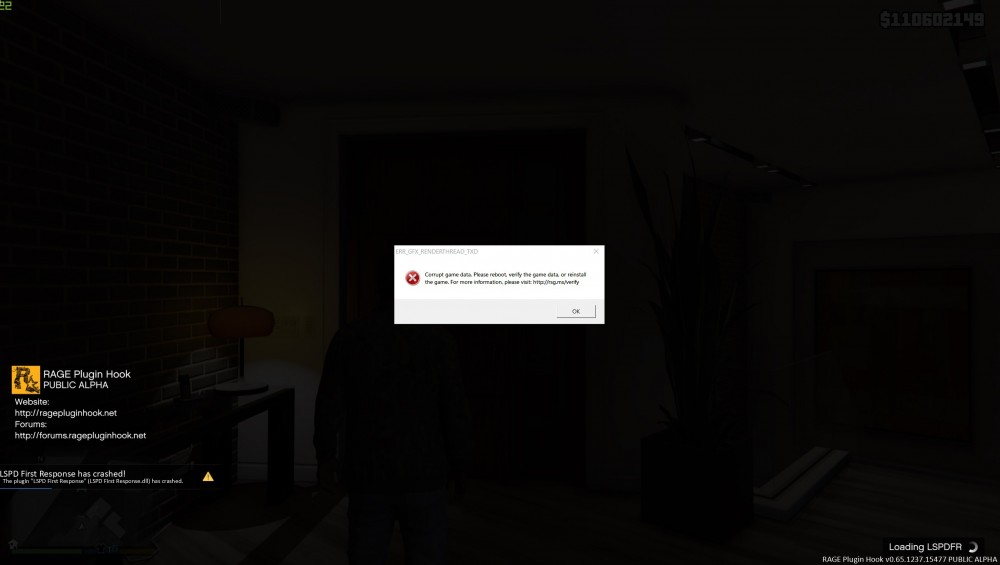
OK, so |I got the chance today to give this another go. I loaded up the game and this time launched RPH at the main menu. This time it seemed to work; all the loading dialogues came up, it said it had loaded LSPDFR. But then as it seemed to complete it instantly crashed. It did however bring up a RAGE crash report, which I hadn't seen before, and generated an .RCR file, which I cant upload here. Here's my RagePluginHook.log though. RagePluginHook.log Also now the game says that the files are corrupt. Here's a screenshot of the crash
-
As I said, I've already restarted, whitelisted LSPDFR and GTAV in my antivirus(and deactivated it completely), and I am running all the files as an admin...no dice 😞 I also have tried installing all these: Microsoft .NET Framework 4.6, or higher. Microsoft Visual C++ 2010 SP1 Redistributable Package (x64) Visual C++ Redistributable for Visual Studio 2015 (x64) But I have the most up-to-date version of all of them. I've only ever owned the one copy of GTA V.
-
I'm on the Rockstar retail version. But I've seen people on both platforms with this issue...
-
Intel i5-8400 RTX 2070 16GB Corsair Vengeance Crucial 1TB SSD It shouldn't have any issues, I usually run the game on ultra settings. Yes, I have the latest ScriptHook and RageHook installed. I'll def keep trying, but I'm kind of running out of options at this point 😅 I already have those settings activated, it doesn't fix the problem unfortunately.
-
I haven't added anything to the game. It's a fresh install of just GTA V, LSPDFR and RAGE. OK so this time I launched the game through the regular GTAVLauncher and loaded my save and then Alt-Tabbed out and launched RHP and it completed its startup and said "Enjoy!" But then the second I return to the game its crashes to desktop. I feel like that's progress though! Any ideas? I also changed the Load Plugin Timeout to 60000 as suggested. Thanks for the help btw
-
Everytime I try to launch the game through RPH I get the error message "could not hook game process. insufficient permissions or bad antivirus." I have tried all the suggested fixes I could find online including: uninstalling/reinstalling the game, installing LSPDFR 0.4, ScriptHookV, ScriptHookDotNet and the latest version of RAGE(overwriting LSPDFR version), installed Albo's .dll, setting RPH to launch the game in forced fullscreen and DirectX 11, setting exclusions in my Bitdefender(and disabling it for good measure), running files as admin, renaming the root folder to "Grand Theft Auto V", and giving all users and apps full control of the GTA V folder. The furthest I've been able to get was by launching the game, then launching RPH without any plugins, which displayed all the RAGE logos and the console in-game, but obviously without LSPDFR. I'm basically wondering is there a fix for this issue? I've seen a lot of people experiencing this but no real solutions... Here is my RagePluginLauncher.log: And heres my RagePluginHook.log:
