


Dutchie77
Members
-
Joined
-
Last visited
Everything posted by Dutchie77
-
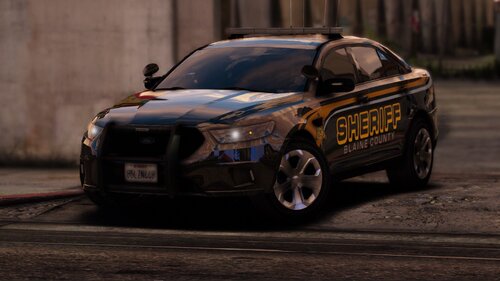 Change the handling ID of the vehicle spot (i.e police3, sheriff2) in vehicle.meta to GRESLEY and roll over will stop. In fact as a tip whenever you install a SUV vehicle change the ID to GRESLEY. You can also do for the other vehicles (especially when they bounce like crazy) and change their ID to FUGITIVE.
- 29 comments
- 4 reviews
-
-
 Nice. But is it just me (and it could be) that the transport van's back-door would open but still showing (like a 2nd door) it closed?
 -
Need more info, which mod and stuff. But from look of it you are using Stop the Ped. You may want to check if Bejojo has updated his mod, he updates them quite frequently. If that isn't the issue, we might need some more info then what you've provided. Yes, same way you replace police vehicles. Find one on this site or GTA5 mods, I would recommend making sure it has "replace" in the description, personally it makes for replacing easily. But then again, as im typing i re-read your question and you say "add", that i am not sure of... I prefer replacing - i like simple..🤷♂️ which mod are you using?
-
There is a call-out that "creates" BOLO's but not where you are the one creating it. Also the latest LSPDFR update added a feature(that can be turned on and off in the .ini) where if a suspect were to have escaped a pursuit (i dont think its just pursuits), still is a wanted person in the game. And if he/she is spotted it will be reported to you by dispatch. Or when he/she happens to be near you and if im correct. I havent used the feature much as im currently have a different way I am playing the game. So I could be slightly off. You can read the notes on the new update (0.4.7) where it is explained
-
You can set your steam to not auto update... As long as you are not trying to play Online or the regular single player you don't necessarily need to update the game. Also, make a backup with RAGE so you can revert back if you have updated the game....but again don't go Online or it will update the game.
-
do it!
-
-
EUP Law & Order and Serve & Rescue (SAR not RAS)... Look at beginning of post and youll see links to them,,
-
you should be able to launch with ragehook.exe after you update ragehook.
-
I found a quick easy way to do it without the extra steps and recorded a video.
-
Load the launcher > click "play on steam" button. Button will change to "loading". Open rage then. Skip first 4 seconds as it is my first time recording anything, hehe
-
Open launcher, click "play on steam" button. when the button says loading, open Rage.
-
Open the rockstar launcher > click "Play on steam" button > open ragehook. Ive tried this back to back for about 10 mins and each time it has worked. And in fact, the "hook" is faster now. Also helpful is to pin ragehook to your taskbar, so you dont have to double-click the shortcut. After you clicked the "play on steam" button it will change to "loading" and thats when you open ragehook. No need to wait for game to load and tab out.
-
Hey folks, maybe a fix for some: After trying every possible fix I know (ive used to fix previous crashes) I couldnt figure out why i keep crashing, so for "shits & giggles" (im not really giggling..) Ive decided to uninstall Nvidia Control Panel and it seems to have fixed MY crashes so far... I just ran a game test for 20 mins, on a high speed chase, on the beach, in the rain, with some vehicle collisions, as well have all my replaced vehicles spawning in game and NO crash... Note: I have not installed any visual mods yet (next on my list to do and testing) and install EUP. So perhaps for some of you crashes, you might want to try this. I know its not for everyone as each crash is unique depending on system etc etc..
-
Benzo, would it not be in patchday21ng? My game has been crashing lately as well ( i almost wanna say right before I actually updated the game yesterday, but i could be wrong ) and I have been using patchday21ng for modding (merely replacing vehicles). And its not a game memory crash, just the "bad graphic card etc.." crash. In the past ive been able to fix these things but today I am a lost...😔
-
 Hey Fellas, Can anyone tell me if they have the same "issue" or message (dont know which it would be); after updating LSPDFR to 0.4.2, as well as updating TP, during loading of scripts (mods), it will give me a message that says something like: "TP detected an older version of LSPDFR.dll..." and that "TP is made for version 0.4.2...". Which is what I am using. It doesnt crash the game or anything like that, but I reckon its not normal... I have ignored the message for a while since it still works, but today i felt like "wondering".. Thanks fellas You can: turn off music and put radio to OFF in your in-game setting. Press Scroll Lock to disable ELS keys and buttons (on controller) . Press again when you are ready to light up sirens.. For calling coroner and tow truck you need STOP THE PED installed and/or Police Smart Radio
- 3,646 comments
- 306 reviews
-
Life is good. 🕺
-
Try some of these settings:
-
This has fixed texture loss for me: In lspdfr.ini change the following: Main.PreloadAllModels = true to Main.PreloadAllModels = false True story.
-
Ok, I let my game "marinade" 🙄 (meaning I did not play anymore after the crashes) overnight without the Ragehook update, and tried the update again this morning, and it has been working. Don't know why it happened last night... But all is well this morning. 😃
-
that is the GTA folder.. Take a full screen-shot. There is usually a uninstall.exe in that folder. But we cant see your whole screen-shot..
-
If you did todays update it may caused the crash. It did mine, and i re-installed the previous version back and all is fine.... Not sure if this is isolated since I don't see anyone else having the issue...just yet..🙄
-
Confirmed that the update indeed is causing the crash. I put in the previous ragehook-plugin.exe and all seems to work again..
-
Has anyone else updated their Ragehook plugin today? Started it today and received message for an update. Downloaded and restarted it and it's been crashing during the "hook". I've played earlier today before the update and all was fine, Anyone else?



