




IvanOogle
Members
-
Joined
-
Last visited
Everything posted by IvanOogle
-
-
This error happens when you either have -scofflineonly in your commandline.txt or you are using a backup with a downgraded version. You will have to wait for Rage to update. If you are not using RagePluginHook and wish to play without it, then delete GTA5.exe then verify your game files.
-
The error usually comes from epic games when you have -scofflineonly in your commandline.txt or are using a backup version. You will have to wait for Rage to update.
-
Just reinstall it you don't need to delete anything.
-
Hi there! Please add your GTAV folder to your antivirus exceptions (you can google it for how to do so), then reinstall LSPDFR manual. If you don't have an antivirus, then add an exception to windows defender.
-
The file comes with ELS. Nobody can upload files here without the permission from the owner, so you will have to reinstall it.
-
Send your log.
-
Send a new log
-
It stops the ambient game blips , so it stops some background processes.
-
Go to your commandline.txt and remove everything. Put -windowed in it. Then, go into your lspdfr.ini file located in your lspdfr folder, and add this line: Main.DisableGameBlipHiding = true Then, try again.
-
Press enter, then add Main.DisableGameBlipHiding = true as a new line
-
drag and drop this file
-
Add a new line save+close and try again.
-
Sorry for the late response.
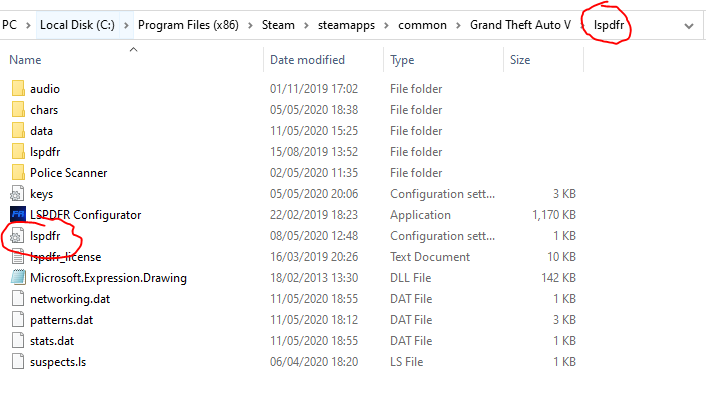
-
Add Main.DisableGameBlipHiding = true in your lspdfr.ini file located in your lspdfr folder
-
You may have to update your operating system to windows 10.
-
1st - Update your .net framework here - https://www.microsoft.com/en-us/download/details.aspx?id=48130 2nd - Add an exclusion to your gta folder in your antivirus. Search on google for how.
-
I apologise for the late responce. Go to your rage.ini file and where it says PluginTimeoutThreshold=10000 change it to PluginTimeoutThreshold=60000
-
Go in your stoptheped.ini file and disable realistic weapons system on startup
-
Go to your commandline.txt and remove everything. Put -windowed in it. After, add your gta folder to your antivirus exclusions, then restart your pc and try again.
-
And lspdfr doesn't load? Are you sure you loaded it correctly?
-
Depends. Epic games version would be something like Epic Games / GTAV Steam is this retail is this


-
Can you send a screenshot of your /Plugins folder?
-
Not working how? Not showing up or not loading
-
Lspdfr and rage does support the epic version, however script hook v does not. You will have to wait for an update. Nobody knows when it comes out. Lpsdfr will be updated when it needs to, not extremely frequently. You should not save your game with rage hooked. It will mess up your savegame. However, your starting person to patrol as will be saved, you need to go on duty in the police station at least once, then you can use the force duty command, and it will remember your last outfit, and agency.


