


hugestones
Members
-
Joined
-
Last visited
Everything posted by hugestones
-
What worked for me was adding ScriptHookVDotNet2 and ScriptHookVDotNet3, I had previously only added the ScriptHookVDotNet file and not all of the contents of the folder. I can't say for sure it's fixed but I'm on duty with my plugins loaded, hoping for a crash-free afternoon.
-
Please disregard
-
For background info, the game loads fine on it's own but it's when I go into the console to load plugins manually that I get this issue. It also persists whether I load plugins on startup or not.
-
Good afternoon, I've been experiencing an issue where GTA crashes to desktop when I load LSPDFR. I'm unable to even get to the point to force duty. I've been experimenting with and without different plugins all morning but am out of ideas. Here's my most recent crash log. RagePluginHook.log
-
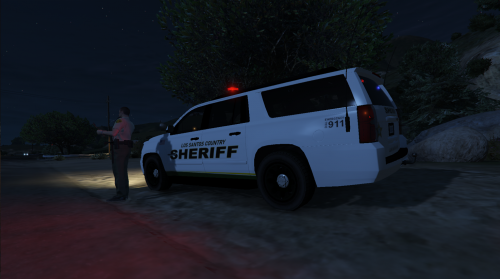 car door says los santos "country" instead of county.
 -
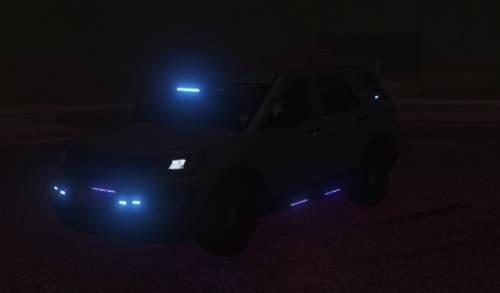 almost perfect. no takedown lighting, but scene lighting is enabled? i turned the scene lights on, the lights that should be takedowns came on, and the illumination of the lights is under the car/behind the car.
 -
-
 when I try to download this it doesn't give me an xml file, it just gives me all the coding that would be contained in the file. I copied and pasted it over to the defaultregions.xml, and when I went to save it, it asked me how to encode it. I wasnt sure which encoding to give it, and now my game crashes on startup. When you have a chance, could you either tell me which encoding method to use to save it, or turn it into an actual download? thanks! edit: nvm, swapped out fresh install files for everything in the data folder, made sure to copy text from defaultregions and customregions. running fine now. editing my edit: when i go on duty, it crashes.
- 170 comments
- 11 reviews

