


Pyxis
Members
-
Joined
-
Last visited
Everything posted by Pyxis
-
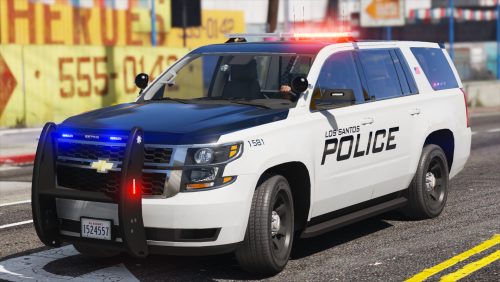 The top light bar is quite pale in comparison to the other lights. Is there a way to fix that? I was thinking about maybe in the visualsettings.dat or the carcols.ymt but I don't know. Thanks
- 51 comments
- 22 reviews
-
So what I figured out: I can load up GTA V fine when not installing OpenIV.asi and asiloader. But when I have them installed, to obviously play with mods, the game notifies me that my game data is corrupted. Don't know if you are able to get anything out of the asiloader.log and RPH.log. Help would be appreciated. asiloader.log RagePluginHook.log
-
It seems to be working right now. Made a clean install of everything, omitting some of the mods.
-
Making a clean install of GTA and LSPDFR plus RPH etc. to see if that fixes it.
-
Yes, I have done that and it worked fine. I am able to play as him and do everything, however, when I enter the police station it freezes.
-
DISCLAIMER: Yes, I am aware, that this is a LSPDFR 0.4 problem, however, I was not able to post in the LSPDFR 0.4 Support forum. Okay, so my problem is that LSPDFR loads properly, I can walk to a police station but when I want to go on duty, LSPDFR loads some plugins and then says "devouring doughnuts". And there is no progress that I was able to detect. If you need any screenshots or anything else, I am happy to provide those. Any help would be appreciated. Thank you
