


debuggyt
Members
-
Joined
-
Last visited
Everything posted by debuggyt
-
 hahaha thats awesome! If you're interested in future releases, suggestions or plugin talk feel free to join my discord! 🙂
 -
 Will check it out, should hopefully be out with a patch tomorrow! Recommend joining the discord for bug reports so I can keep it logged 🙂
 -
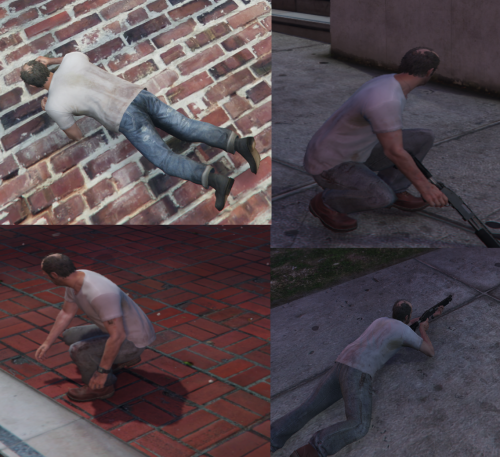
This plugin allows you to crouch and prone with or without a weapon with aiming and shooting working. It's more of a proof of concept since--yes I know the keybindings/movements can glitch out at times--thats why my stuff always is open source! I aim to make QOL plugins for players, with the ability to advance the code further. Know someone who has the skills to improve the code? Possibly make it more stable? Here's the source code, feel free to take a look at it or share it around! https://github.com/Debugg-RPH/Debugg-Crouch Interested in future releases or public beta scripts? Join my discord! https://discord.gg/zUB4nytNkm Showcase: Default keybinds: Crouch = X (can be changed in the .ini file) Prone = Y (can be changed in the .ini file)
-
They don’t die. It takes 5-10 seconds for them to get back up Defo an interesting idea. Might explore this later. Make sure to join my discord if you wanna submit more suggestions or try out some prereleases 🙂 https://discord.gg/zUB4nytNkm
-
At the moment with how to plugins is coded it isn’t possible, although I do agree that this would make a great addition. One problem though is I’m not yet sure how to integrate it so it could possibly be part of a future update. If not then once I’ve uploaded the source code, feel free to send it to any other dev who’d be willing to make a PR on GitHub! 🙂
-
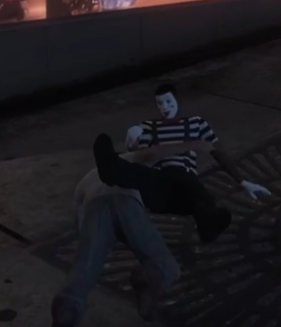
This script has two different styles of tackling, configurable with a true or false config in the ini file. Drag and drop both files inside your plugins folder. advTackleEnb=true enables "advanced mode" which looks like this: advTackleEnb=false enables "simple mode" which looks like this: As you can see, in "simple mode" the 6 second cooldown between tackles is more prominent than in "advanced mode". Also looks a lot worse in my opinion. By default use Shift + G to tackle, the key can be changed using the ini file/config to Shift + whatever. I don't plan on making any other changes to this resource as it is as simple as it can get but source code will be available later 🙂 note: after tackle peds do not die, even though it might seem so looking. At the video (badly recorded) they stay down for 5-10 seconds. Source code: https://github.com/Debugg-RPH/Debugg-Tackle Discord: https://discord.gg/zUB4nytNkm
-
 Might have been overlooked by me, thank you for the feedback. I will look into integrating this, an update should be around by the next weekend! Feel free to join my discord (link on profile) to get more news/updates regarding RPH stuff from me or to get near instant help when needed! 🙂
- 28 comments
- 12 reviews
-
-

- 1
-
-
I'm planning on making hotkeys for every toggle button, with the option to enable or disable them all seperately! 🙂
- 28 comments
- 12 reviews
-
-

- 1
-
-
This would be a problem with your EUP installation and not the menu, most of these toggles dont replace with variations but simple just removes and puts them back on which is what this toggle does.
- 28 comments
- 12 reviews
-
An update has been planned where you'll be able to setup hotkeys for every single item however I'm experimenting with different ways to integrate this better than how it currently works. As for now, unfortunatley there is no other way.
- 28 comments
- 12 reviews
-
In version 2.4.1 you're able to map keys to glasses and gloves, more will be added once I find a better way to integrate this, if you wan't to keep up to date with updates made on this plugin and future releases make sure to join my discord: https://discord.gg/Zng4BaU4f7 mMask is not a setting that exist, read the comment I put in your ticket on github for more info
- 28 comments
- 12 reviews
-
-
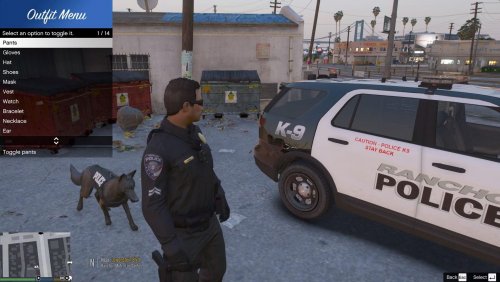
Outfit Toggler is a standalone plugin I made per request of people in opus' discord server. What it does is allow the player to toggle multiple clothing options practically taking specific clothing on or off. For example you can remove and put back on your gloves but for your hair, some hair variations allow you to switch between a bun and back to normal. At the moment, the menu allows you to toggle/switch your: Hair, Bag, Glasses, Ear, Necklace, Bracelet, Watch, Vest, Mask, Shoes, Hat, Gloves, Pants, Shirt, Jacket, Hat variations (visor) and Open/close bags. Bug reports, pull requests, suggestions and more can be made on the GitHub. This plugin is open source and the code can be found on my GitHub, linked above. Thank you to @OfficerBenzo for this showcase & installation video (version 2.5.0) This resource REQUIRES RageNativeUI to work, it is bundled with GitHub and LSPDFR releases, if you are unsure how to install the plugin or RageNativeUI just extract all the files in your main game files folder. If you have a YouTube channel and have made a video showcasing the plugin then please link your video in my discord server (can be found in my profile bio) if you want it featured on here. Would love to possibly get some setup + showcase videos.
- 28 comments
- 12 reviews
-
-
-
- 6
-

