Skip to content
View in the app

A better way to browse. Learn more.

LCPDFR.com

A full-screen app on your home screen with push notifications, badges and more.

To install this app on iOS and iPadOS
  1. Tap the Share icon in Safari
  2. Scroll the menu and tap Add to Home Screen.
  3. Tap Add in the top-right corner.
To install this app on Android
  1. Tap the 3-dot menu (⋮) in the top-right corner of the browser.
  2. Tap Add to Home screen or Install app.
  3. Confirm by tapping Install.

NickiBOOM404

Members
  • Joined

  • Last visited

Everything posted by NickiBOOM404

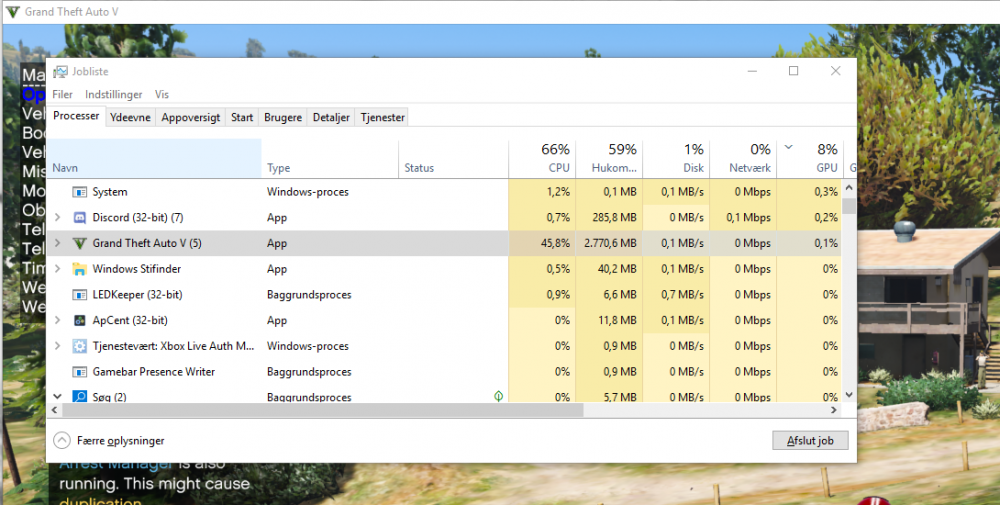
  1. When i launch Gta, it puts all the load on the cpu, and 0,2% gpu. Help, tried almost evrething Amd ryzen 1500x Msi rtx 2080 Gigabyte X470 Aorus Ultra Gaming
  2. Thank you! Is that why i cant play LSPDFR with my plugins because of SHV?
  3. Simpel trainer dont work with scripthookV.net. ive Searched all over google. I just need help to get it downloaded.

Account

Navigation

Search

Search

Configure browser push notifications

Chrome (Android)
  1. Tap the lock icon next to the address bar.
  2. Tap Permissions → Notifications.
  3. Adjust your preference.
Chrome (Desktop)
  1. Click the padlock icon in the address bar.
  2. Select Site settings.
  3. Find Notifications and adjust your preference.