


detobben
Members
-
Joined
-
Last visited
Everything posted by detobben
-
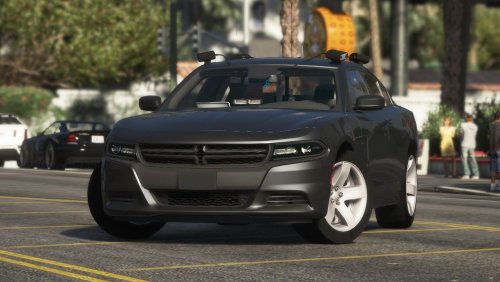 wondering which audiofile you used for the sound? sounds just like I would expect the car to sound irl. I have a 2015 slicktop chp charger in my policeold2 slot that I would like to have the same sound.
- 38 comments
- 14 reviews
-
Love it. As far as I can tell perfect execution of the car I always imagined to live in my police4 slot! If you could make the rambar equipable that would be the cherry on top but otherwise 5 stars all the way!
- 38 comments
- 14 reviews
-
Yeah sure man. Sorry was on a business trip for some days. I currently have Arrest Manager (just updated it now), Computer+, SmartRadio, StopThePed, Assorted Callouts and Traffic Policer installed. Just removed LSPDFR+ after reading this: Thanks man! Seems to work now although I'll probably wait for LSPDFR+ to be updated (apparently, it's currently being worked on) for full features.
-
Alright just tried without Arrest Manager. Unfortunately the problem still occurs. Again I'm pretty sure there was a version for 0.4 online and that the problem is therefor not due to AM.
-
Interesting .. I was pretty sure it said 0.4 when I downloaded it yesterday. Now it's not available any more - weird. Thx bud!
-
LSPDFR has been crashing on me when ordering a stopped driver out of the vehicle verbally or at gunpoint. Does not occur after chases. Already replaced Traffic Policer and Arrest Manager multiple times - doesn't seem to do anything. Any ideas? Plus, one less important question: Is there any way to disable 0.4's stock traffic stop menu? It's overlaying with Traffic Policer's menu which annoys me. Thank you in advance gentlemen!
-
I already did. As I said, I figured out that it's outdated, I was just wondering if I might have been doing something wrong .. thx I guess 🙂
-
I've had issues with the Albo1125 plugins on 0.4 .. narrowed it down to traffic policer which, when installed, crashes LSPDFR instantly. Last update was November 18. Is this a common issue and I'm just preaching to the choir or is there anything I'm doing wrong. Thanks guys!!
-
G'Day. Wondering if anyone else is experiencing issues with Mods by Albo1125 that rely on RageNativeUI? I am aware of the fact that he (Albo) is working on updating his plugin infrastructure for 0.4 but I'm not reading much about the issues I have: - Police Radio crashes LSPDFR when searching for a peds information or license plate - When trying to launch LSPDFR with RageNativeUI installed it either crashes instantly or loads in off-duty, when I go on-duty it crashes Hoping that someone can help me out here- really spoils the experience.
-
That did it. I feel really stupid now. Wasn't it just throw all ELS files in the main folder before? Thx dude! Thanks for all the response, should use these foums more often! I have it solved, stupid mistake by myself, as anticipated.
-
Unfortunately, it does not. Any other ideas?
-
I can't really figure out why only my police1 seems to have working ELS after updating to 0.4. Crown Vic (police1) works perfectly, Charger (police 2) has the parking lights turned on constantly, els does not repond, fpis (police3) has all lights contantly lit up, els also does not respond, neither do the sheriff or FBI cruisers ... only the vic works. I have obviously tried to reinstall the vehicles and rei-downloaded and installed ELS - no effect whatsoever. Help? Anyone?
-
kind of experiencing the same problem here. only since updating to 0.4 though. works perfectly for the cruiser (police1) but every other car has some kind of fault. buffalo lightbar doesn't work, interceptor has all lights on all the time .. tried replacing all els associated files - no effect.
