986s
Members
-
Joined
-
Last visited
Everything posted by 986s
-
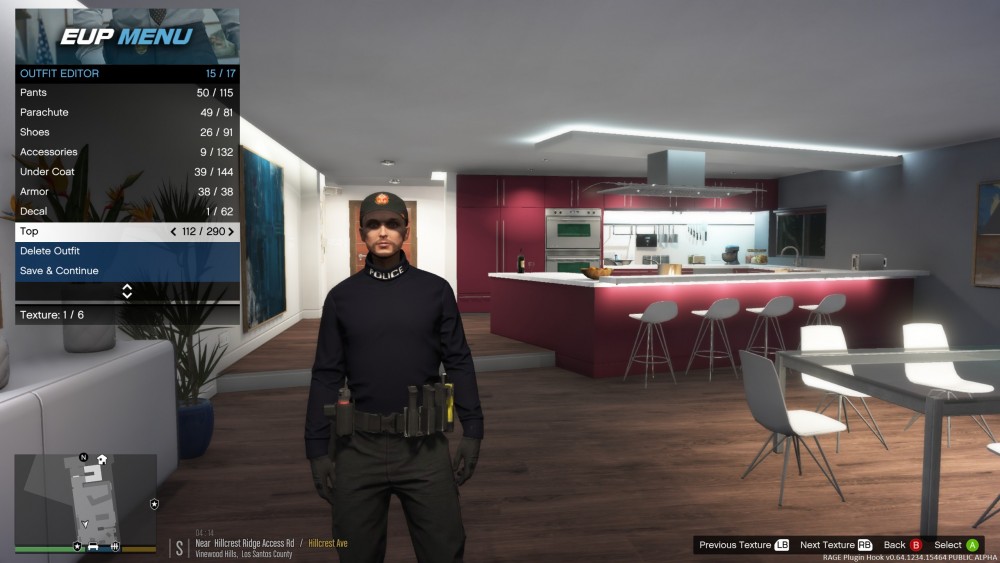
Hey guys, so im putting the final touches on my own agency and im looking to re texture this top. anybody know where i can find the file? ihave been through every file in eup_componentpeds.rpf
-
Yep. works Perfect
-
thats the one! cant belive its Gump. i use most of his cars lol thanks for the help guys
-
Not quite What I'm looking for, I should have said in more detail to be honest. The charger in question (The one in the video) is the only one I have seen with ALPR, traffic advisor and a "physics antenna" on the trunk lid
-
So 0.4 is here and I found this to be the perfect excuse to start with a fresh install of GTA and make the perfect LSPDFR for myself. I'm almost there, but I'm looking for a specific charger that's perfect for my SAHP. For the life of me I can't find the mod. Attached is a link to a video using the car.
-
That's the thing. Every time I try to reinstall (PSR first, then stop the ped, then ultimate backup.) The game prompts for the first time setup but only asks for the PSR buttons. Even trying to install PSR on it's own, running the game and then installing the other plugins **EDIT** fixed, i just bit the bullet and went for a full GTA reinstall
-
RagePluginHook.logI seem to be having an issue of my own now. My game was running perfect. I carried out a traffic stop up on Joshua Road and all was well untill I tried to use Police Smart Radio to tow the vehicle. I received a notification " No action has (yet) been assigned to arrest manager/coroner. You may have gone on duty twice - make sure only to go on duty once" similar message for all buttons except the default Police Smart Radio few. I updated both stop the ped and ultimate backup, reinstalled police smart radio. Next I cleared my game and began fresh. The problem now is police smart radio Adds it's default buttons and not any other plugin. Looking at the log, the plugins request and police smart radio comes back with "police smart radio is not finnished setting up, adding to queue." No matter what I can think of doing I just can't seem to get it to load. Like I say, I have tried updating my plugins, a full reinstall, albos tool, reloading all plugins. And no joy 🤔 I'm away from my computer right now but I will attach the log when I'm home if anyone would like to cast some light on this for me.
-
try changing the key binding in LSPDFR Keys.ini. for me, the default conflicted with Ultimate Backup so i changed it to the X key look for this line "CRIME_REPORT_Key=B" just simply change the B to whatever key you like. keep in mind you have to hold the key for a couple seconds for the pursuit to activate. you should see a blip flash on the suspect while you are holding the key
-
its a change in 0.4. you now need to report crimes to dispatch, once a car takes off on you hold "B". you will see the blip start to flash and the usual pursuit begins
-
Arrest manager is updated too. I noticed that after installing police smart radio I got the message "police smart radio is optimized for use with the latest arrest manager" gave it a go and it works