


DaErich
Members
-
Joined
-
Last visited
Everything posted by DaErich
-
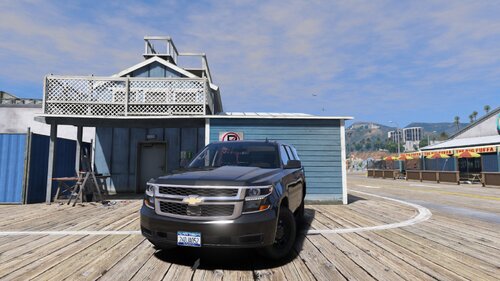 Unmarked / Low Profile 2020 Tahoe PPV(YAUT Edition) Now finally with proper M4 Placement! As for me the newest iteration of the Chevrolet Tahoe with those beautiful tail lights struck me on first sight. Inspired by a movie production I tried to find a Chevy Tahoe with just two LEDs on the grille. After some self education on how to handle that sometimes stubborn less unknown piece of a program called 'ZMODELER 3' I can now present my first , though rough around the edges, Unmarked or 'Low Profile' 2020 Chevrolet Tahoe PPV. Featuring less detectable Whelen M4 LEDs on the grille and some outer edges Whelen IONS in the back to frame the impressive tail of the Tahoe. For your information 'YAUT' refers to 'Yet Another Unmarked Tahoe/Vehicle'. Installation is, like any other mod, fairly simple: Just drop the vehicle files into your latest dlcpack with a valid vehicles.rpf, preferably located in your OpenIV mods folder. Preferred Slot: FBI2 along with its corresponding handling lines (alternative: GRANGER) The ELS file goes straight into your pack_(default) folder. Known Bugs / Matters of future revision: - Positioning of the M4 (further back behind the grille if permitted by base vehicle's LODS) (Sorry for the missing lod lights on the front, it is just not possible with the model Iam using) - Colors of the back emissives (ELS reflections) - EPL compatiblity TOS: THIS VEHICLE IS NOT TO BE USED IN FIVEM, ITS TECHNICAL SUBSIDIARIES AND MULTIPLAYER ORGANISATIONS, SUCH AS CLANS. IT IS NOT PERMITTED TO EXTRACT AND REUSE CERTAIN PARTS OF THIS RELEASE AS WELL AS THIS SUBMISSION AS A WHOLE("LOCKED STATE").
- 3 comments
- 2 reviews
-
-

- 2
-
-
I kind of concur with @chadc78 . First off I can only imagine the pain of having unreasonable impatient complaints by people, who rather think of complaining first then remarking the effort going into developing such sophisticated plugins, it must be devastating...: Seeing people not recognizing all of your hours of free time going into a project, which could have been assessed semi-professional work at that point. STPD and UB almost never crashed on my end and updates where frequent with new lore-friendly features coming every once in a while. With that said I don't want to hurt anybodies feelings by stating that this approach on that matter - by deleting all of your files relentlessly - might be a little selfish. A lot of my RP depended and still depends on those plugins and callouts, which eminently enriched my LSPDFR experience to a point, where it is a fully functional police simulator with a level of interactivity never reached by other sims. To completely erase all of your modding history on that page is a huge loss to many of us. Instead, the way of @Albo1125 's communication would have been a more favorable choice. By posting an open and honest statement concerning easily accessible to everyone on this page, keeping your plugins in a sort of legacy state and maybe revealing your source code to the public for everyone to review and refine, to take over the time you need for recreation. That would have proposed a soft resignation with nobody feeling overwhelmed by such sudden events. Right now everyone is left irritated and even sorry for not having made comprehensive backups maybe due to limited space or hardware corruption etc. In conclusion I really understand the fact that they're a lot of people behaving like self-righteous customers, who don't fully understand the concept, the philosophy of a modding community in all of its depth. But there are also people out there appreciating every work submitted, offering support in every aspect. And there are many. In contrast this way of assertion didn't leave anyone contented and solely sheds light on the more regrettable part of our community.
