


BayState E
Members
-
Joined
-
Last visited
Everything posted by BayState E
-
TreadRed I saw that but I really don’t understand what other process is using it. I only run rage hook and steam when I play. What else would use LSPDFR? It’s driving me nuts
-
everything loads fine but I stand in game not touching a thing and after about 30 to 50 seconds lspdfr crashes. it doesn't send me back to desktop I stay in game. I reload all plugins through the f4 menu and it does it again. here is my log RagePluginHook.log
-
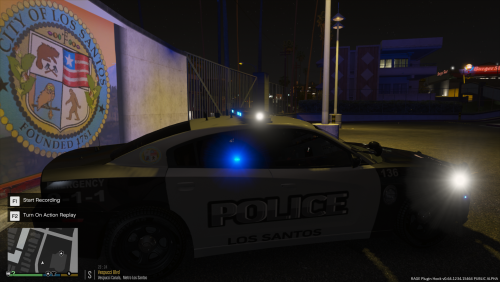 This is my first attempt at making skins so please go easy if it's not perfect! the black and gray are loosely based off of Chelmsford MA police. the rest I kind of played with. Files include 3 marked black and gray's an all black marked unit, a black ghost skin, a white ghost skin, and I threw in an unmarked unit as well! please tell me what you guys think. I would love some constructive criticism. hope you enjoy!
