


Tuskin38
Members
-
Joined
-
Last visited
Everything posted by Tuskin38
-
I have to agree, the GTA5 update tomorrow will probably break mods again for a day or 2.
-
Thats a big question considering there is so much to do, I think I'll find a fast car and drive around the entire map if thats possible at the begining. Then find a copter or plane and fly above it. Actually you can customize stolen cars because they mentioned repainting and changing the licence plates stops cops from coming after you if they see you're in a stolen car. If you're in a stolen car you will automatically get stars if the cops see you. They have not said how it works exactly, I would assume if you're near them for a certain amount of time or something.
-
The consoles are 7 years old. Any PC younger then 5 with a dedicated graphics card about the same age could run it fine if the port is handled properly.
-
If GTA5 is as modifiable as GTA4, I would not be surprised if this team or another team makes a similar mod.
-
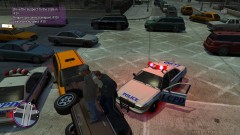
From the album: Screenshots
Ended with me flipping his truct and having to arrest him on the spot -
-
Thanks, it worked. Weird though, I thought I already installed that through Windows Update.
-
I'm crashing after loading a saved game in EFLC-TLAD Before installing the mod I did a fresh install of EFLC, I started a new game of TLAD, beat the first two missions of it, Manually saved at the club house. Then I installed the mod with the Automatic installer, selected the DSound scriptloader like suggested, I start the game, load my saved game it loads, I can see my character for about 4-5 seconds then it crashes. Log attached to this post.
