


.gif.eda18e6d94e55fa0b72853d36c8c3d1c.gif)
GhostDaGhost
Members
-
Joined
-
Last visited
Everything posted by GhostDaGhost
-
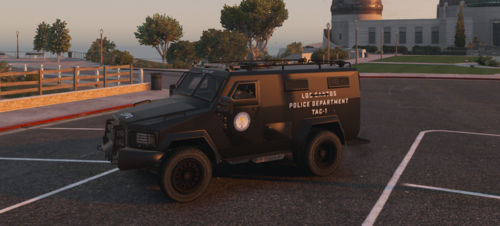 Yeah I know they aren't used for regular patrols. I felt that more stuff should've been slapped on the truck. I'll probably add them as just toggle-able extras
- 18 comments
- 3 reviews
-
-

- 4
-
-
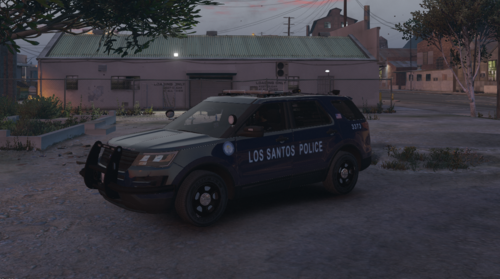 There are still updates coming to this pack 😉 At least two new vehicles are coming by the next update which isn’t too far. I am working on the dirt on light bar issue and made the white lights on the light bar toggle-able. Stage one lighting got borked on most of the vehicles so I’m fixing that. Stay tuned...
- 57 comments
- 5 reviews
-
Hello Everyone. Discord (for updates): https://discord.gg/rm8zhHr The vehicle is ELS! You will need the separate ELS plugin and install it into your game otherwise the lights will not work! Installation instructions are in the README file. I will not help you if you did not read the file. Credits are in the CREDITS file. ZIP contains ELS xmls, Templates, Liveries, Vehicles Files and Vehicles Meta files. Extra 5 = Rear ALPR Extra 6 = Side ALPRs Extra 7 = Speed Radar Lights GIF: https://gyazo.com/dee80df6cf828ee35e34aa2663eb63d7 NOTE: YOU CAN USE THIS MODEL AND LIVERIES FOR ANYTHING, AS LONG AS YOU GIVE THE PROPER CREDIT!
- 18 comments
- 3 reviews
-
-
-

-

- 6
-
-
That will very likely be a different pack soon to come. My next goal is to either work on unmarked units or BCSO.
- 57 comments
- 5 reviews
-
-
\Grand Theft Auto V\mods\update\update.rpf\common\data\levels\gta5 Open a meta file from one of the vehicles in my pack and copy the entire entry. Then open your game's meta file in OpenIV and paste it in over the original meta. My metas usually just change default window tint and handlings.
- 57 comments
- 5 reviews
-
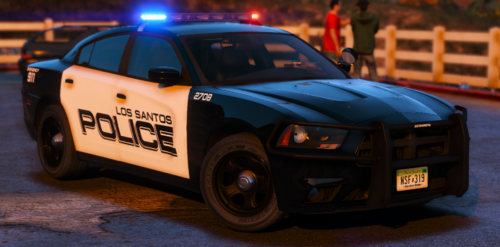 Nice work on the liveries man!
 -
-
-
I based the pack off of livery and not parts. I'll consider maybe adding that rambar and wraparound in future updates 😄
- 57 comments
- 5 reviews
-
-
- 1
-
-
-
-
-
Hello Everyone. Discord: https://discord.gg/rm8zhHr This is the first time I have made vehicles for GTA V from zModeler. So please spare me if I made mistakes or missing some stuff 😄 I based the liveries off of Seattle Police Department. The vehicles are ELS! You will need the separate ELS plugin and install it into your game otherwise the lights will not work! Installation instructions are in the README file. I will not help you if you did not read the file. Credits are in the CREDITS file. ZIP contains ELS xmls, Templates, Vehicles Files and Vehicles Meta files. 2014 Charger GIF: https://gyazo.com/0bb9a2edc3158b85fc6dde5faf1db0b5 2018 Charger GIF: https://gyazo.com/ab14f58be1ab29d90f26fb88e1236647 2017 SS GIF: https://gyazo.com/ac3952595add963ae02c4f5141e50470 2016 Taurus GIF: https://gyazo.com/2e1534a72e5e27851102cc43aa3a85be 2010 CVPI GIF: https://gyazo.com/f374577281d90e7bf3a5a003df4f8522 2016 Explorer GIF: https://gyazo.com/7b8f1fa05988e93c93c1b894f06d772a 2016 Tahoe GIF: https://gyazo.com/39c59ac9731484f6e55b310b03584651 TIP: Press H twice to activate spotlight 😉 FUTURE UPDATES: Rework of all vehicles. (PRIORITY) NOTE: YOU CAN USE THESE MODELS AND LIVERIES FOR ANYTHING, AS LONG AS YOU GIVE CREDIT! Thanks to GeneralFord1 for making the blue lighting option! If you want blue lights, check his file out! 🙂 I RECOMMEND YOU TO USE THIS TO USE ALL VEHICLES.
- 57 comments
- 5 reviews
-
-
- 6
-
-
.thumb.gif.f23bb5f880a4f087bee303d0eae49df3.gif)
