



VigorousDragonTV
-
Joined
-
Last visited
Posts posted by VigorousDragonTV
-
-
-
Edited by Blaze WarDog016
As I recently started to play LSPDFR again tonight, I noticed first of all my LSPDFR page doesn't show me the key bindings page and all the other essentials. It looks just ike the normal page that show stats for all the main GTA V characters.
Secondly, I cannot pull people over but instead I can target them and place them under arrest.
I have no clue as to why I am having these issues; may someone help troubleshoot these problems?
Would I need arrest manager to pull them over?
At the time of writing I am going to be deleting and reinstalling everything for GTA V at a later date.
-
-
-
-
I am unsure as to why it keeps on crashing at the loading screen. Last known mods I put in were an AutoSoundSwapper and Hot Pursuit Blaine County Non-ELS pack.
Below this is the RPH log maybe we can somehow find out what is causing it to crash. I stayed up all night trying to fix this issue but to no avail it still crashes.
-
Tbh I've looked and I even have trouble with the same thing, I have taken the time to also notice my GTA V is supported with RPH, but then as I took a closer look my launcher version is different...... Shouldn't it be the same in order for everything to work properly?
-
I wanted to bring this up with the ppl here at LCPDFR/LSPDFR. I've come to realize that we have a military but we are not implementing anything for the military. I had played a mission from Ace Combat Assault Horizon where I was a door gunner and I had to fire on a cargo ship with a lot of hostiles and we had to secure the ship in the end. Would it be possible to do both air land and sea callouts for the military at Fort Zancudo in the near future?
- LostBoyLazarus, Haywire and OfficerSledge
-
 2
2
-
 1
1
-
-
hmmmm I'll have to check again, but I found this Unhandled Exception while digging through my LSPDFR.
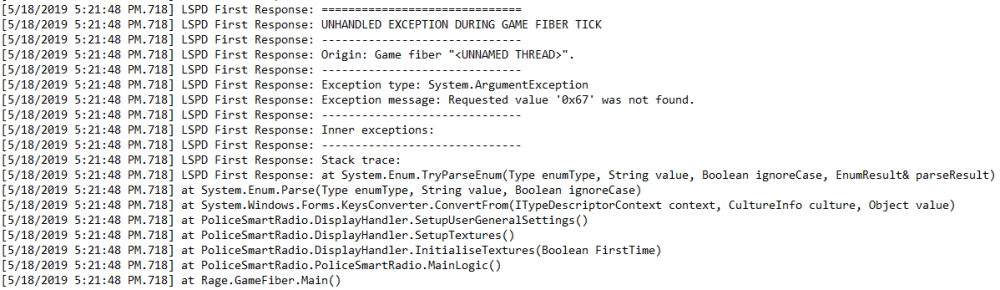
I am unsure if these are the correct files you are wanting to take a look at.
-
-
-
-
Under the folder titled Logs correct? I think I may have found it. Although there are three logs so my apologies. I would very much like to get back to playing LSPDFR hopefully soon ^^
RagePluginHook_17052019_062837.log RagePluginHook_17052019_105325.log RagePluginHook_17052019_112215.log
-
-
Edited by Blaze WarDog016
Tbh at this point I'm not sure whether or not to continue playing LSPDFR or even FiveM. LSPDFR is what got me into FiveM RP where I was an outstanding cop as ppl in some of the communities told me. Now the problem lies I believe in LSPDFR itself or elsewhere. I have been non-stop trying to get LSPDFR to work fully again without crashing. But Now I can't even cloth my ped without it crashing on me. If someone can help me as quickly as possible with this that would be great. I'm not sure as to why I can't even send any crash reports either. I would love to play LSPDFR again;but now I am unsure. I have spent 2 days with fixing this problem and had no sleep as to try and fix this. At this point I'm giving up for now. Hopefully this issue will be resolved soon. All this is gonna do is make me want to uninstall LSPDFR and GTA V and never play it again.
-
-
-
I just installed the new update last night. I went to test it out today with nothing but LSPDFR running; everything was fine. When I put new callouts including the EUP menu and ELS along with Radiance V: everything crashes, even when I try to spawn in my created character. How can I get things running smoothly and without any errors? If anyone has a solution to fix these problems regarding my characters, EUP Menu and the extra addons that would be greatly appreciated thanks!
-
-
-
Edited by Blaze WarDog016
No picture to show proof of lighting issuesHi there, I am a frequent member here in the LSPDFR community. I have a problem with my lights. Whenever I turn them on, all the lights do not show up bright red and blue normally. How can I fix this? Included is a picture of this Crown Vic as an example. Please note that all credits go to the person who made the model.

-
-


LSPDFR Base mod keeps crashing
in LSPDFR 0.4 for Legacy Edition Support
I have the log file here, all I have is XScanner, ELS, Radiance V and the EUP Menu. No plugins are being added right now due to LSPDFR crashing for no reason. If anyone can help me clear up this situation that wouldRagePluginHook_28052022_191033.log be awesome, thank you in advance!