


TreadRed
Members
-
Joined
-
Last visited
Everything posted by TreadRed
-
https://www.lcpdfr.com/downloads/gta5mods/vehiclemodels/18630-new-york-state-police-mega-pack-els/
-
-
-
 If you installed eup clothing made by someone else, it could be that they replaced an lspd badge with the bcso one. I cannot think of another reason, unless you have other files in your lspdfr/data/custom folder that could be interfering. It likely stopped working when you updated lspdfr, anything you add into lspdfr/data would overwrite my files. This is something I'm fixing in the update, to where they will not be overwritten. Unfortunately, I have not been in the mood to update the other versions and I removed the old versions from lspdfr. You can get the old versions from gta5-mods.com I believe. https://fr.gta5-mods.com/misc/lspdfr-xml-jurisdictions-versions
- 62 comments
- 1 review
-
-

- 1
-
-
 Thanks, they only have an 15% chance of responding as backup, you can lower it, or even set it to zero. <VehicleSet chance="15"> make sure you adjust the other vehicleset line for the reg cars to equal 100.
- 170 comments
- 11 reviews
-
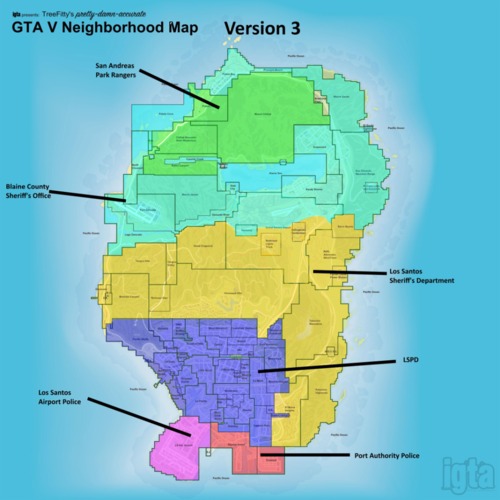
This map is pretty accurate for gta universe. And highway department does exist as well.
- 62 comments
- 1 review
-
Right that's because all of the EUP models are now in plugins/lspdfr/ultimatebackup/customregions.xml. Its not necessary to have them in the defaultregions.xml anymore.
- 170 comments
- 11 reviews
-
If you have it installed correctly its not possible for most units to not have eup so check your plugins/lspdfr/ultimatebackup/customregions.xml and make sure its the one from this download. Ofcourse, Ultimate Backup itself is required and make sure your on the latest version. Also make sure you have it installed/updated first and then you install these files.
- 170 comments
- 11 reviews
-
The USAF will respond as backup in Zancudo when calling for local patrol there. If that's not an option in the older version, it is in the new one.
- 62 comments
- 1 review
-
you saying the old version of option 6 does not work? The auto installer did not, you could still manual install. Ill be working on 6 soon.
- 62 comments
- 1 review
-
-
- 1
-
-
-
Jurisdictions+ Maps will now be uploaded separably to keep track of download count. I do not want to update stuff nobody likes. If you used map 1 or 2 from previous versions, I do not plan to update them, so if you would like me to you should contact me. This is a complete set of xml files for setting up the map to have your custom fleet/s patrol, and respond as backup, in their relevant jurisdiction/s. These xmls's will now make it simple to switch between summer and winter outfits. See the ReadMe in the Winter folder on how to do for lspdfr. For Ultimate Backup, Winter outfits will be applied automatically when there is snow. There is also a custom pause map with jurisdiction highlights, optional. This version is set to have EUP 8.1 outfits for both LSPDFR and Ultimate Backup Files are ready to play as-is but, they are very easily customizable for your chosen vehicles. If you need help adding vehicles to your game or help adding those added vehicles to these configurations you can find me on this discord, where there is others who could help also. https://discord.gg/mJMKAd5 Required before using these xml scripts: Emergency uniforms pack - Law & Order 8.1 Emergency uniforms pack - Serve & Rescue 1.2 Ultimate Backup (All In One Backup) is optional, but highly recommended to use these scripts to their full potential! Note this is an external link to his new personal website. If your upgrading from a previous version of jurisdictions+, you need to remove the files in lspdfr/data/custom before installing this, as they have been compiled differently. If your happy with the old version then keep it. The jurisdictions+.dll is optional to keep. PLEASE DO NOT COPY, RE-UPLOAD OR REDISTRIBUTE THIS WORK! These are made for individuals and their personal games.
- 62 comments
- 1 review
-
-
-

- 10
-
-
Nope, not seeing any issues with weapons You can put the default configurations back in if you think its these one's causing it, to see, but they work on my end and others so Ima doubt
- 170 comments
- 11 reviews
-
They have one in their inventory, they do not have a holster for it, and your using Cop Holster, hence nowhere to pull the weapon from That belt is likely not inputted into the xml for cop holster, making it incompatible.
- 170 comments
- 11 reviews
-
-
-
Not sure what to tell you there, FIB swat is wearing the correct vests actually the males are not, I see I will fix that at a later date, not going to update again for one issue. You can see the reason why in its wrong in the known issues part I created. Let me know if you see anything else
- 170 comments
- 11 reviews
-
-
- 1
-
-
-
-
 Im not totally sure what you mean by them spawning empty vehicles, does this happen only when your calling for backup using ultimate backup menu? Empty vehicles that are moving? When you say at random places?
- 23 comments
- 4 reviews
-
 These are xml's to configure the Dutch uniforms on GTA5-Mods for Lspdfr and Ultimate Backup, created by jw15. You will need to find and configure your own vehicles since I cannot find a mega pack. A big thanks to the LSPDFR & EUP creators for all they do, and a big thanks to @JackyThePoliceOfficer for help with translation and placements. Onopvallend - Used to fill the State Patrol, They will patrol highways and respond for backup when calling for statepatrol. They also fill K9statepatrol. Dutch Police - Will Patrol the map, and respond for backup when calling localpatrol. De Mobiele Eenheid - Used to fill Noose, they will respond as backup when calling nooseswat. They also fill nooseair. De Koninklijke Marechaussee - Used for SWAT, they will respond when calling for localswat. Hondengeleider - Used for K9, they will respond when calling for K9localpatrol. The remaining Agencies will be available in code 2 or 3 situations. Mobiel Medisch Team Explosieven Veiligheid Vrijwilligers Wegmisbruikers Team Verkeer Officier van Dienst De Koninklijke Toeristenbond Kogelwerend Integrale Beroepsvaardigheid Handhaving Rijkswaterstaat Dutch Securities Institute Requirements/Steps: 1. Eup Law and Order 2. EUP Dutch Mod https://nl.gta5-mods.com/player/dutch-eup-mod 3. Ultimate Backup https://bejoijo256.wixsite.com/bejoijo/post/ultimate-backup-v-1-7-8-8 4. These files from this page should be installed last. Drang and drop the lspdfr and plugins folder into your gta folder.
 -
If your backup.xml in lspdfr/data does not look the one I included in this download, then that would be why, or if there is a backup xml in lspdfr/data/custom. Otherwise, they should be using the outfits you see when looking at eup's wardrobe outfits or in the police locker for that agency.
- 23 comments
- 4 reviews
-
-
- 1
-
-
Go to lspdfr/data/custom/agency_eup.xml find bcso agency and change <TextureDictionary>rde_bcso</TextureDictionary> <TextureName>rde_bcso</TextureName> to <TextureDictionary>dia_police</TextureDictionary> <TextureName>dia_police</TextureName>
-
**Please note, installing any other files from other mods/configurations into lspdfr/data after installing this could alter your British experience. ** These are configuration files to use the uniforms provided by @brutaljohnny and vehicles provided by @British Officer. The uniforms will effect the AI as well. A big thanks to the LSPDFR & EUP creators for all they do, and a big thanks to @maestrosback for teaching this bloody American what British Agencies do, as well as helping with testing. Frontline Policing Agency will patrol the map for the most part, unarmed. They will be the agency to respond as backup when calling for localpatrol, with the exception of ARV's Patrol unit having a 20% chance to respond. FLP will respond with localair and K9localpatrol as well. Armed Response Vehicle's Agency has a patrol unit you should see at a very low chance patrolling. Armed Response Vehicle's Agency has a Geared Unit that will respond as backup when calling for localswat. Armed Response Vehicle's Agency has a Tactical Unit that will be available in code 2 or 3 situations. Territorial Support Group's Agency will respond when calling for nooseswat and nooseair. Roads & Transport Policing Command's Agency will patrol the highways, and respond as backup when calling for statepatrol. Criminal Investigation Department's Agency & Dedicated Source Unit's will be available to respond as backup in code 2 or 3 situations. I have also added in a British paramedic that is configured in the files, and will be in the required downloads as well. It does not use the multiplayer model, so it will always be the same guy. There is no fire uniforms I can find for the British Configurations, so they will use EUP's loadout in Ultimate Backup. If anyone makes content, or knows of any content to add to this British Configuration, feel free to share in the comments and I will get them implemented. Instructions: 1. Download & Install Eup Law and Order 2. Download and Install EUP Serve and Rescue 3. Download and Install Metropolitan Police 4. Download and Install Ultimate British Police Pack https://www.gta5-mods.com/vehicles/ultimate-british-police-pack-1-british-officer 5. Download and Install British Paramedic Skin https://www.gta5-mods.com/player/british-paramedic 6. Download and Install Ultimate Backup -- Optional, but recommended https://bejoijo256.wixsite.com/bejoijo 7. Download these files from this page, and drag and drop the lspdfr and plugins folder into the GTA directory.
- 23 comments
- 4 reviews
-
-
- 3
-
-

