
Bing Z
Members
-
Joined
-
Last visited
Everything posted by Bing Z
-
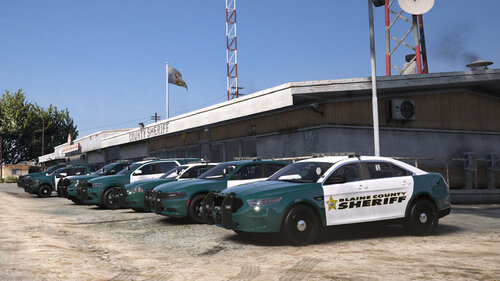 Sorry, I took a break from this for a while. I will try to update this pack whenever SoCal Thero updates his. My plan is for this pack to coincide well with his OCRP vehicle pack. However, if you are looking for more to add to your server today, I would highly recommend using this alongside SoCal Thero's lore friendly FHP pack, if you aren't already! The only thing I've created for my server that's not here would be a couple, simple FWC/SAWC textures that I made for two LEO boats. I didn't add them into this pack because I believe uploading textures for paid mods is against lcpdfr's website policy. If you or anyone are interested, I can add the logo textures and the names of the fonts I used in photoshop to my pack file. That way, you or others can create as many similar liveries as you please.
 -
Thank you so much, I'm glad you're enjoying it!
-
Oh yeah, I'm sorry, I forgot about that. There are reflective textures in the .ytd that overlap whatever livery you have on. There are a couple of workarounds. One is in game, just change the trim modification from one to two or vice versa on the car (through something like vMenu), which will hide the reflective texture. The other way would be going into OpenIV and replacing any texture called "reflective" with a transparent layer, or just remove them entirely. I attempted to make this pack reflective, but I couldn't get it to work, it only seemed to add a matte finish to the liveries, rather than having that cool glowing effect. I will post an update to the livery pack in a few hours that will include a blank reflective.png for each vehicle that requires it, to make it easier for people downloading the pack in the future. They'd just have to drag and drop both the _sign.png and reflective.png into the .ytd files. Thank you for letting me know and bringing this to my attention! I can see that being very troublesome to anyone downloading the pack.
-
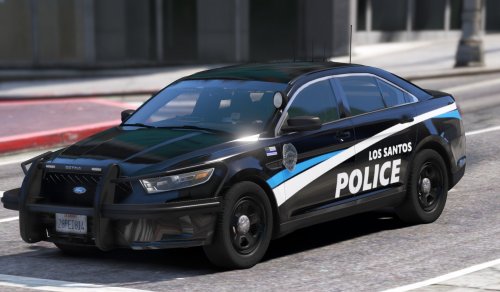
A lore-friendly, Florida-based, livery pack to be used with SoCal Thero's Orange County Roleplay (OCRP) Version 4 Leo Fleet. Link to the car pack used: There is a livery for every vehicle in SoCal Thero's pack (28 in all). The departments included are: Blaine County Sheriff's Office (BCSO) - Inspired by Broward County, FL Sheriff Grapeseed Police Department (GSPD) - Inspired by Clermont, FL Police Los Santos Police Department (LSPD) - Inspired by City of Miami, FL Police Paleto Bay Police Department (PBPD) - Inspired by Tallahassee, FL Police San Andreas Fish And Wildlife (SAFW) - Inspired by Florida Fish & Wildlife Conservation (FWC) Law Enforcement Sandy Shores Police Department (SSPD) - Inspired by Sarasota, FL Police This pack includes liveries that have transparent backgrounds, so you can mess around with the background colors. Here are the colors that the pack was built with in mind: BCSO = Sea Green GSPD = Black LSPD = White (LSPD's BMW Motorcycle has 2 livery options, one works best with Black and the other with White). The Tahoe requires a secondary paint for its doors). PBPD = Black SAFW = Bluish Silver (including wheel color). SSPD = White Requirements: You will need OpenIV (for editing .ytd files) and SoCal Thero's Leo Fleet V4 (linked above for the vehicle models) to use these liveries. Thank you for your interest in my very first livery pack. Let me know if anything needs to be worked on or fixed, and I will get around to it at some point.
-
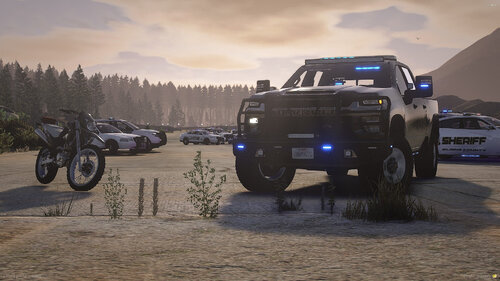 Hey, I've been messing around with this. Did you figure out how to fix the brown on the pbtahoe? I think I've narrowed it down to the rgba171717ff texture but I can't seem to figure out the right compression / mipmap type that fixes it.
 -
 Thank you for the speedy response, you're a lifesaver! I knew it was something silly that I was doing wrong, lol.
 -
Hello there! First off, I love this pack and the car models look great! I am writing this because I'm having an issue adding liveries to the cars or at least to the 18 charger. I have never added liveries before so it is definitely something I'm doing wrong but I couldn't find anything on the internet on how to fix it. When I add a livery, it shows up in-game but the original livery is still there and in-front of the one I have selected. Is this intentional or is there something I need to change to get it to work properly? Screenshots: https://imgur.com/a/wujnw5C
-
My cpu is definitely a bottle neck. I'm only using 40% of my GPU when my CPU is at 100%
-
Yeah I'm a bit surprised on how slow GTA V is on my pc but GTA V is more reliant on your cpu than anything else. I would recommend looking up the best graphic settings for your specs. If you want I can upload a screenshot of my own to see if that helps.
-
I know me putting my input in here isn't really going to help anything out but I'm going to share my FPS and specs anyway. FPS test during day/Afternoon on Sandy Shores Runway. All at same time, weather, and on or next to Sandy Shores Runway. (Avg. is just the general area where the fps would stay at, not an exact average of the fps) FPS without LSPDFR loaded: 61-112 fps. Avg. 75 fps With LSPDFR loaded: 61-78 fps. Avg. 68 fps On Duty (on foot): 51-71 fps. Avg. 60 fps On Duty (in stock gta police car): 50-68 fps. Avg. 60 fps On Duty (ELS police car): 43-60 fps. Avg. 50 fps In Pursuit (2-5 police backup in stock gta cars): 50-63 fps. Avg. 55 fps In Pursuit (2-5 police backup in ELS cars): 43-58 fps. Avg. 53 fps In conclusion: I lost 8-20 fps when I load LSPDFR, around 8 fps when I go on duty, 1-2 fps on duty in stock police cars, 10 fps in ELS vehicles over stock police cars, and 3-5 fps in a pursuit when using ELS vehicles over stock. Sometimes I will get random frame drops while patrolling bringing me down to 30 fps but these only happen once every 5-10 minutes. My Computer Specs: i7-7700k intel processor, RTX 2070 8GB DDR6, 16GB DDR4 of ram, and I'm operating on Windows 10. I know my cpu isn't that good for GTA V but it is still able to run it alright at max settings 1080p which I used to test the fps earlier. Hopefully some of my info will be helpful in someway or another. If you want anymore information like my exact GTA V graphic settings or other stuff don't be afraid to ask. I'm really enjoying LSPDFR 0.4 so far and my only problems that annoy me at the moment would have to be when you install Computer+, LSPDFR will crash if you ask a pedestrian for their ID. Stop The Ped is really buggy/crashes a lot. So I'm not able to do breathalyzer tests, call to truck, etc.
-
 Great concept and everything seems to load in but whenever I stop my police car the body guard will keep getting in and out of the car. I tried to use the solution that worked for Jeff Favignano but it didn't work for me. If this is something on my end please let me know : )
- 542 comments
- 98 reviews