Skip to content
View in the app

A better way to browse. Learn more.

LCPDFR.com

A full-screen app on your home screen with push notifications, badges and more.

To install this app on iOS and iPadOS
  1. Tap the Share icon in Safari
  2. Scroll the menu and tap Add to Home Screen.
  3. Tap Add in the top-right corner.
To install this app on Android
  1. Tap the 3-dot menu (⋮) in the top-right corner of the browser.
  2. Tap Add to Home screen or Install app.
  3. Confirm by tapping Install.

Allmonator01

Members
  • Joined

  • Last visited

Files posted by Allmonator01

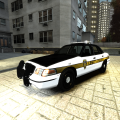
  1. This is my first modded vehicle. CVPI, Lightbars, and Rhino Bar is Bxbugs, i put it all together. Please send me some PM's on how to make it better, please no hate, i am new. The front Wig-Wags are buggy, and only work from a certain angle, can anyone tell me how to fix this? Im working on putting some additional lights on the Rhino bar. Thanks everyone!

    Credits:
    - Model is Ford Crown Victoria by Bxbugs123
    - Whelen justice by Bxbugs123.
    - Rhino Bar made by Bxbugs.
    - Livery by Allmonator01.
    • 200 Downloads
    • 4 Comments
    Updated

Account

Navigation

Search

Search

Configure browser push notifications

Chrome (Android)
  1. Tap the lock icon next to the address bar.
  2. Tap Permissions → Notifications.
  3. Adjust your preference.
Chrome (Desktop)
  1. Click the padlock icon in the address bar.
  2. Select Site settings.
  3. Find Notifications and adjust your preference.