



captain brimstone
Members
-
Joined
-
Last visited
Everything posted by captain brimstone
-
im having the same exact issue
-
Possibly I have callout script that doesn't close a call I'll look into that I've been using only 3 so I'll start with deleting them thank you for your help. I do know I've tried pressing the end key to clear callouts and that hasn't worked
-
Its every time either 3 or 4 traffic stops I have to reload everything but theres no crash notification
-
After I preform 3 traffic stops I can no longer blip a vehicle and pull them over any suggestions, it's very cumbersome to reload lspdfr plugin every 20 minutes.
-
 I couldn't ask for anything better. This pack is amazing not only is it lore friendly but the suggested files to download with this pack made my game run smoother overall. highly recommend if your looking for a KY pack with multiple vehicles, jurisdictions, and finally pre-made custom back up that literally drag and drop.
- 214 comments
- 38 reviews
-
-

- 1
-
-
This pack is awesome followed your directions to a T and no issues at all thank you for always creating amazing content. As a Kentuckian its much appreciated. Also downloading those other files you suggested in the description lowered my total crashes by 90 percent thank you for that.
- 214 comments
- 38 reviews
-
-
- 1
-
-
I went into my anti virus and removed rage and gtav from the list of stuff it checks in other words rage and gtav have full permissions on my anti virus
-
I had this problem with the previous version to fix it I would load the game normally, then when i got to the screen that has you choose singleplayer or multiplayer i would load rage hook plugin, then when it loaded i would click single player mode and it would load right up hope this helps
-
i read through it and nothing worked for me. finally after reading through a bunch of threads i found that opening gta v, then waiting until the main screen, alt+tab out click on my desktop in an open space then open rage plugin wait for it to load and go to bottom left of desktop, then click story mode on gta v it works. before all i had to do was click the shortcut for rage and it worked. regardless im finally back to playing and it feels great.
-
Same problem but I dont even here the glass break only way I get it to work is if I click the box in advanced setting stating disable directx hook but then you cant use f4 or anything
-
how do you launch rage plugin after loading gta5 i have the same problem
-
same problem here and it seems no one has an answer for it been working on it for a week now
-
mines doing same thing only way it works is if i disable rage hook from doing the directx hook but then i lose alot of stuff like the f4 menu
-
im having the same problem only way i can get it to work is if i disable the directx hook in the rage settings but then theres no f4 menu
-
rage hook crashes when i start the only way it will get in game is if i disable the directx box in settings but then it wont load all my plugins and i have no f4 menu any advice? heres the crash report
-
when i start lspdfr via rage hook it starts fine then when it loads the logo goes to bottom left corner like normal but theres no sound (the normal window break sound and sirens that play when it starts) then screen goes black and it crashes. please help
-
how did you solve problem when i start the game the rage logo goes to bottom left of screen but there is no sound then screen goes black and it crashes
-
-
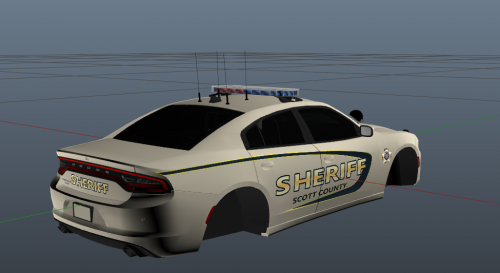 awesome man thanks again for making a local pack to scott county
 -
-
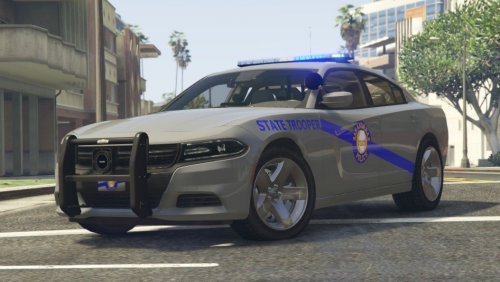 couple of bugs like cruise lights not working on some models or only one side of bar lighting up when in cruise mode besides that this pack is awesome. I work fire and EMS in ky and can attest to the fact that these cars are very accurate. not overpowered with lights and the lightbar model is an exact replica. its very easy to see a lot of work and detail went into this pack. keep up the good work.
- 33 comments
- 12 reviews
-
-
- 1
-



