


CommanderCole
Members
-
Joined
-
Last visited
Files posted by CommanderCole
-
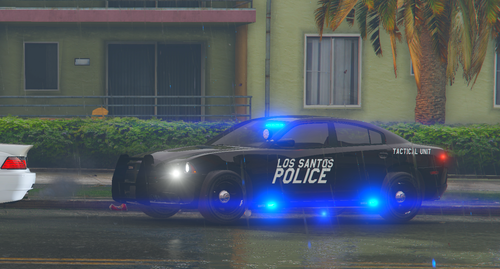
This took me two days to complete. Not my first model, but my 3rd model ever. I tried my best, did what I can, and this is what came out. I hope you guys enjoy it, and you guys can use it in any way you guys would like. What else would you guys like to see?
All I ask you to do, is not to repost it anywhere at all. Just use it for your own fun, enjoy it.
Check last 3 pictures up top to see what it looks with and without the extras.
NOTE: You can customize it anyway you'd like
Extra 11: Pushbar
Extra 12: ALPR
Please Consider the Credits: (Show some love to these amazing developers)
2014 Charger by @Fartknockr
Whelen LIN3 Linear Super-LED Lighthead by @OfficerFive0
Rambar/Pushbar by @husk
Pro-Gard Organizer by @Koduuh
Whelen Inner Edge XLP by @Dan with da van
Spotlight by @Shmurda
iForce Workstation by @bvmps
ALPR by @BiscuitHead Modifications
Ya'll can see the lights, the light pattern, and the vehicle here in this video
- 3,952 Downloads
- 1 Comments
Updated -
I'm a Michigander and the State Patrol Cars here are bit different and I wanted to see what I could do. Personally, this is the first ever time I developed a vehicle. Yes, there are gonna be some bugs because of the original file of the 2020 explorer. I wanted to make something a bit different because I don't see any present MSP vehicles in lspdfr. Hopefully you guys get some fun out of it. Took me about 2 days to make because I was a rookie, and I learned from my mistakes. Enjoy the vehicle guys.
CLICK HERE to see the video of the Explorer
- 885 Downloads
- 11 Comments
Updated

.thumb.png.461ce8880ceafbe24cade7cae1e3f8ee.png)