jasonm82299
Members
-
Joined
-
Last visited
Everything posted by jasonm82299
-
It was an error in one of my installations. I had duplicates of things that were supposed to be in my GTA V>LSPDFR folder but were also in my GTA V>Plugins>LSPDFR folder
-
-
 Does anyone know how to get Emergency Uniforms Pack working with this? My EUP was fine before installing this and now everyone is crazy-looking with weird random clothes.
- 267 comments
- 36 reviews
-
I fixed the issue
-
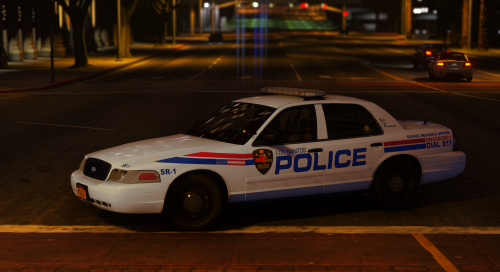 Hey I just wanted to say thank you for this pack. Back when I played GTA IV I tried to make a Troy PD texture for the CVPI because Troy is my hometown. I searched this up on a whim and I was absolutely amazed that someone had made a pack, and how accurate it was. I also love how instead of writing Troy on the car you kept it GTA by writing Los Santos instead. Astonishing work. It's a really strange but awesome feeling to be driving the cars in-game that you see driving around all the time.
- 5 comments
- 6 reviews
-
-

- 1
-
-
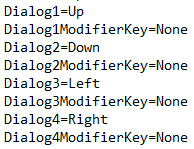
EDIT: I figured out what was causing the issue, I forgot I had to hold down right click while going through the dialog prompts. (Wow I know right I suck) Now I'm going to try to modify it so I can use the 1, 2, 3, and 4 keys instead of F9, F10, F11, and F12 because even when using the arrow keys, I can't take my finger off the right click, so I still have to move my left hand across the keyboard to use them. Using 1, 2, 3, and 4 will be much easier because I won't have to move my hand at all. EDIT 2: It worked! By changing the keys in the LCPDFR.ini to D1, D2, D3, and D4 (guessing D is for decimal) I can now use those keys in-game.

-
When I play LCPDFR, using the function keys to navigate dialogue can be a pain since I have to hold the function key down, then reach across the keyboard to press F9, F10, F11, or F12. In the LCPDFR.ini file I changed those keys to the NumPad keys, and when that didn't work, I changed them to the arrow keys. When I stop a pedestrian in-game, the new keys show as they should (pictures of arrows), but when I press the corresponding keys, nothing happens. Am I doing something wrong? I've attached a photo below of how the customized keys look in the LCPDFR.ini file. Thanks for any and all replies.