


.webp.00aca5d09b9c78c53d5069296bf98aef.webp)
Perfects
Insiders
-
Joined
-
Last visited
Everything posted by Perfects
-
I think the issue was because I had a majority of my plugins in the "plugins" (NOT "plugins/LSPDFR") loading on startup, so when I got in game I could just hit ForceDuty and i'd be all set. It appears I both had an outdated RAGENATIVE UI by a month, and Spotlight was not checked with the other plugins to load at startup, likely because I added it last a few days after, and therefore Spotlight files never were preloaded into my game despite correct installation.
-
Hey, your fast reply means a lot. I just troubleshooted two things I thought I might have messed up, including having a just barely outdated RAGENATIVEUI which I think was making spotlight not be recognized, or the fact I had my Rage LOADALLPLUGINS on startup and added Spotlight AFTER setting this option in my Rage. Fixed both issues and for now it seems to be working, but I will return here if I am wrong. I also appreciate the heads up on VD as I had no idea, thanks:)
-
Hey there, I recently fresh installed my game and the only current error I am running into is this Heli Assitance one that happens immediately when a Helicopter is attempted to be dispatched, where my entire game just crashes. Part of my RPH log is included here, any help is appreciated as I'd love to keep this plugin, and have tried correctly reinstalling both Heli Assistance and spotlight in their correct locations. I have VocalDispatch and GrammarPolice aswell, and installed the air.xml for Heli Assistance in the Grammar Police folder and still am having crashes.
-
-
No worries, I would look into the other things i mentioned, such as trying a fresh install again, especially with base graphics, new scripthook, new els, new lspdfr and new gameconfig file. Then like me, try reinstalling your NVE once you have a working base game. Once you can get your LSPDFR and NVE working again, install your plugins few at a time, maybe even fresh installs, I can assure my game is still working for about 6 hours now with NVE, reshade, ELS, and LSPDFR installed. I used the NVE reshade crashes as an opportunity to reinstall my entire game piece by piece, and remapped all of my plugin controls aswell. While doing this, I tested many of the plugins on my base game without NVE and came to realize all sorts of minor issues with things, and even still crashes. A fresh install of a lot of things made my modded game happy and working in unison again, and truthfully I have nearly everything installed as I did before minus some things and plugin packs I found faulty in my game files. I reinstalled all visualsettings files, reinstalled all heap and pack adjusters, made sure my betterELS v1.05 and VisualV were uninstalled, uninstalled all NVE files entirely, and redownloaded the latest GTA V Remastered and Forests of San Andreas and fresh installed them entirely on top of the things mentioned above, including LSPDFR and scripthook also. Sorry for the rant, just giving things I did because my game is now working entirely fine again and Im hoping it can help others, and the only file I found interfering with and causing the asi crashes or game crashes in general after reinstalling NVE earlier today was LML's vfs.dll.
-
I found it was included with LML. I did an entire fresh install of my game, excluding my mods folder. I uninstalled VisualV, made sure my scripthook and gamconfig were the latest and working version, and tested my LSPDFR was working without NVE installed, aswell as had the default visualsettings and timecycle installed. Then today a few days later attempted a reinstall of NVE after my game was confirmed all working and fresh, and was immediately having crashes. I removed the vcf.dll file in my directory as I saw it mentioned in the NVE discord, and sure enough my game booted just fine. I have LSPDFR Preload Models on FALSE, and have all plugins load on startup. I also created a fresh LSPDFR, EUP, RagePlugin Install. So far everything works fine. So far my game has been working flawlessly again after following all those steps, and all NVE optional packs are working, but texture loss occurs without the LSPDFR patch. After some hours of personal tinkering and maybe luck, I can confirm fresh installing and not having lenny's mod loader has currently bypassed all of my SCRIPTHOOK V .asi crashes. I highly suggest looking into a fresh install of everything if you continue to face issues, sadly it is time consuming, but I was able to copy and paste a good majority of files over like my entire dlcpacks folder and trainers etc. Two mods I noticed using LML were Coastal Callouts, and EMS callouts.
-
I'd like to give a personal update on this. I was using a fresh LSPDFR install on the latest GTA V patch these past 2 days, but was using VisualV instead of NVE due to the asi crashes with Reshade. HOWEVER, after readding the NVE Oct 10th Update to my game today, 11/11/23, INCLUDING THE RESHADE FOLDER AND ALL FILES, Yes ALL, even the dxgi.asi, and only the LSPDFR patch-Performance boost-gameconfig optional packs, my game is performing perfectly fine in all areas of the map, Zero texture loss and ELS, OpenAllInteriors, LSPDFR, over 300 car/map mods, and all of my LSPDFR plugins running fine with latest Reshade and NVE public release. I have not encountered an asi crash for over 3 hours on duty. The one thing I did do this time when installing NVE was removed the vfs.dll that was in my main directory. So far not an issue on this fresh install. Im happy to try and help any others get there LSPDFR and NVE game back to a running state like mine
-
 One of your best👍
 -
My apologies, after messing with it for a short while I ended up running into the same error. It seems this did however create a temporary fix which prolonged the time it takes for me to receive the scripthook errors. It solved a few of the issues but the crashes still seem to occur and be triggered in the region near the Movie Studio. Assuming NVE or Scripthook will need an update to ultimately fix it.
-
Hope you hit every green light for the rest of your life. Fresh installed with LSPDFR to try this, and with the compatibility patch installed, has been working awesome again on the latest ReShade, no texture loss. Thanks a ton, this needs to be pinned as its the only temporary solution I've found. Benzo might find this helpful.
-
Wish I came across this thread sooner. I've had my LSPDFR game PERFECT, literally, after about 4 years of total additions and upgrading to my game along the way. Ive created dozens of backups of my game to prevent issues with Rockstar updates, and I personally have had two PC's completely fry and lost all of my GTA V mods and progress as a result, which has caused me to ensure my game is always in a perfect running state. Just the other day, I noticed the new NVE public beta release (OCT 10th), and thought nothing of it, as I figured it was nothing new to my previous NVE other than the volumetric clouds and autumn pack. BOY WAS I WRONG. I loaded up my modded GTA V version 2944 like normal, and noticed a strange issue with texture loss across numerous blocks in the Richard's Majestic district, right near the Movie studio. This annoyance caused me about 6 hours of constantly uninstalling things, til I finally gave up and reinstalled everything to the newest game version. Was able to fix the texture loss, however immediately ran into this error, as well as Openinteriors.asi errors, every time I boot up with LSPDFR. Complete bummer NVE doesnt work anymore at the moment, and Im used to wasting hours/days of time modding this game so I guess no problem. Temporarily crossing my fingers and using VisualV in hopes this gets repaired in this next public update.
-
 Hey there, really insane work on the latest release! Ive been really loving this pack, and am aware it is in beta, but was curious if there was a quick fix I could do to get the Spotlights working on FHP 19, 25, 27, and 53. These models currently have permanently steady lit spotlights and some lights on the rear, and swapping with a different ELS file was unable to fix the small issue Ive experienced. Other than that, only other potential bugs are possibly the middle rear brake light on all FPIU models, and the mustang rear lights not working. Awesome Pack though, will be using it for a long time😎
- 300 comments
- 22 reviews
-
 Ah no worries at all. My temporary fix is just using it for more stationary purposes or just repairing the vehicle while its in god mode. Thanks anyways, this pack has been a long time blessing.
- 34 comments
- 3 reviews
-
Sorry for such an outdated support question. Any chance you might know what meta file or thing i can change to fix the 13 Explorer from duplicating inside itself after activating ELS lights or driving for about 10 seconds. It slowly has another model spawn inside of it and then if driving long enough crashes my game. Rest of the pack has been fine and awesome for a very long time, just started using the 13 explorer recently.
- 34 comments
- 3 reviews
-
 This is actually wild... and unexpected sheesh. Basically renders any and all other car packs useless. The effort and time into each car in this pack is insane🤧 Most if not all of these vehicle models are flawless, making me question how I got my hands on em for free. The Paleto Bay skins= Perfection. 20/10 pack
- 358 comments
- 26 reviews
-
-

- 4
-
-
-
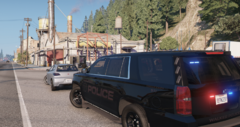
Hey there, figured I'd showcase off some of my personal use singleplayer vehicles from surrounding Michigan departments. Many of the vehicle models are custom made and skinned by the extremely talented EmergencyDistributors, or reskinned versions of their pre-released LSPDFR vehicles. Many of the skins seen were further edited/tweaked by me for over +20 hours, adding realistic insignia or creating alternate versions/colorways of skins from scratch, however much of the graphic design you see is done by EmergencyDistributors. Other vehicle models shown include Torz new Legacy LSPD Pack 1.1 he just released on LSPDFR, one of my new favorite ELS packs i've ever used, reskinned by me FOR PERSONAL USE ONLY. Click on images or select show as Large Previews to view without blur. I HAVE ZERO AFFILIATION WITH EITHER ARTISTS CREDITED. NOT AVAILABLE FOR SALE OR PUBLIC DOWNLOAD. Hope you enjoy:)
-
Walker Police Unmarked Ghost Tahoe
-
 Walker Police Marked Units Light Showcase
-
 Walker Police Marked Tahoe Units
-
 GVSU Marked Campus Patrol Explorers
-
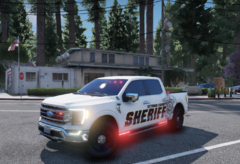 Ottawa County Accurate Unmarked Ford Pickup Truck
-
 Ottawa County Marked K-9 Unit Explorer
-
 Ottawa County Marked FPIU Light Showcase
-
 Ottawa County Marked FPIU
-
 Ottawa County Outdated Skin FPIU Patrol
-
 Ottawa County Outdated FPIU Supervisor Patrol
-
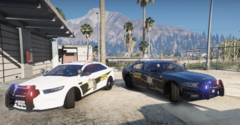 Ottawa County Outdated Skins Charger and Taurus
-
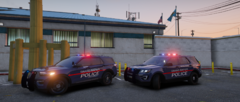 Grand Rapids Police Supervisor x K9 Explorers
-
-
-
-
-
-
-
-
-
.thumb.webp.d5bdb45c0b036e628eb2b4233b1f39d4.webp)





