.webp.00aca5d09b9c78c53d5069296bf98aef.webp)
Perfects
Members
-
Joined
-
Last visited
Everything posted by Perfects
-
 This is an absolute must. Such a profound and useful mod. This has been a life saver for me. I guarantee this will save people from hours of stress, and instead create hours of patrolling. Cheers for the perfect mod.
- 15 comments
- 3 reviews
-
-

- 1
-
-
 I sat idle near the UCLA university campus while on duty for about 5 real time minutes. Over 30 blown up and destroyed cars were spawned in the intersection near me when I finally started patrol. This was my only encounter with this plugin so far. I adjusted EventChance but it seemed to have no effect.
- 19 comments
- 1 review
-
Appreciate this. Got it figured out now, windowed borderless works flawlessly, just no changing in game settings which obviously can be done in an unmodded session using PlayGTAV.exe. Thankfully now I am able to continue using my NVE and my ReportsPlus, much thanks! Good to be back up and running again!
-
After treacherous days and hours of trying to fix my broken game after the recent update, I have narrowed it down to my NVE.asi being the cause of crashing, especially when pausing or tabbing out of game, or trying to change in game settings. This is likely due to NVE needed another update despite it being updated in February 2026, correct? Or is there a workaround or working gameconfig I can use so that my NVE.asi does not crash my current updated GTA V. It worked flawlessly with the last few game updates and LSPDFR, sadly I was forced to update my game from a backed up version due to many LSPDFR plugins requiring the newest version aswell as internet connection.
-
Hey, does anybody know the current patchday to replace my AI vehicles in game. My patchday 20ng, 22ng, 25ng, 28ng, patch2024_01, mp202*_01, mp202*_02, all do not replace any vehicles except for sheriff and sheriff2 in my mods folder. Any help is appreciated.
-
Thank you for this massive insight. I will do all of the following here soon and will come back and mark resolved when done. It likely has to do with my CalloutInterfaceAPI and XScanner Pursuit updates. Thanks immensely for your detailed and prompt response!
-
Hi there, long time LSDPFR modder here. I have been trying to slowly update all of my mods so that I can reboot my game after the recent GTA V update. After days of work, I am finally back and can patrol for as long as necessary. However, I am unsure what causes this crash, as I have had it happen numerous times this week, but it crashed right after a pursuit was initiated on a traffic stop. Here is my attached ragepluginlog, the error will be near the bottom as it was my last launch on the log. Appreciate any help, stay patrollin'. -Perfects RagePluginHook.log
-
I would check your LSPDFR>chars and delete any old ones sitting in there if not all of the contents of the folder Just kidding, it says you are missing those necessary DLC files for EUP, which is caused by an extremely outdated mods>dlcpacks folder. I would copy and paste all of your open iv car packs to a folder, delete your mods>dlcpacks folder, then copy a new one over and paste your mods back in.
-
Have you tried resetting and making an entirely new LSPDFR character? I used to have this occur years ago and it was because my LSPDFR was trying to pull information from an older LSPDFR character after a GTA V update. This can also just happen from having multiple modded game versions over time too I believe, as your LSPDFR sometimes comes across older files that no longer are applicable to your game. Just a thought, hope it helps you.
-
 Cool mod, really nice job with this last update. Appreciate detailed plugins like this, 10/10🔥
- 30 comments
- 2 reviews
-
-
- 1
-
-
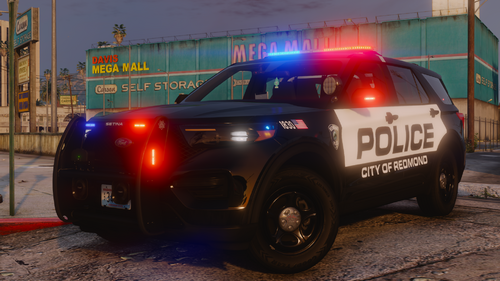 Truly a beautiful job you have done with this pack. Slightly altered it to work with ELS, been using the pack for a week now, and no plans to use any other pack for a while. Absolutely awesome variety of cars, with exceptional quality. 10/10🔥
 -
 DM me if still interested. Thanks for stopping by to take a look(: Happy Holidays! DM me if still interested. Thanks for stopping by to take a look(: Happy Holidays! DM me if still interested. Thanks for stopping by to take a look(: Happy Holidays!
 -
-
Is there any confirmed release date for the public version of Policing Redefined? After seeing all the YT showcases it is hard for me to even launch LSPDFR knowing that mod exists in the back of my mind.🤕
-
 Is this broken with the new update? Fresh installed grappler 3 times and it freezes my game when loading plugins each time. When uninstalled all my other plugins work.
- 62 comments
- 25 reviews
-
 Very unique and wholesome mod. Hilariously, the ones hating on this are likely the ones who could use it the most👌
- 38 comments
- 4 reviews
-
-
- 1
-
-
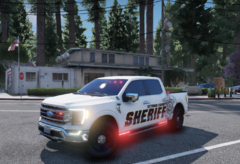
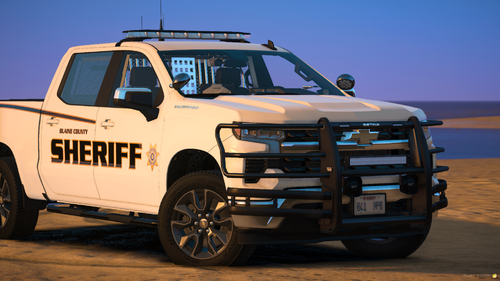 One of my favorite packs of all time. The new 21 tahoe however, I can't seem to get the lights near the rear license plate (Vehicle Modification #5) to work at all with the rest of the lights. I can select them on or off the car, but they do not work with the rest of the emergency lights and are stagnant.
 -
-
-
 Signed in on here for the first time in months, just to say that this is one of the coolest and most unique releases I have seen on here. Love all of your work, but this was super dope lmao. Nice work
 -
Check your Messages if you see this by chance!
-
-
 Was able to get this with the Space101 livery, and the entire vehicle model is sheer beauty. The customization is incredible, and quality and lighting patterns are unmatched. Super dope car!❤️🔥
 -
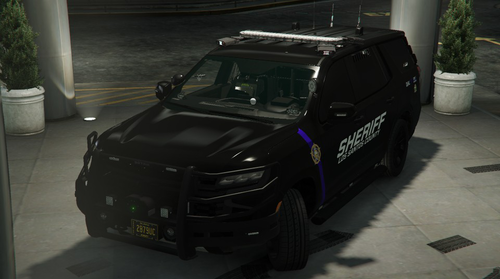 Without a doubt one of the best ELS vehicles I have seen on this site, or honestly in general. Lighting, livery, vehicle model; all perfect. Will be using this one for a long time, amazing work!❤️🔥
- 61 comments
- 12 reviews
-
-
- 1
-
-
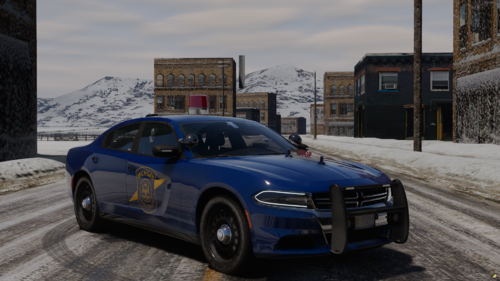 Been loving this pack, any plans to release the newer '20 tahoe?
 -
Try Visual V with its included enbseries, and Better Visuals "Dim setting" with higher in game settings. Looks pretty similar graphically without any of the performance lag or crashing. GTA V remastered, Joshua road remastered, and Forests of San Andreas are all great mods also to help out without NVE!
-
Sorry to hear that, everyone's game is slightly different but I would definitely focus your attention on anything in the dlcpack folder, including EUP and anything texture related such as weapon textures, as for me if I entirely delete my dlcpack folder minus the NVE packs, my LSPDFR runs flawless everytime with NVE/reshade. If this is not the case for you, a fresh install of everything is likely needed. I agree a new visual pack is likely the way to go and for now I am lucky to have a working NVE game, I wish I could pinpoint the issue better. My process for new installation went like this, loaded in after each arrow to ensure game ran smooth and fine. Also make sure your EUP and LSPDFR are completely fresh. Anytime you see a > is when the game was loaded into, console commands ReloadAllPlugins and ForceDuty were applied, I accepted a forced pursuit callout and drove around the map with an ELS car code 3 to ensure no crashes for as long as I needed to confirm it working (Typical test time between installs 30min-1hr, all map areas tested). Main game only>LSPDFR, EUP, ELS with ONLY 3 ELS cars, SCRIPTHOOK, OpenInteriors, No PLUGINS, and all Heap Adjusters>NVE, LSPDFR optional pack only>Plugins contained in plugins folder only>Plugins in plugins/LSPDFR folder>Additional NVE optional packs>Extra DLCPACK vehicle add-ons(one car pack at a time)> Extra DLCPACK and custom_maps add-ons>Extras such as minimap mods, extra visual mods, traffic discipline and accuracy mods, speedometer (anything mods folder related). I did not begin to experiment until I could confirm an entirely working game with only LSPDFR and NVE first, then ELS and EUP and so on.
.thumb.webp.d5bdb45c0b036e628eb2b4233b1f39d4.webp)