
xDATxGAMERx
Members
-
Joined
-
Last visited
Everything posted by xDATxGAMERx
-
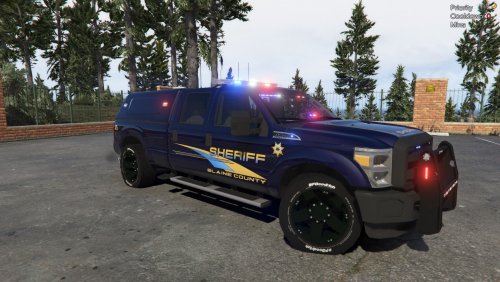 Additional vehicle for the BCSO pack credited below. Based off Alameda County Sheriff Department in California. This is my first upload guys, let me know how I did in the comments below! Installation: Use OpenIV to open Sheriff2.ytd found in TheHurk's Model credited below. Find & Click F350_sign_1 Click "Replace" & replace with file given in download. (Optional) Replace F350_sign_2 for unmarked livery. Save & use edited Sheriff2.ytd when implementing vehicle. Vehicle Model by: TheHurk Additional Vehicle for BCSO Pack by: SouthernFuture https://forum.fivem.net/t/release-blaine-county-sheriffs-office-pack-add-on-non-els/55713