


Dutchmastermo
Members
-
Joined
-
Last visited
Everything posted by Dutchmastermo
-
.thumb.png.e560bde9a6e6b3b9f1c7c6270ab0894a.png) This car is great, very good work. My only qualm is the license plate is not the same size as other GTA cars and seems a bit stretched out. Nonetheless, this is the only issue in my opinion, and this car has found a permanent place in my game. Because this is a civilian car in the US (and never used for police to my knowledge,) playing a undercover cop while in this car seems like more fun. Thanks for the car!
This car is great, very good work. My only qualm is the license plate is not the same size as other GTA cars and seems a bit stretched out. Nonetheless, this is the only issue in my opinion, and this car has found a permanent place in my game. Because this is a civilian car in the US (and never used for police to my knowledge,) playing a undercover cop while in this car seems like more fun. Thanks for the car!- 11 comments
- 6 reviews
-
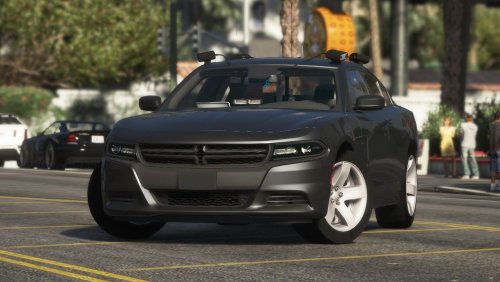 I enjoy this model very much. I like the fact that it has regular wheels. The 4 alpr's on the roof are a bit much for my taste, however, It makes sense from a policing perspective. The interior is well detailed. I actually made this car my characters default car outside the apartment in 0.4. Great work.
- 38 comments
- 14 reviews
-
Thank you so much!
-
Jesus christ, you could run the matrix with that computer.
-
Hello, I was wondering if its possible to remove these two things only: Phone up (in vehicle/on foot) Light Melee (on foot) There is a similar version (set 23) but it also removes the cinematic view in vehicle, which in turn disables the siren wail button for ELS. This request is made so I can have ELS functionality. Thank you for your time!
-
.thumb.png.e560bde9a6e6b3b9f1c7c6270ab0894a.png)

