


poroushawk
Members
-
Joined
-
Last visited
Everything posted by poroushawk
-
Sounds like whatever you've added is crashing it then, fresh install whatever you added and try again. might have misplaced something.
-
Sure i'll send you a pm.
-
last try, try adding the vehicles into the mods folder section instead of patchday. if you don't know what i mean by the mods folder vehicle area let me know i'll guide you through it. Failing that send me the vehicle files/els file and ill add it to my game. see if i get any errors while adding it.
-
they can but they need to be base cars, like police,police2 ect. add-on cars you need to spawn yourself & can't get npcs to spawn in them far as i'm aware.
-
hmm not too sure then tbh, usually when my lights work it's because of els file i didn't add by mistake. did you remap your keys at all? could be that but if not i'm not too sure. Weird how it'll work sometimes but then not others.
-
does it crash at the wavy text area or crash before anything loads up?
-
You're welcome 🙂
-
use this for the police to spawn in the vehicle they need to be in the normal police slots that are ingame ( i believe )
-
did you add the els file in correct place? with the correct file.
-
Do you have the shader/post fx/particals quality on high or above?
-
mind posting a video on your issue if possible?
-
Yeah install them new, if that doesn't work & you have copys of ur gta v directory install lspdfr/rage/els on a fresh gta v. then install a vehicle and see what happens that way. This way you can see if another mod is making it go weird or it's one of those vehicles.
-
do you have any other mods installed? & have you edited any vehicle files
-
Ah i see, thanks for information.
-
may be the els thing you changed, can you revert and try? ( make a backup of the file you changed )
-
This might be what you're looking for, could only find one like this. https://www.gta5-mods.com/scripts/policelifes-alpha-online-control-panel-vehicle-gas-system-hunger-system-rank-system
-
hello, you just need to drag & drop the .awc file. i recommend checking albos guide;
-
thanks 😄
-
not to worry my man, appreciate you having a go at it too 🙂 thanks buddy. edit; which tahoe did you test this on btw?
-
that's great 🙂 yeah i'd love to add it thanks man.
-
No problem 🙂 yeah just keep making back-ups so if anything goes wrong and you have to install stuff again, you don't have to spend a long time on it.
-
most likely be something you added that's causing your game to lag as some mods can be intensive. however if you didn't add anything prior to this happening it could be some of the mods updating possibly, go into your task manager and see how much usage the gtav is taking up.
-
-
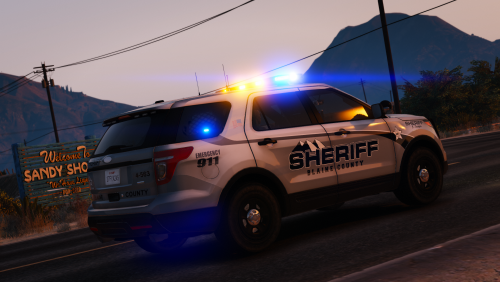 love the grey/black with the white mountain area in this model, well done hope to see it on more vehicles 🙂
- 7 comments
- 11 reviews
-
yeah don't worry take your time with it 🙂 thanks. ps; forgot to add the red text on side door i wouldn't want on the texture.


