


HookerHeels
Members
-
Joined
-
Last visited
Everything posted by HookerHeels
-
 Works flawlessly, but sadly, due to GTA'a dumb ass AI, the responding cops cause too much havoc for my tastes. 5 stars regardless.
- 346 comments
- 43 reviews
-
-

- 1
-
-
 Uh, no? Siren Mastery (used) to be for Non-ELS cars. So, yeah, if it did work, it would very much have a use as its basically a non-els els.
- 53 comments
- 21 reviews
-
-
- 1
-
-
.thumb.png.6a3bd121b5c76bdc0ab40c0222617534.png) Yup. Born n' raised in Fort Myers. All we get is LCSO and FMPD, but we do get a bit of FHP, but usually just on 82 lol I live out in Lehigh now and all we get is LCSO and oddly, cops from the Cape o.O
Yup. Born n' raised in Fort Myers. All we get is LCSO and FMPD, but we do get a bit of FHP, but usually just on 82 lol I live out in Lehigh now and all we get is LCSO and oddly, cops from the Cape o.O -
Ayee my Hometown, FM rep rep
-
Ragehook and ASI don't like each other. Thats all.
-
.thumb.png.c90705ef47daab1b5eea67fb8b5074e3.png) That is incorrect. I love the lighting! Too many cars have too much lighting or not enough. This is the perfect amount (at least in the front, can you add more pics for folks?) Looks like a high quality model too, something a large amount of non-els cars lack.
That is incorrect. I love the lighting! Too many cars have too much lighting or not enough. This is the perfect amount (at least in the front, can you add more pics for folks?) Looks like a high quality model too, something a large amount of non-els cars lack. -
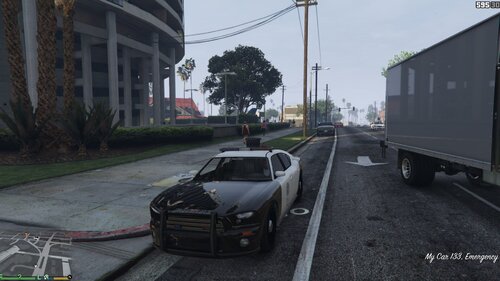 Not really possible, all ELS cars have different light coding, while non-ELS have only a couple to choose from (most choosing Police2.)
 -
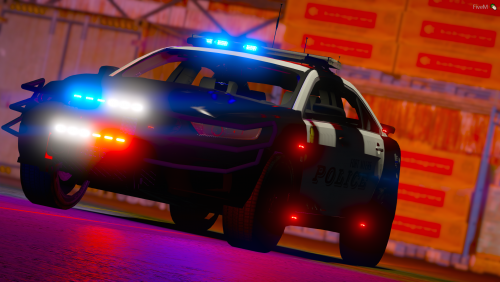 Ayee my home town. LCSO has been running them for so long, it'll be nice to see FMPD do the same.
- 10 comments
- 1 review
-
 This, was the best thing I have seen all year.
 -
Vehicles, no, but all mods.. possibly, as we don't know how they'l react with the mod.
-
SO EXCITED
-
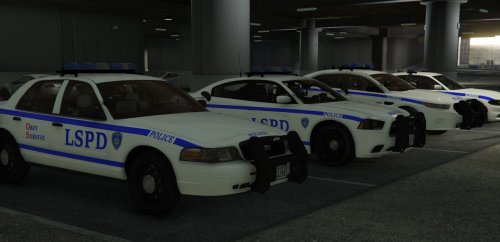 Not too bad, just a few things need some work. As others have stated, the font is wrong, but what they're not pointing out is, all your fonts are level. If you look at all the writing on basically any police vehicle, they're at an angle. That include the fonts on trunk (somewhat.) I'd also suggest adding another letter, OS_. I like this, as it makes it lore friendly, but its off with only two instead of three. You did a pretty good job for a first timer, don't let some party poopers ruin it for you, texture creating is great fun.
- 10 comments
- 5 reviews
-
I was wondering of anyone has plans/is working on an older Camaro model. Obviously it doesn't have to be CHP as skins can be made (in fact, I make my own skins and we could colab on it?) I've been diying for a HW patrol in one of these, and there aren't any out there. Theres a Lore-friendly car that looks similar to it in the Camaro in the DispatchWorks pack, but I'm looking for a regular straight lightbar (no preference, but please not an Arjent, I hate Arjents lol.) and obviously an official Camaro, not GTA lored'. This beautiful Camaro Don't know if anyone will be interested, but I thought I'd make a request. In return, I can make skins for it and boom, awesome colab.
-
This is why, as much as I love ELS cars, I use non-els. Theres some really nice ELS style carts that don't have the issues of FPS dropping like ELS does. I have an 8350, GTX 1060 6GB and 16GB DDR3, and with Albo's plugins, plus a half dozen other script hook plugins, and a few ragehooks, with everything on ultra (except grass) I only manage around 50FPS, with dips into the low 40s. Sadly, Albo's Policer is the hardest hitter. But alas... can we really play without it xD
-
The scripts work fine for me, I just delete the mod folder that contains all the cars/peds. I'm wondering if regular adding our own cars with the same names, and tweaking some settings might work.
-
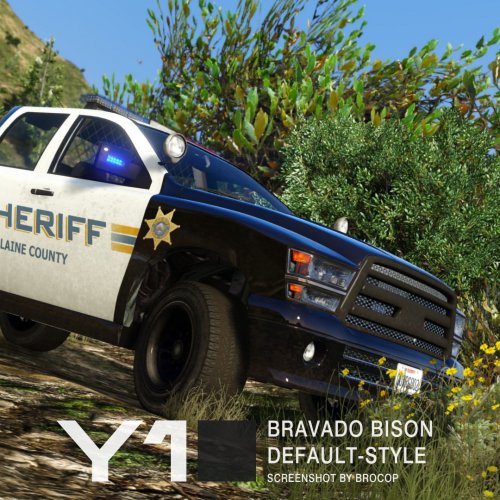 Really love this. Most of the (non-els)trucks here have lots of issues, or just don't fit my style. This one has no issues, fits the lore perfectly, lighting is a great setup, not too much, not to little. The template could be a little less, polygoninzed, but thats just me. 5 stars from me, and I have it in my game five times! (departments)
- 11 comments
- 4 reviews
-
-
 Not for the Sheriff Granger it seems. I had an FPIU for police7, and I had the handling for SHERIFF2, always crashed. I looked at the carvars, and sheriff2 uses FBI2 for handling, switched my FPIU/police7 to use FBI2 handling, works just fine. Idunno, I always use Police for CVPIs, polic2 for chargers, etc, etc.
- 267 comments
- 36 reviews
-
I had one issue where I was using SHERIFF2 handling.....but there is no sheriff2 handling, so that was crashing my game lol. PSA for those that don't know; SHERIFF2 uses FBI2 for its handling.. lol
- 267 comments
- 36 reviews
-
-
- 1
-
-
-
Yeah, least thats what it says. https://www.gta5-mods.com/misc/gta-5-gameconfig-300-cars. I'm gonna give it another shot, and see how it goes.
- 267 comments
- 36 reviews
-
-
- 1
-
-
Yeah, followed every step. RDE cars crash my game too, even with an updated gameconfig. The scripts work fine, and as soon as I delete the mods folder (containing all RDE's car/ped models,) the game works fine. Idunno. Think I'll run vanilla for a little while and wait for updates, etc.
- 267 comments
- 36 reviews
-
Replacers work fine. Addons are what break. Yep, textures work fine in OIV. Copied the metas and such exactly in the video. Hell even wrote the files exactly the same. I'm gonna see if I can get RDE to work, and I'll come back to cars at a later time. Getting frustrated lol. (I used to add cars in GTA4 all the time, but GTA5? Pfft)
- 267 comments
- 36 reviews
-
Oh hell so it is. Been waiting all week for it! In that case. I dunno. I just got GTA5 last week, haven't been able to install ELS cause Scripthook.
-
Did you update your game? Scripthook hasn't been updated, ELS uses it, so that'd be more than likely why.


.thumb.png.6a3bd121b5c76bdc0ab40c0222617534.png)
.thumb.png.c90705ef47daab1b5eea67fb8b5074e3.png)
