frotta03
Members
-
Joined
-
Last visited
Everything posted by frotta03
-
 Is there a way we can already use this in-game? Should we replace VocalDispatch files or create a new folder in Plugins/LSPDFR? @opus49
- 46 comments
- 1 review
-
-
-
 Very good idea, execution could be better. The area in which you need to place your car is sometimes a bit small and counter intuitive. Can obviously be improved with updates. The plugin is stable and has little to no performance impact. Good job!
- 37 comments
- 10 reviews
-
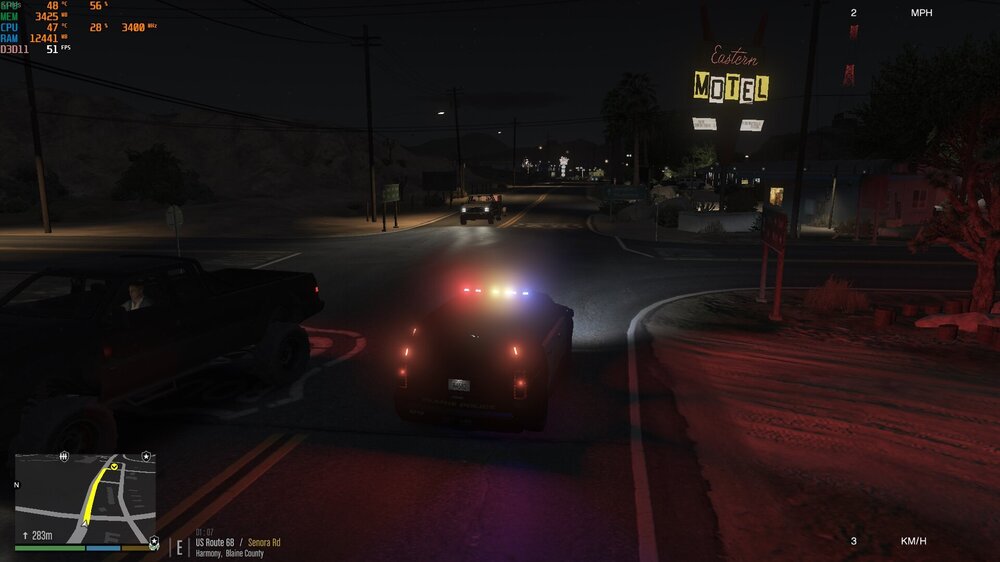
Hello guys, I've always had this problem in which although I have the settings on low/normal (which is much less than what my GPU can run), I still struggle to reach 60fps in game. I really see little performance boost when lowering graphic settings, and my GPU and CPU usages are pretty low. I don't mind having my graphic settings on low, but I can't find a way to get higher FPS. I'm currently rocking a R5 1600 with an 8gb RX 570 and 16gb of DDR4 RAM at 2666 MHz. Thanks to everyone in advance. Have a great day! Here's some screenshots of my in-game performance. I only get, to my perspective, playable framerates, when I'm patrolling outside Los Santos.
-
Then I really don't know what's wrong with your game. Check for updates on your files
-
And did your game start crashing when you installed those or was everything working fine?
-
Have you installed any add-on or replace vehicles?
-
Hello to everyone! My PC's running a R5 1600 with an RX570 8gb and 16gb DDR4 2666MHz. No matter which graphic settings I use, I get maximum 40 FPS in Los Santos and 60 FPS in San Andreas. I'm really not sure which upgrade would be better to improve my FPS, if it's the CPU or the GPU. I don't notice much performance difference when variating graphic settings so I think that a GPU upgrade wouldn't help much, but I wanted to reach out to you guys before making a purchase. Thanks a lot in advance!
-
I suggest you go to your vehicles.meta for addon vehicles, search for the hwayfpiu lines and copy them, then paste them either in the replace or addon vehicles.meta but for your other car that you want to drive like your FPIU. For example, if the car whose driving characteristics you want to change is in the slot POLICE2, just copy the lines from the hwayfpiu slot (ensure to copy from the opening <Item> tag to the closing </Item> tag, erase the lines from the vehicle that you want to change and paste the ones you copied. Change the model name, txd name and gamename (but NOT the handling ID) to the slot where you're installing the vehicle. I really hope it helps and I was clear. Let me now if you're having trouble or don't understand my explanation. Have a good day!
-
Open your game, wait for it to crash and, when it does, send us your RagePluginHook.log file
-
 There it is! I had put NativeUI.dll in the main GTA V folder, and not in the scripts folder. Now that I've changed it everything works perfectly. Thank you!
- 330 comments
- 24 reviews
-
Hi man! I'm unable to get the script to work, could you take a look at my files and tell me what's wrong? Thank you in advance. (edit: I've taken a look at my folder and realized that I didn't have NativeUI installed, but after installing the 1.9.1 version, it still won't work! In fact, the log file looks the same) ScriptHookVDotNet2.log
- 330 comments
- 24 reviews
-
Thanks for your help, but I found another way (I think easier) to solve it, and here it is: So I went to "Options" in the menu and disabled keybindings. Thanks for your help! Have a great day.
-
Hi to all of you, Since I started playing LSPDFR less than a week ago, I noticed that my letters K and L trigger my car's indicators, but I haven't installed a mod or plugin for that, so that means that it comes "hidden" in one that I did install. Could you please tell me which one it is so I can disable it? Thanks!
-
 I'm having the problem that the top light bar of the 2016 Dodge Charger won't light up while the rest of the car does. Any ideas on what it could be?
- 283 comments
- 95 reviews
-
I did and took the decision that I will buy it. Thanks for the simple (but very useful) answer!
-
Hi to you all, I've been thinking about buying GTA V on Steam when it is at discount on Steam, but I'm not sure I'll be able to run it vanilla and with mods. These are the specs: Intel Core i7 7700HQ @ 2.8GHz 8GB RAM 7200RPM 1TB HDD 2GB GTX Geforce 1050 (mobile) What do you think? If you need more information, here's the laptop's page on Amazon: https://www.amazon.es/gp/product/B071WM22RB/ref=oh_aui_detailpage_o00_s00?ie=UTF8&psc=1 Thanks in advance! Greetings.