


JVKE
Members
-
Joined
-
Last visited
Everything posted by JVKE
-
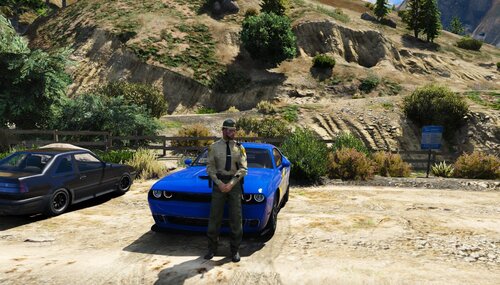 This skin was made for Van's Challenger Hellcat, which you can purchase from Trooper D's discord (https://discord.gg/KqxArB7) This is my first post and I worked really hard on this one, I hope you guys enjoy! This texture is completely custom made, with inspiration from other skins I have seen *I am using a visual pack in game, I do recommend using a visual modification to make the shading on the paint look a little better* *Do NOT reupload to ANY other site or discord without my explicit permission. Do NOT slightly alter the skin and call it yours either, if caught, you will be reported to most of all the LSPDFR/FiveM creators and discords.* Installation: Replace Texture in Open IV Follow path mods\update\x64\dlcpacks\[name of you vehicle mod folder]\dlc.rpf\x64\levels\gta5\vehicles.rpf\ replace texture in .ytd Credits: Model: Van (Not included in download) Inspiration: JBDesigns, Liberty Designs Donation link (Not required but greatly appreciated!): paypal.me/theracc or send to jbsc3@outlook.com thru PayPal This work is licensed under a Creative Commons Attribution-NonCommercial-NoDerivatives 4.0 International License. © 2019 SEALTHREE Design
 -
 Yo, just so I have proper permission, can I create textures for these vehicles and upload those (without models and other things). I will definitely source the cars to you and give all credit to you for the models just wanted to know if I could make some custom liveries for these
- 66 comments
- 26 reviews

