econdriak
Members
-
Joined
-
Last visited
Everything posted by econdriak
-
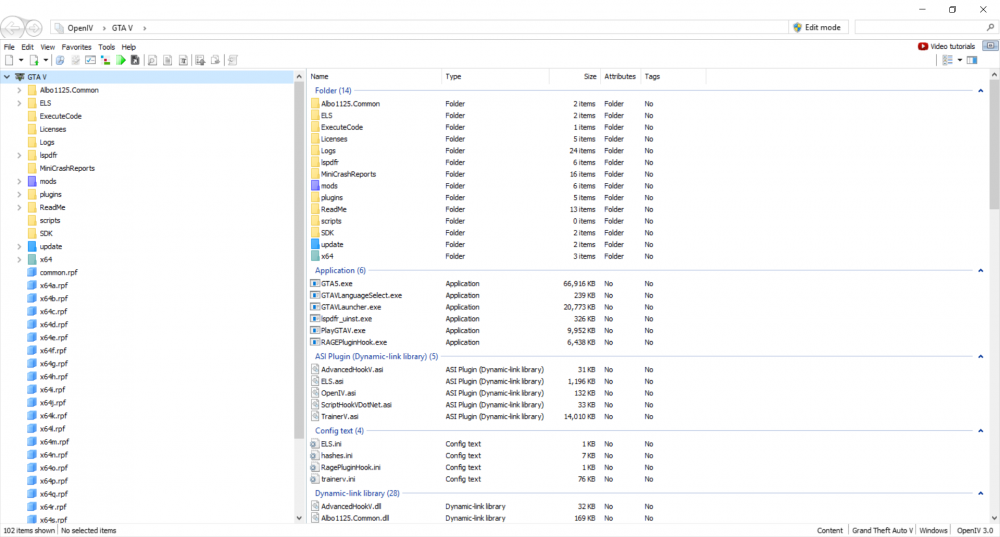
Hi All. I am having issues getting add on mod cars to spawn through simple trainer. I have followed several different tutorials on doing add on car mods and then spawning from simple trainer but with no success. I am dying over here to put in some ELS CVPI models along with the chargers, tahoes and some cool retro stuff. I have followed several videos (a few listed here) Aldo's Unlimited Addons First Thirty Minutes Tutorial Sereous33 Tutorial I have also gone through the readmes for each car as well. The ones that I have tried starting with are: http://www.lcpdfr.com/files/file/18158-retro-bcso-pack-els/ http://www.lcpdfr.com/files/file/19269-declasse-yosemite-police-package/ http://www.lcpdfr.com/files/file/18790-els-1982-chevrolet-impala-f41-california-highway-patrol/ Ive tried a few others including even replacements and still have had no success So you know. Here is a screenshot my file structure in OpenIV. I have Scripthook, Rage, LSPDFR, ELS and many other mods already installed for LSPDFR. I have no issues with any of the script mods (other than LSPDFR crashing occasionally) and a few buggy things, but I can work around that. Any help is greatly appreciated as I'm I'm pretty certain there is some minor step that I missed at some point and just need a more knowledgeable set of eyes to look it over.