


LimitedProximity
Members
-
Joined
-
Last visited
Everything posted by LimitedProximity
-
-
-
 @alexguirre I was wondering when I try to edit the spotlight, I only see the text with no background panel and it basically immobilize my character. The old version had the same issue and I thought oh it was because it was outdated so I got your latest one but it still does the same thing. I can turn the lights on and such but the game play of my character is frozen. I have to restart the game to go back to normal. I just want to fix this amazing plugin because it has made my game play experience more realistic.
- 477 comments
- 73 reviews
-
 Do I need to install these https://www.gta5-mods.com/tools/packfile-limit-adjuster https://www.gta5-mods.com/misc/gta-5-gameconfig-300-cars https://www.gta5-mods.com/tools/heap-limit-adjuster-600-mb-of-heap to use this file or can I just download it with no problem?
- 485 comments
- 78 reviews
-
 This script haven't been updated yet and the owner albo is retiring from updating any of his mods.
- 1,915 comments
- 242 reviews
-
I'm also having that same issue.
-
-
 Okay well I love this jeep but I got a small problem that I can't seem to fix. I'm not sure because I put it under crusader instead of ranger but when I go a far enough distance, the vehicle seems to disappear. It gets irritating when I'm patrolling Fort Zancudo and you just see military men hovering until you get close enough until you actually see them. If anyone can help me, it would be fantastic.
- 85 comments
- 40 reviews
-
 Okay I know this comment is old but I tried that and It still showed up blue even when I put the xml file with the red and blue instead of the all blue one. I might reinstall the whole thing and try again.
- 65 comments
- 36 reviews
-
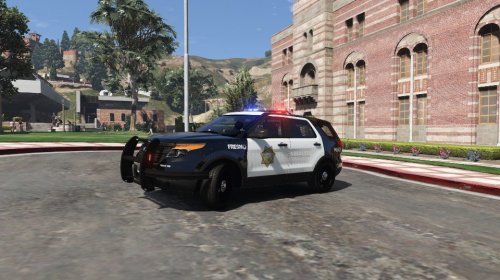 So I downloaded this pack. It's a wonderful pack absolutely marvelous but the thing is I don't see the Silveraldo skin file when I tried to put it in. It has only "14 CHARGER, 15 PFIS, 15 TAHOE, 16 CHARGER, 2015 FPIU, and CVPI." Did I do something wrong while downloading this or did he update it?
- 6 comments
- 2 reviews
