
Respawn Modifications
Members
-
Joined
-
Last visited
Everything posted by Respawn Modifications
-
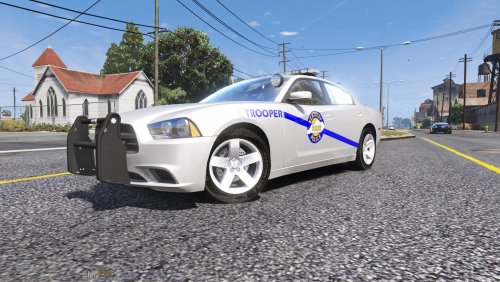 I've went ahead and made the texure. You should find a link for the cruiser in the what's new section. I've went ahead and made the texure. You should find a link for the cruiser in the what's new section.
 -
Give me just a couple days and I'll see what I can do. Thanks for the feedback. I''l search for a suitable model and start on it as soon as I can, stick around to stay updated. Thanks for the feedback.
-
This is a texture I made for Gump's 2014 Bowman, SC Dodge Charger which can be downloaded here. I tried to make the texture resemble the real cruisers as close as possible, but upon further inspection I left out 1 piece of text(the words state police on the rear of the car) not thinking it was a big concern I decided not to redo the whole texture. I'm from Ohio so I love the Sheriff and HP cruisers there but I've been living in Kentucky for a few years and decided to make a cruiser that's closer to me. I hope you enjoy. Any questions feel free to contact me. There are now textures for a slicktop Charger and a 2015 Charger.