
Respawn Modifications
Members
-
Joined
-
Last visited
Everything posted by Respawn Modifications
-
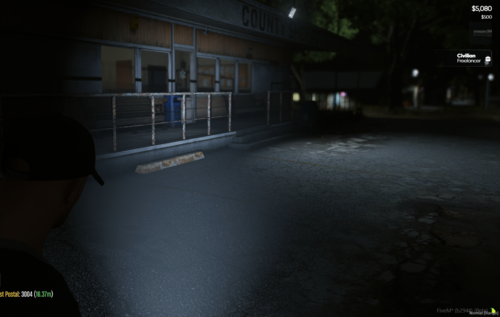 It's going to be 1 of 2 things. Either you have fivem mods that are overwriting it OR you something server sided that could be overwriting it. If you have anything else client or server sided that utilizes a graphics.ytd then you have to make sure you edit those files and delete the "torch" texture from them.
 -
 These are all custom serverside tones. If you wish to add the default vehicles and have them use certain sirens within this preconfigured pack then you will have to edit the SIRENS.lua file and add the game name of the vehicles. I'll do an example below: ['ambulance'] = {45, 46, 47, 48, 49}, ['police'] = {45, 46, 47, 48, 49}, ['police2'] = {45, 46, 47, 48, 49}, etc. Edit: You would obviously change the siren numbers to the numbers of the siren you want to use as well.
- 23 comments
- 2 reviews
-
Make sure when adding vehicles you use the vehicles "game name" from the vehicles.meta and not the spawn name. Also make sure you're setting the correct sirens numbers.
- 23 comments
- 2 reviews
-
-
There isn't a SIRENS.lua folder. The SIRENS.lua is in the root folder of lvc and is included in the one download.
- 23 comments
- 2 reviews
-
Make sure you're running all of the sirenpack resources. As long as everything is running correctly then everything should work. There's no tutorial. I did it all myself with the knowledge I have. There's a program you can get though to make simple siren resources. It's called SirenSharp. I used it to make the resources with sounds I created then just coded it all within the SIRENS.lua to work with the vehicles.
- 23 comments
- 2 reviews
-
You set each vehicle to use whatever siren at the bottom of the SIRENS.lua file. I don't have a video right now but I could make one. As for installing it. It should be a simple drag and drop for everything.
- 23 comments
- 2 reviews
-
 Works perfectly fine for everyone on my server.
 -
I do believe that will be the one.
-
Yes. You would just have to pull the .ytd file out of the stream folder and replace the one in your game install with it. I don't know the exact path off the top of my head though.
-
This is a pack including not 1, not 2 or 3 but 7 custom siren packs to use with Luxart Vehicle Control 3.0(LVC) with an already pre-configured SIRENS.lua file. All files are drag and drop and will work from the start with very little work or effort involved. I've been working on my own server and I know getting custom sirens to work with LVC can be a pain sometimes and a lot of people will end up using WMServerSirens which is limited to a certain amount of tones, so I thought I'd be nice and share my setup to help make it easier for those that don't have as much development experience. Sirens that are included and already pre-configured. Sirenpack1 - Code3 RLS Sirenpack2 - Whelen Gamma 2 Sirenpack3 - Custom Fire/EMS tones made by myself. Sirenpack4 - Federal Signal PA4000 Sirenpack5 - Powercall DX5 Sirenpack6 - Whelen Cencom Sapphire Sirenpack7 - Federal Signal Smart Siren I hope this helps anyone that downloads and has been struggling with getting custom sirens to work correctly. -----TO SETUP---- 1. Drag [sirens] into your Resource root folder. 2. Make a backup of your SIRENS.lua found in your LVC resource folder. 3. Copy my SIRENS.lua over to your LVC resource folder. 4. Open your server.cfg and add the following line to your resources section: ensure [sirens] 5. Start or Restart your server. 6. Done!
- 23 comments
- 2 reviews
-
-

- 3
-
-
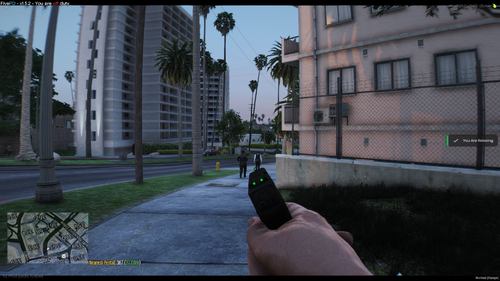
It's automatically done with the script. With this script it changes the new aiming mode to the tilted aim. You can't change back and forth between straight and tilted. Just start the script in your server then use either the Pistol or Combat Pistol and it'll be titled. I just want to add that in the pictures I'm not leaning, I'm just holding the gun at an angle.
-
This is a mor realistic flashlight texture I made and setup for FiveM use.
-
I was able to increase the fire rate to a more realistic one, however for any of the combat related stuff, I am unable to find what code is altered in which files. The new version an increase in fire rate is now available at this very moment.
-
Have you tried restarting your server with it active? I know if you start it while in server or stop it while in server it will crash you every time.
-
Do you have any other scripts running that alters anything with any weapon meta files? If you're running QBCore I know it comes default with a qb-weapons file. I removed that script from my server and everything runs fine.
-
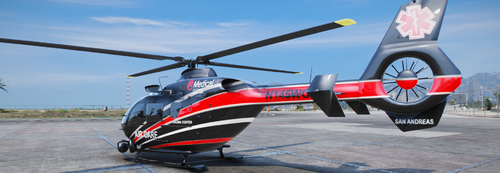 These are 2 liveries I made but never used for anything. They are for Candice_211's Air Ambulance MedEvac Helo EC-135. It comes with 2 Pillbox Medical variants based on Cinncinnati, Ohio's UC Health Med Flight. Install: Singleplayer This is a SuperVolito replace so you'll have to add a flag to the SuperVolito's vehicles.meta flag line. Go to mods>update>update.rpf right-click vehicles.meta. Search supervolito with Ctrl+F. Once you've found the helicopter scroll down until you see the line that says <flags>FLAG_NO_BOOT FLAG_DRIVER_NO_DRIVE_BY etc. etc. Simply add FLAG_HAS_LIVERY before FLAG_NO_BOOT. The full line should look like below but all on one line. <flags>FLAG_HAS_LIVERY FLAG_NO_BOOT FLAG_DRIVER_NO_DRIVE_BY FLAG_NO_RESPRAY FLAG_AVERAGE_CAR FLAG_DONT_SPAWN_IN_CARGEN FLAG_DONT_SPAWN_AS_AMBIENT FLAG_DONT_TIMESLICE_WHEELS FLAG_HAS_REAR_SEAT_ACTIVITIES FLAG_USE_LIGHTING_INTERIOR_OVERRIDE</flags> Save and then you're done. FiveM Download the extra vehicles.meta file I created. Simply add the livery to the mods YTD, create a new folder named SuperVolito_MedFlight. Inside this folder make 2 new folders, one named stream, the other named data(case sensitive). Right-click and create a new text document. Name it fxmanifest.lua, make sure .txt isn't at the end and the name ends with the .lua. Open that text file and paste the following inside and save. fx_version 'cerulean' game "gta5" files { 'data/**/*.meta', } data_file 'VEHICLE_METADATA_FILE' 'data/**/vehicles.meta' After you've saved that, simply add the vehicle to your server like you normally would.
 -
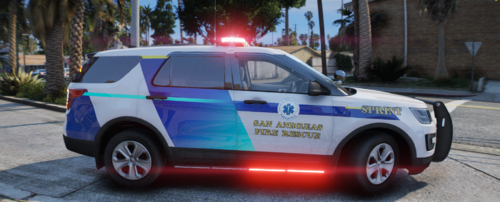 This is a 4k Paramedic Sprint unit livery for lolepop21's 2016 EMS Explorer which can be found here. I original made this livery for the FiveM server FivePDRP when I was a developer and Administrator there before their shutdown. I no longer use this is any servers so I figured I'd share it with the community now. I won't be making a pack or a similar livery for any other vehicles, sorry! I'm currently way to busy making new liveries and other development for my own upcoming server.
 -
Possibly. I can look into it and see what files are altered. You are talking about from Immersive Combat right?
-
This is a Tactical Grip conversion for FiveM. It's completely ready and all you have to do is drag and drop. Go into your server.cfg and put -> ensure TacticalGrip. Refresh your resources and start the script or restart your server.
-
-
-
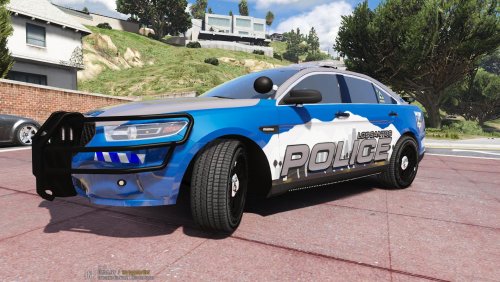 Just a texture I made for Gumps 2016 Ford Taurus K9 FPIS Unit. I may end up doing a complete lineup with this skin so stick around for updates. Gumps FPIS can be downloaded here. If you have any feedback or any questions feel free to msg me.
- 5 comments
- 3 reviews
-
-

- 3
-
-
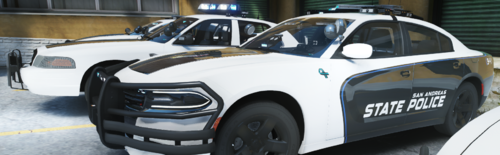
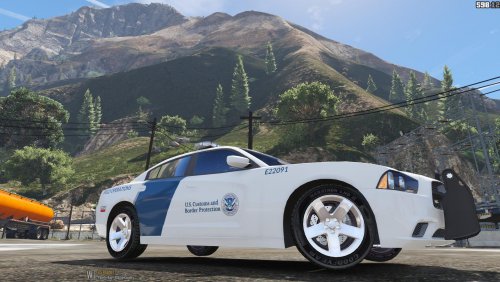 This is a texture I made for Gump's Charger which can be downloaded here. I tried to make the texture resemble their Charger as closely as possible and I think it turned out extremely close to the real thing. I haven't ever seen this texture any where so I figured I'd go ahead and create it. Let me know what you think. I hope you enjoy. Any questions feel free to contact me.
- 1 review
-
-
- 1
-
-
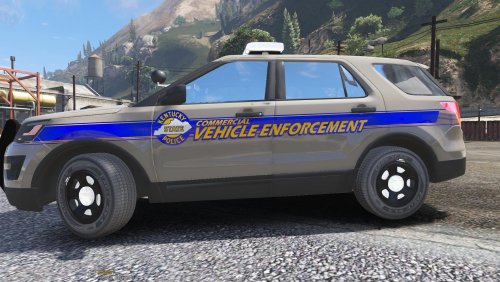 These are textures I made for Jedahdiah's Ford Explorer found in his Los Santos Police Department (Atlanta themed) pack which can be downloaded here. The pack includes a normal State Trooper stripe, while the other is the big notorious Commercial Vehicle Enforcement stripe. I tried to make the texture resemble the real cruisers as close as possible, but I made the stripe for the Commercial Vehicle Enforcement a little bit too high which will be corrected. Besides that I hope you enjoy. Any questions feel free to contact me.