


Samson Thomas
Members
-
Joined
-
Last visited
Everything posted by Samson Thomas
-
Hi Ice. - I do not use NVE. I've read how complicated it can get with replacement vehicles and don't want the headache. - I have the Impaler police vehicles (which spawn somewhat appropriately, I need to mess with the files for livery issues) and the Police Dorado in mp2024_01, as that's the vehicles.rpf they seemed to originate from. When the Dorado replacement wouldn't show up, I also put it in Patchday27 hoping it might override the older models. My Police 5 and Police Gauntlet replacements are in the mp2023_02 patchday. - When I reinstalled the game and LSPDFR last week I believe I also added the most recent gameconfig. I can add the latest one again and double-check, in case I missed that step earlier. Edit: I verified my file and it's the most recent one. Appreciate the assist!
-
Hi friends. I'm having some issues with replacement cars. I've been able to replace a few of the latest DLC vehicles in the mp2024 update and adjust the variations file to get them to spawn in properly (polimpaler5 and polimpaler6) but when I adjust the vehicles.meta file to fix their handling, it doesn't apply it. I've tried switching the handling line to everything from Gresley and Baller (they're Explorers) to Comet - I flip no matter what. It's like that file isn't even being read by the game. Strangely enough, I've also tried replacing poldorado (which is in the same folder) but it will not show up in game at all - just the vanilla vehicle (with its original livery) even with the model replaced in OpenIV. Additionally, my police5 and polgauntlet replacements in the mp2023 file refuse to load in-game. I never had issues with them in the past. I tried adding them to patchday27 in the hopes they'd override any older models but alas, no luck. I've been holding off on posting to see if I could fix it myself or find another thread with these specific issues but I'm all out of options. Any advice would be greatly appreciated. Also happy to provide any clarity if needed. -Samson
-
Your English is excellent. You can't use the back seats because the vehicle is programmed to be a 2-door vehicle, not 4-door. Replacing it with a 4-door vehicle doesn't override that. I'm sure there's some vehicle.meta coding you can change in that regard, but I'm not advanced enough to know what to change without risking your game's integrity.
-
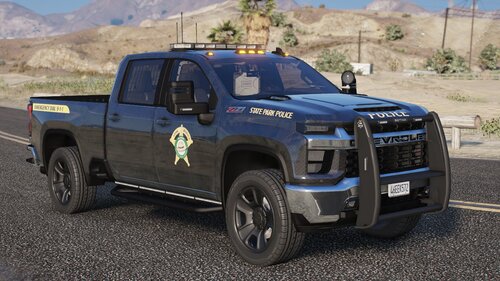 Love this vehicle. Superfix worked like a charm (after I had some issues on my end). Awesome work as always.
 -
I deleted R*GL, Steam, and my entire directory and started fresh. So far everything is working. I'll consider this issue resolved.
-
I'm only 5'4.
-
Good afternoon folks, I've been troubleshooting this all morning to no avail. I can load up the game in single player and it's fine. When I load LSPDFR in-game, I get a crash. I have tried RPH with only LSPDFR and it's the same issue. I have EUP Menu installed but turned off auto-load for it. I removed my other mods - Stop The Ped, Utlimate Backup, Vocal Dispatch, Super Callouts, and CompuLite - to load up vanilla LSPDFR. Another crash. Changed my mods folder to _mods and I have the same issue so it's not a bad vehicle or altered game file (I only have a handful of custom cars and a clean vehicles.meta file). Reinstalled a fresh LSPDFR, added the latest gameconfig, heap adjuster, and packfile limit adjuster but the issue is persisting. I'm savvy enough to troubleshoot, but not savvy enough to understand the reports. The first attached RPH log showed an extra command line in my root folder which I deleted. Second RPH Log showed a warning with trying to load the EUP outfits from the custom folder, so I reset the LSPDFR folder to its default vanilla settings. Third RPH Log is most recent, I've exhausted every adjustment I can think of. Hoping somebody can pinpoint a potential error so I can get this fixed. Thanks! RagePluginHook.log RPH Log 2.txt RPH Log 3.txt
-
I've searched far and wide but can't find an answer to this. It's frustrating when I arrest a criminal and immediately all the other cops leave, the helicopter shuts off the spotlight and flies away, and traffic goes back to normal while I'm clearing a crime scene - all because the arrest signals an automatic callout end. It ruins immersion to be the lone officer handling a pile of dead bodies and cuffed criminals while everyone abandons me like the Avengers after destroying a city. Is there a way to change settings to require all callouts to be ended manually? I have had no success in finding a script or a code adjustment that would do this and am wondering if it's even possible. Much appreciated.
-
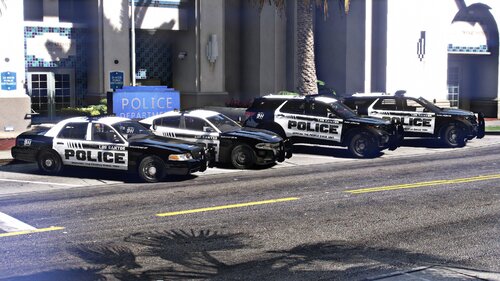 Hands down my favourite vehicle pack I've discovered so far. My only issue is that the website written on the rear bumpers has a typo: San Andreas is spelled San Andress in the URL. It's the only thing that keeps this from being absolutely perfect.
- 40 comments
- 8 reviews
-
-

- 1
-
