Brayden B.
Members
-
Joined
-
Last visited
Everything posted by Brayden B.
-
Yeah, I didn't try that. I did, but noticed this is the file version, and I don't know what to do now.

-
Do you know of a way to fix this? Or should I get in contact with Steam or something?
-
Indeed I have, Steam does not need updated, nor does Grand Theft Auto itself, I did the DLC update and nothing else has presented itself in means of an update.
-
I have done this, I keep getting the error message, I have looked through steam to see if it requires any further updates and it doesn't, I have read the error message and updated what I could, still nothing.
-
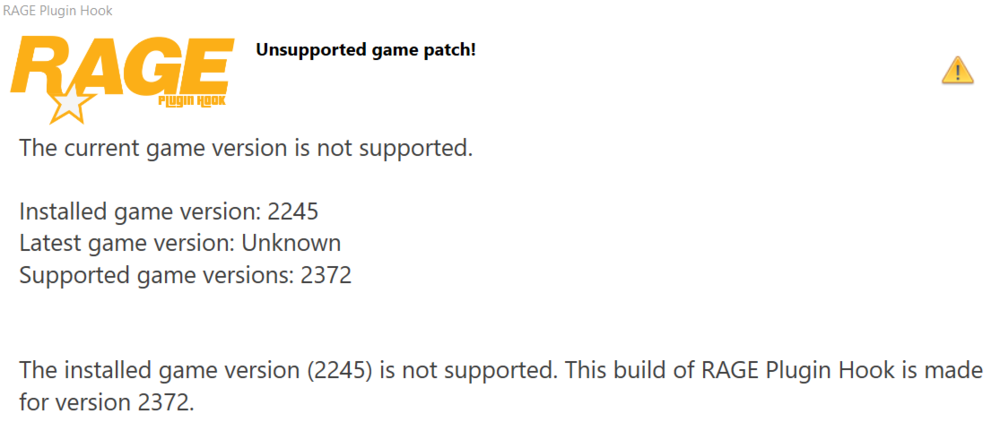
I keep getting this error, I updated RagePluginHook after LSPDFR released their new version and said RPH had been updated too, did I do something wrong here or something? Someone, please help me here.
-
Yeah, I tried running it as an Administrative Application too. It once again did not work, it happened right after an update which is confusing for me since I am very new to LSPDFR, and RagePluginHook. I removed all of my plugins and such to try that and once again it did not work, do we need to delete LSPDFR and reinstall that itself? And if there happens to be a solution to this somewhere else please direct us to such.
-
So I am new to LSPDFR and RagePlugin, GTA V was recently updated and now neither work, I have deleted RagePlugin twice and reinstalled it and it gives me the hook error and it says it is my Anti-Virus or the permissions, though it worked before, and yes I disabled my Anti-Virus to try that, and yet it did not work. Can anyone help me out here? Here is a photo:

-
 Does anyone happen to know how I an get the AI vehicles to use these? i.e. I call for a State Patrol backup unit it sends one of these cars and not the bike? Same for other cars for other departments.
 -
 Does anyone happen to know how I an get the AI vehicles to use these? i.e. I call for a State Patrol backup unit it sends one of these cars and not the bike? Same for other cars for other departments.
- 964 comments
- 158 reviews