Skip to content
View in the app

A better way to browse. Learn more.

LCPDFR.com

A full-screen app on your home screen with push notifications, badges and more.

To install this app on iOS and iPadOS
  1. Tap the Share icon in Safari
  2. Scroll the menu and tap Add to Home Screen.
  3. Tap Add in the top-right corner.
To install this app on Android
  1. Tap the 3-dot menu (⋮) in the top-right corner of the browser.
  2. Tap Add to Home screen or Install app.
  3. Confirm by tapping Install.

thanthandafeared

Members
  • Joined

  • Last visited

Everything posted by thanthandafeared

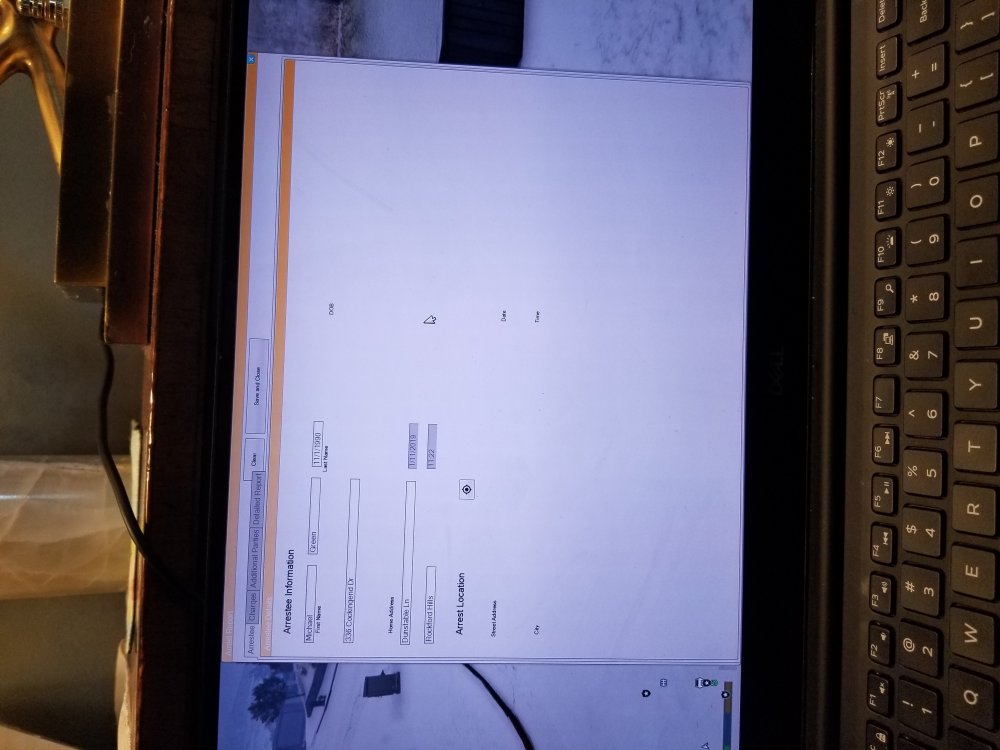
  1. Hello! First off, I love this plugin! It adds even more realism to the game and want to thank you for your time and effort in making it happen. The only issue I keep running into is that when I go in to write an arrest report on any ped, it gives me a really large window (see attached picture) and I can't seem to mark the location of the arrest or anything of the sort. I've tried looking at the .ini file and others included in the download briefly but I can't seem to figure out how to fix this. Other YouTubers like Jeff Favignano always seem to have a smaller window pop up whenever they open their Computer+ as well as the ability to fill in the arrest report location. Any ideas on how to fix this? Any help would be much appreciated.
Account

Navigation

Search

Search

Configure browser push notifications

Chrome (Android)
  1. Tap the lock icon next to the address bar.
  2. Tap Permissions → Notifications.
  3. Adjust your preference.
Chrome (Desktop)
  1. Click the padlock icon in the address bar.
  2. Select Site settings.
  3. Find Notifications and adjust your preference.