Edubs
Members
-
Joined
-
Last visited
Files posted by Edubs
-
Have you ever needed a detective unit for something? Problably not, but here it is anyway.
This is a SpecialUnit for UltimateBackup, which uses EUP 8.1 Uniforms. Los Santos, Los Santos County and Blaine County have different detectives. Detectives either come with a suit or withour a suit.
I'm planning on adding Code 3 Detective unit (with vest) and possibly a windbreaker option, if anyone is interested.
You need these:
Special thanks to @TreadRed for making Backup+, which adds eup uniforms to backup.
This is suggested:
- 3,120 Downloads
- 7 Comments
Updated -
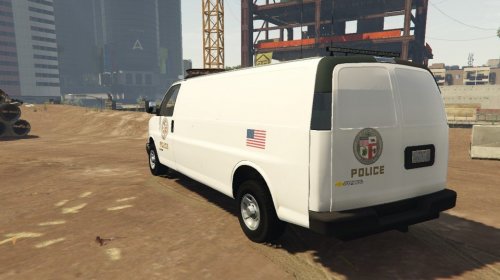
L.A.P.D. Chevrolet transport van
Since the main model most of the previous LAPD vans we're based off has been deleted and I could find a good and realistic skin, I made my own. The skin is for the transport van in Thero's Vehicle Pack.
It isn't an exact copy of the white police vans LAPD uses because I added less detail (no unit number, etc) and added an American flag on the side.
If it's requested I can add details or make different ones (TRANSPORT or CORONER on the sides). Feel free to give feedback! 🙂
NB!!! It's a bit hard to put suspects in the van because it can sometimes glitch out. NPC cops also glitch a bit but in my experience it's not really that big of a problem. If such things happen you can contact me for assistance.
- 733 Downloads
Submitted