


michelin15
Members
-
Joined
-
Last visited
Everything posted by michelin15
-
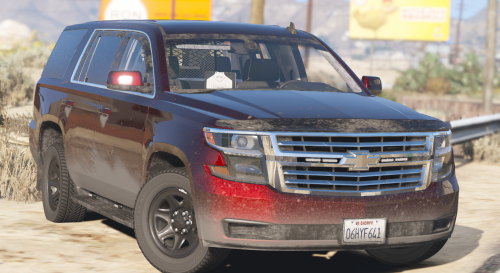 I'm not sure I have ever been more excited to see a model posted to this site. I have wanted a non-els vehicle with a half visor for a very long time and you not only made one, but you made a great one. Quality is excellent, setup is unique, and I especially love the final touch of the new wheels. Well done!
 -
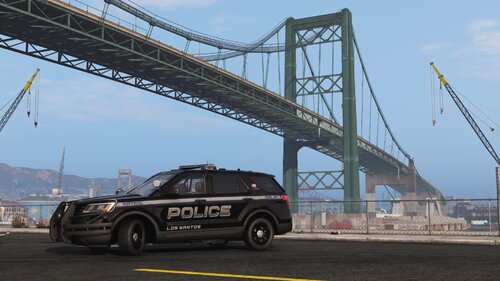 The pictured model is the one from this pack (Non-ELS): Valor Pack – Ripples Development (ripplesvehicledev.com) The public version is here, but there may be some differences from the one pictured: [ELS] LSPD Valor Pack (Reupload) - Page 2 - Vehicle Models - LCPDFR.com
- 99 comments
- 11 reviews
-
-
I can do that! Im currently taking a short break for Christmas but I can get this added in the next week sometime👍🏻
- 99 comments
- 11 reviews
-
Just added this Vic, the template is by Underwood (so that's how it's listed in the download).
- 99 comments
- 11 reviews
-
-

- 1
-
-
Thanks for the kind words! I know the struggle of spending hours to try and find a skin that fits the pack or car you’re using so I’m hoping to minimize that for as many people as I can👍🏻 I will get that CVPI uploaded tomorrow! Thank you! They aren’t based on any departments that I know of, just something I came up with 🤷🏻♂️
- 99 comments
- 11 reviews
-
-

- 1
-
-
This is just a livery pack, no vehicles are included. Do you have a template you could send me? I would be happy to add it, but with so many different templates it is hard to figure out exactly which one you're looking for. DM'ed you.
- 99 comments
- 11 reviews
-
Do you have a template you could send me? I can't seem to find his pit bull anywhere. Open the .ytd of the vehicle you're using, find the current liveries (usually end in "sign_1", "sign_2", etc.) highlight them and click Replace. Then just go to where you saved my liveries, find the right vehicle and double click the livery you want to install. Then save and you're all done for that vehicle.
- 99 comments
- 11 reviews
-
Unfortunately there are no templates included with those vehicles so I can't add those, sorry man I'll look into this tomorrow and should be able to add another version that fits that 20 FPIU better 👍
- 99 comments
- 11 reviews
-
-
Just added some K-9 and supervisor units 👍 That one is not. I prefer Non-ELS so I usually default to vehicles that are Non-ELS. With there being so many different bases for F150s, if you have a specific F150 you would like added, feel free to link it and I can add it.
- 99 comments
- 11 reviews
-
Working on this now as well as some additional patrol unit numbers and some supervisors. I will try to have them added sometime in the next day or two. I used this one: Code 3 F150 - Redsaint Mods
- 99 comments
- 11 reviews
-
-
I appreciate the suggestion, unfortunately with this many vehicles its hard to gather all the links. Plus, a lot of the vehicles I use aren't publicly released but often use the same templates as some publicly released vehicles. The ram that I use is this one: 2014 Ram 2500 – Ripples Development (ripplesvehicledev.com), but this publicly released Ram uses the same base so my skin will fit it: Slicktop Dodge Ram - Vehicle Models - LCPDFR.com Hope that helps!
- 99 comments
- 11 reviews
-
Sent you a PM. Just added BxBugs' 14 charger since that's the only other one I know of. If you have another template you would like specifically included, send it to me and I can add it.
- 99 comments
- 11 reviews
-
-
- 1
-
-
-
I'm working on a Ram 2500 and an F-150 right now, I will add a Durango when I add those sometime this week!
- 99 comments
- 11 reviews
-
I used the one from this pack: [ELS] Hampstead Inspired LSPD - Vehicle Models - LCPDFR.com I won't be near my computer for a couple days, but if you want a different one included just link it and I can add it when I'm back.
- 99 comments
- 11 reviews
-
-
-
-
Thanks! Here you go: The vehicles pictured are actually the non-els versions that are available for purchase from Ripple, but there are only slight differences to my knowledge.
- 99 comments
- 11 reviews
-
Thanks! I will start working on those additions tomorrow and should have them up sometime this weekend👍
- 99 comments
- 11 reviews
-
-
- 2
-
-
Here is an LSPD Livery I made up for my game and decided to share. It is made for vehicles from Ripple's Valor pack, Ripple's Liberty pack, and Redneck's Whelen pack, but should work on a lot more. Each sedan in this pack has at least 2 patrol units, each suv/pickup has at least 1 patrol unit and 1 supervisor unit, and various vehicles have K-9 units. TERMS OF SERVICE: You may NOT redistribute these files, claim them as your own, modify them for redistribution, or use any parts of these textures without my explicit consent. Liveries included for: 06 Tahoe 07 Expedition 11 CVPI (2 base models) 13 Caprice 16 Impala 09 Charger 14 Charger (2 base models) 18 Charger 14 FPIU 16 FPIU (2 base models) 20 FPIU (4 base models) 16 FPIS 18 FPIS 14 Tahoe 15 Tahoe 19 Tahoe (2 base models) 16 Ram 2500 18 Silverado 18 F-150 XLT 19 F-150 18 Durango 19 Durango 14 BMW 1200RT F-450 ESU & SAR Chevy Express Vapid Speedo Express Pit-Bull VX Armored SWAT Truck (available for purchase here: PITBULL SWAT UNIT - Grand Theft Auto V - GTAPoliceMods)
- 99 comments
- 11 reviews
-
-
-
- 26
-
-
 I'm sure I'm missing something, but can anyone tell me how to customize the AI Yield to Vehicle per stage setting (Issue #17 in the change log) for DLS? On half my cars, AI yields to everything, including cruise lights. On the other half, they only yield to stage 3
- 272 comments
- 20 reviews

