



gtoliver
Members
-
Joined
-
Last visited
Everything posted by gtoliver
-
-
That did the trick, AVAST was killing it, thanks for the help!
-
I would love to see some support, I’ve been waiting a year for this to come out and I can’t even open it.
-
It’s a fresh install
-
Yes Latest’s version. I’ve done the check file integrity twice, nothing
-
I’ve tried that, game still crashes before I can even select story mode.
-
I have nothing except for LSPDFR .4, it's a clean install.
-
Not getting any response on someone else’s post so I’ll make my own. Rage hook starts the game and everything like normal and then the game crashes, and a rockstar pop-up comes up saying the game quit unexpectedly. Here’s the log.
-
@Sam
-
I just tried that and the game crashes upon loading, i’ve Even tried loading the game and then rage hook, but it crashes as soon as it hooks.
-
Same for me, would like a soloution.
-
Yes the vehicle.meta is fine and the extras don’t seem to be causing the problem
-
So I have a charger in both my POLICEB and SHERIFF slots and the one in the POLICEB slot has a huge lightbar going through the center of the car at ELS stage 3. While the same car in the sheriff slot does not have this problem. I'm sorry there aren't any pictures but the site wouldn't let me upload them. https://www.lcpdfr.com/files/file/15689-2016-dodge-charger-wvalor-lightbar/
-
Before the update, I had a charger in the policeb slot, and now if I have anything in that slot other than the default police bike, the game crashes when I spawn it. Any suggestions?
-
Some of my police slots have an issue where the vehicle doesn’t distribute weight forward or backward when accelerating or braking, does anybody know how this can be fixed?
-
Some of my police slots have this thing where the vehicle doesn’t distribute the weight towards the front when braking or to the sides when turning. Does anybody know how to change this?
-
You are a life saver, thanks so much for the help!
-
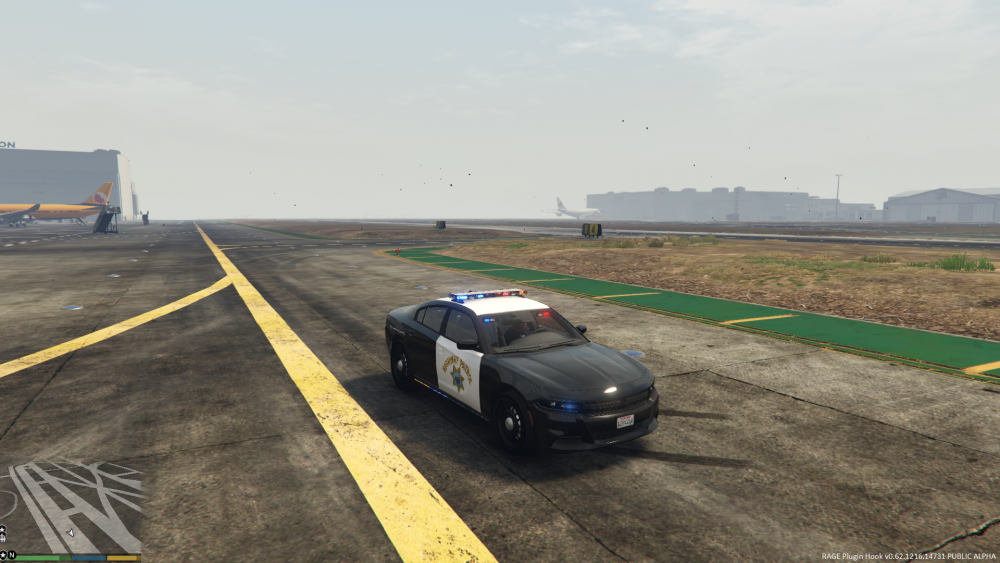
So I'm seeking any kind of advice on this issue. I used zmodeler3 to put together light bars and lights on TheHurk's dev model 2016 charger. Everything works but the wheels and the driver position is offset as seen in the picture below. Does anybody know what I did wrong or what I'm missing?
.thumb.jpeg.5a1cfbd7feec991c2dfbd30449586ab2.jpeg)
-
-
How’s it going people, I was wondering if there’s anyone out there with zomdeler2 that would be willing to convert this file to a z3d for me? http://www.lcpdfr.com/files/file/7074-whelen-500-series-tir-6-super-led/
-
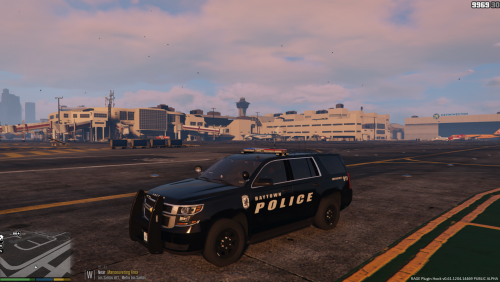 This is my first texture, re-creation from my home town police department Baytown, Texas. I haven't been home since they changed the style so I'm not sure what the rear looks like. Let me know if the rear needs to be changed to match the real version. Every thing except the rear will match the real version. This texture is for TheGreatHah's 2015 Tahoe model. Please let me know if I'm missing any credits as this is my first upload.




.jpeg.87ad84d951f2da38f86fdf199e90fb9c.jpeg)

