


Wazay02
Members
-
Joined
-
Last visited
-
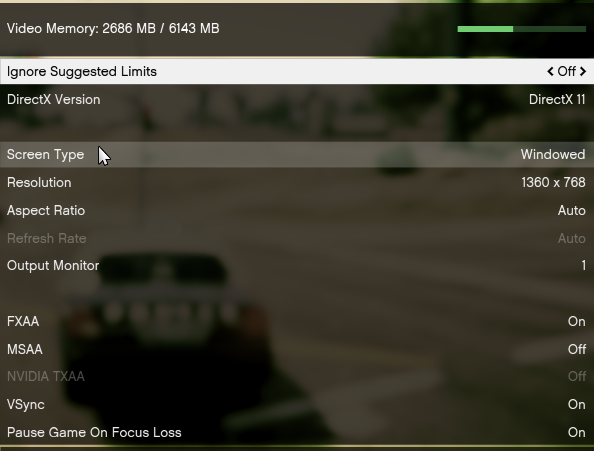
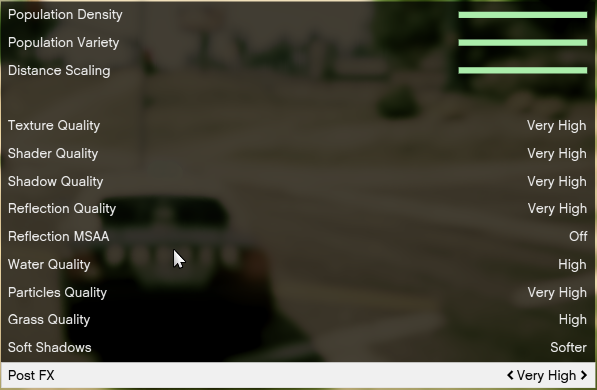
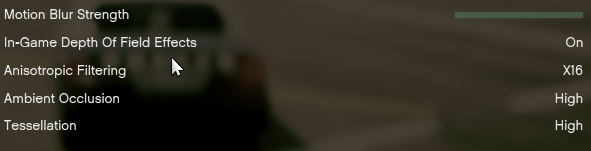
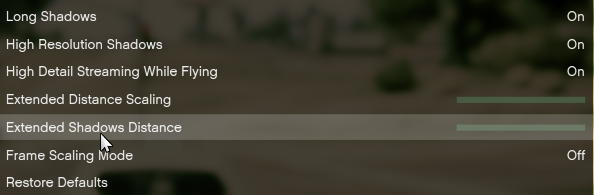
I send you screenshots of my graphic settings :
-
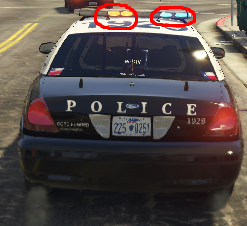
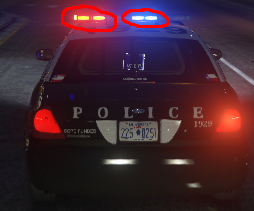
Hello, I explain my problem, basically I installed a vehicle compatible with ELS, the vehicle works well and ELS works well the only problem is in the colors of the emergency vehicle lighting. When it is daylight the lights are rather orange and light blue (instead of red and blue) but at night the colors become red and blue again, would anyone know where the problem comes from? It should be noted that the vehicle link is: I use Radiance V (the problem is not from where I already tried) and all my graphic parameters are at maximum I'll show you this with two screenshots : <--- day <--- night
-
Problème réglé :) pour ceux qui ont aussi ce bug demande de renfort (Police Backup) ne se trouve pas sur la touche B mais sur la touche 1 du numpad et arrêter des véhicules (traffic stop) se trouve sur la touche R
-
Bonjour/Bonsoir tout le monde aujourd'hui j'ai installé LSPDFR en version 0.3.1, tout fonctionne nickel mais impossible de demander des renforts en appuyant sur B (rien ne se passe) et impossible d'arrêter des véhicules en appuyant sur Shift, même en étant avec les sirènes derrière le suspect rien ne se passe. Quelqu'un aurais t-il une idée ?
