Zukuto
Members
-
Joined
Everything posted by Zukuto
-
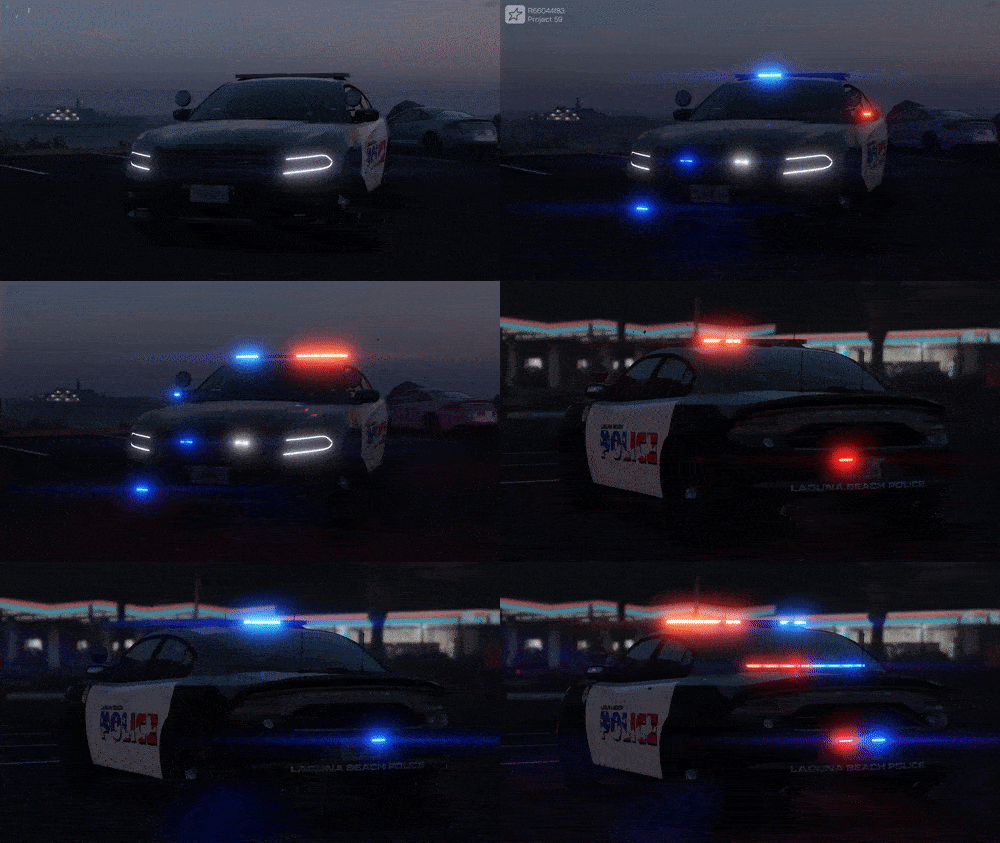 CLICK THE LAST IMAGE TO SEE A GIF OF THE LIGHTING, IDK WHY IT DOESNT SHOW Here is my first publicly released vehicle, a NON-ELS 2018 Dodge Charger PD Styled vehicle equipped with a Whelen Legacy. **Don't note the skin, it is NOT accurate to the Laguna Beach police vehicles, it's just a skin that was made a while ago and I genuinely liked** This vehicle is optimized for use on FiveM servers, is FiveM ready and doesn't put a load on your server. Feel free to join the discord for future projects and releases! discord.gg/ASxnTpvsgR If you require assistance then feel free to join and ask for help aswell. This vehicle also uses a custom lightsettings ID, which enables the indicator lights to been seen from a much further distance than default. Extras Extra-1: Setina Rambar Extra-2: Setina Wrap Extra-3: Siren Speakers Extra-4: Trunk Antennas Extra-5: Front DRLs Extra-6: Roof Sharkfin Airlink Extra-7: Spotlights Up Extra-8: Spotlights Down
 -