


macky1878
Members
-
Joined
-
Last visited
Files posted by macky1878
-
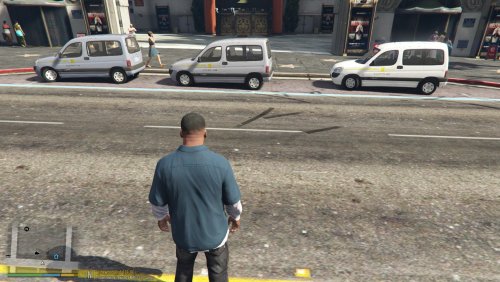
This is the first vehicle in a pack that i will be making.
It will involve taxis from all across the country!
Uber
Addison Lee
ComCabs
Alpha Taxis
Delta Taxis
Dial-a-cab
And many more to come!
For the linked vehicle, you can either install it in the slot that has been chosen already, or install it into the taxi slot.
The Livery can work on yellow, but you'd really only be able to see the letters. I will fix this in a future update and make fixed colours for it.
The colours pictured above are the best fitting, but you can experiment with it.
IF YOU HAVE ANY PROBLEMS WITH THE VEHICLE, DONT COMPLAIN TO ME AS IT IS NOT MINE!
All credit to the author of this vehicle!
All credit to the author of this vehicle!
MODEL: Skybh
TEXTURES: Skybh
CONVERSION: Skybh
https://www.gta5-mods.com/vehicles/citroen-berlingo-replace-add-on-template
- 29 Downloads
Updated -
This was on a special request of my favourite lspdfr YOUTUBER, Double Doppler https://www.youtube.com/user/TheDoubledoppler
Its amazing to have the honour to this for him and i hope he loves it!
Don't be fazed by this, though. It is free for people to use!
Original File:
Credits:
Base model & accesoiries: Rockstar games
Model adjustments: MOHaalsmeer
Template and skin: MOHaalsmeer
Round light: MOHaalsmeer (IDE)
Hope you all enjoy it
!!THIS IS A SKIN AND NOT THE ORIGINAL MODEL!!
JUST SWITCH THE "SKIN" IN THE FOLDER WITH THE ONE IN THE OPEN IV YTD.
Instructions:
Download the original file and place it into your open IV (most preferably Patchday18). Place the "SKIN" involved in this and place it onto your desktop. Then double click the TOWTRUCK.YTD (after you have turned on edit mode) and replace it with my "SKIN" folder which is on your desktop. Then click save.
I WILL INCLUDE LICENSE PLATES TOMORROW 3/07/18!!!!!
- 27 Downloads
Submitted
.thumb.png.8ecbfbf534c7bd238414cceea9d16a1a.png)