memelad
Members
-
Joined
-
Last visited
Everything posted by memelad
-
My game is crashing on load after updating everything. I think the only thing left to do is update my mods folder. What all needs updated in the mods folder I know update.rpf for sure, but what else? I'm trying to avoid completely redoing everything as I have like 400+ addon cars, and quite a few other changes. Any help would be appreciated.
-
I updated lspdfr and RPH and removed scripthook, the game launched. I updated scripthook when the update came out and installed the advancedhook update for ELS. Now the game won't make it passed the loading screen initializing game support. When I remove Dinput8.dll the game loads but obviously not much works. Any help would be appreciated
-
Already found the problem in another forum post thanks for the reply though
-
I have found the problem but its kinda wack. So when I remove my ELS folder the game loads. This would be an easy fix assuming its just a faulty XML file, but one problem I have 463 ELS XML's. Is there any easy way to find what one causes the crash by looking in the ELS log? Ok so I think I finally found the issue. It wasn't even NVE before I installed NVE I installed a new firetruck and went to bed without testing it. The next day I installed NVE and it crashed. All I did was remove the faulty firetruk.xml. I feel pretty stupid right now but at least its solved plus I can install NVE now hopfully.
-
another update I've narrowed it down to ELS.asi when I remove it I can load in.
-
I reinstalled the game and copied my Mods folder over and my plugins folder got everything working fine I was able to load in, but I noticed ELS wasn't working so I reinstalled it. I already copied my ELS.asi and .ini over from my old install so I just needed to install advancedhookv.dll from the ELS download. After I installed advancedhookv.dll It started crashing in the same place again. When I remove AdvancedHookV or ScriptHookV the game loads but if both are installed at the same time it crashes. maybe one of my plugins are causing the crash
-
I'm gonna just reinstall
-
I created a completely fresh mods folder with fresh update and x64 copied into it, still got the crash in the same spot. Maybe I need to reset up my main directory?
-
I renamed dinput and I loaded in but of course not much works. If I try and install the openiv asi it crashes again. I just don't know if its a problem with my Mods folder because I completely removed it and still crashed.
-
I already tried moving my Mods folder completely out of my GTAV directory and still crashes in the same place
-
I installed NVE and my game started crashing during the loading screen after my plugins load. I tried uninstalling NVE with the uninstaller and it still crashes in the same place. For reference my game was working just fine before using NVE. I also know the problem is not in my Mods folder because I completely removed my Mods folder from my game directory and it still crashed in the exact same place. Here is what I have tried -removing my Mods folder from game directory -reinstalling pack file limit and heap adjuster -restarting my computer -launching from steam -verifying game filesTo be clear my game had no problems before this I had many DLCs and plugins could run fine for hours. I decided to reinstall NVE. The version I installed was an old version by accident and wouldn't let me launch the game so I uninstalled using the uninstaller. After uninstalling my game wouldn't load it would crash right after loading my plugins. I decided to try installing the most recent version of NVE, but this also causes it to crash in the same place. Tried uninstalling the new version still crashes in the same place just after plugins load. What I have tried: -reinstalling my gameconfig -reinstalling pack file limit and heap adjuster -restarting my computer -renaming my mods folder to _mods -making sure all NVE entries are gone from dlctext.meta -launching from steam Any suggestions to avoid having to do a full reinstall would be appreciated also no crash report shows up after the crashI had a perfectly stable install plenty of DLCs and plugins could run for hours no crashes. I decided to give NVE another try after uninstalling a month ago because texture loss. I installed and it said unsupported game version. I uninstalled NVE and the game started to crash to desktop when loading no crash report or anything is popping up. I thought maybe the vanilla files in the NVE uninstall .OIV were outdated so I downloaded the newest free version of NVE and installed still crashing on load. I tried reinstalling my gameconfig tried a new gameconfig and also made sure heap adjuster and pack file limit adjuster were still installed. I tried uninstalling NVE with the new version and also tried verifying integrity of game files. I also renamed my mods folder to _MODS and it still crashed on load, so that leads me to believe its a problem in my root directory. Any help would be appreciated.
 I thought I already had it but that was my old install, fixed now.
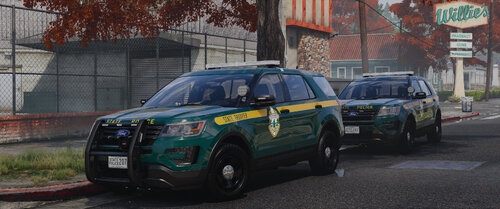
I installed the cars but the non els lights (pushbar, rear window, wigwags) aren't working for me. Everything else is working fine though.
I thought I already had it but that was my old install, fixed now.
I installed the cars but the non els lights (pushbar, rear window, wigwags) aren't working for me. Everything else is working fine though.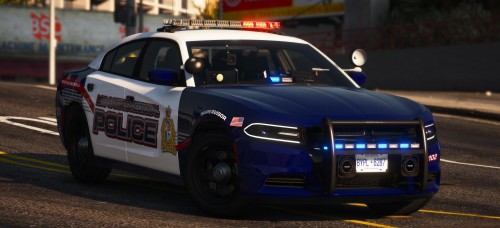 The headlights, and tail lights on the charger are tinted. I tried setting the defuse tint to 0x00FFFFFF, but it was already set as that. the lights are fine from a distance but when I get close the tint just pops in. anyone know how to fix this
- 36 comments
- 11 reviews
so I have radiance V installed but at night when i turn on my lights the game makes everything else super dark and I can't see a thing. does anyone know if i can edit the visualsettings.dat or some other file to fix this. here are some screenshots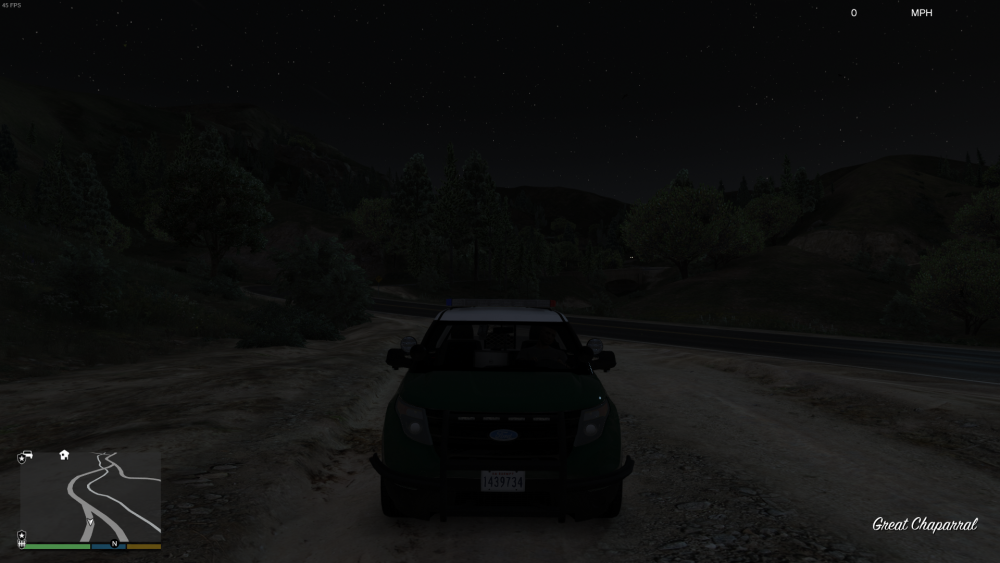
.thumb.png.7f113e394d29eb4a76a527b3f2ffc4fb.png) i fixed it i had to delete and remake my mods foldernope that didn't workOk I'll try that thanksI just reinstalled GTA5. When I tried installing a car pack 2 of four of my replacement cars where not showing up, even tho I replaced every file in the x64e and all patchdays ( by using the search function) and they still wont show up. I tried installing another pack that i had installed a month ago but 2 of four of its cars wont work ether. the car slots that aren't working on ether one are police2 and police3 (police and police4 work just fine)
i fixed it i had to delete and remake my mods foldernope that didn't workOk I'll try that thanksI just reinstalled GTA5. When I tried installing a car pack 2 of four of my replacement cars where not showing up, even tho I replaced every file in the x64e and all patchdays ( by using the search function) and they still wont show up. I tried installing another pack that i had installed a month ago but 2 of four of its cars wont work ether. the car slots that aren't working on ether one are police2 and police3 (police and police4 work just fine)


.png.a3adfd42fdf0e191f13fbb774d466ace.png)