


WiNgNuTz
Members
-
Joined
-
Last visited
Everything posted by WiNgNuTz
-
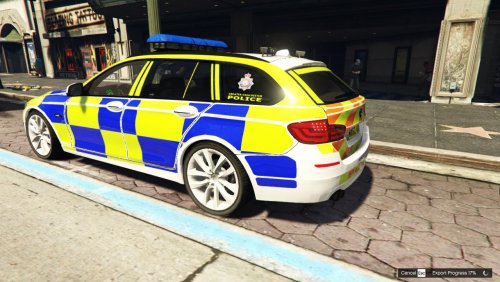 Any chance someone could supply a vehicles.meta entry that doesn't cause the car to wallow around and roll over at the lowest possible speeds? Never seen a 530d pull a wheely or a stoppy before. xD Can only assume I have a meta entry from another vehicle that doesn't work with this car... ;)
- 3 comments
- 1 review
-
 Handling is terrible for me, rolls over so easily at speed, though I can't guarantee I haven't editted the handling.meta previously for another vehicle. Any chance someone could post handling lines that work for this car? Can swap out entire entries, but wouldn't have a clue where to start with editting specifics myself! ;)
- 36 comments
- 8 reviews
-
Right, with the help of the OpenIV site, I have solved this. A fresh boot of windows to ensure no processes are using the game folder, and disabling any Antivirus allows the ASI loader to be installed. Let's just hope it fixes the ELS problem now!
-
Fixed it now, realised the dinput8.dll file was missing from the GTA V directory, so copied the one supplied with Scripthook across, and all is well. Ok, scratch that, same issue with the ELS lights, and uninstalling the ASI loader then produces the same error upon trying to reinstall......anyone? Out of date dinput8.dll possibly?
-
I've recently discovered LSPDFR, and have been experimenting with different mods to see what works for me, couldn't get ELS working right until today, but then had the whole "lights only work on level 3" issue, for which I found the "uninstall and reinstall ASI loader, etc" solution....except upon trying to reinstall ASI Loader, i get the error message "The Installation Failed, restart OpenIV and try again". I have restarted OpenIV, restarted my PC, uninstalled and reinstalled OpenIV with the latest version, all to no avail. Google seems to fail me on this issue as well, so can anyone here offer any suggestions?
