



ConnorB.2L147
Members
-
Joined
-
Last visited
Everything posted by ConnorB.2L147
-
.thumb.jpg.182dedb1a55dea252c1853d35d4d1e3c.jpg) I’ve had a look but it says there’s no male ped yet... are you likely to add that?? Connor
I’ve had a look but it says there’s no male ped yet... are you likely to add that?? Connor- 256 comments
- 29 reviews
-
Make sure all scripts and files are all up-to-date and that you have all the required .dll files. Also make sure you have the appropriate game config Files etc which can be found here: https://forums.gta5-mods.com/topic/19337/fix-for-game-memory-error-may-2018-by-police18651 if all else fails, delete mods folder make a new mods folder and place update and x64 back in via copying it from the main directory. Potential there’s a corrupt folder somewhere.
-
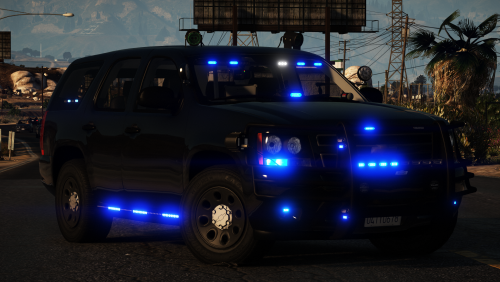 So in stage 1 lighting, only the light on the left is working and not the other side. Not sure what’s happening here.
- 33 comments
- 34 reviews
-
I've got those links in and so far have zero issues.
-
Did you place this one in: https://www.gta5-mods.com/tools/heap-limit-adjuster-600-mb-of-heap#comments_tab and check out this: https://forums.gta5-mods.com/topic/19337/fix-for-game-memory-error-may-2018-by-police18651
-
So when placing vehicles into my patch day, I should have the x64e.rpf in my mods folder?
-
Hi there, game config goes here: most recent game game config is here: https://www.gta5-mods.com/misc/gta-5-gameconfig-300-cars Open openiv, then proceed to your mods folder then go here: mods/update/update.rpf/common/data Also try this: https://www.gta5-mods.com/tools/heap-limit-adjuster-600-mb-of-heap#comments_tab and check out this page: https://forums.gta5-mods.com/topic/19337/fix-for-game-memory-error-may-2018-by-police18651
-
As soon as I get my game back up and running, I’ll be for sure using this pack!! Any plans on a similar pack compatible with EUP and vanilla peds (female and male) for LSPD??
- 256 comments
- 29 reviews
-
Is your visual 8500 for both day and night? What settings are your els config? (ini)
-
Most likely as those above have mentioned, a game config is critical when adding new vehicles. That would likely be the issue.
-
I feel this issue occurs after an update comes out and users upgrade with mods etc still Installed. My honest recommendation is to reinstall everything again - just to be safe.
-
Hey guys, obviously with my LSPDFR, I’m looking for a really realistic approach with my police lights where I have radiance V installed but was wondering what settings you have set for your els config and visualsetting.dat where your lights aren’t too bright and reflect of buildings without extending for miles which isn’t too realistic. Just was wondering if you would be okay providing some examples as to what your els config and visuals settings are set to as I’m looking for a real life approach. Thanks, Connor
-
Yes. * You cannot download the game twice - it can only be downloaded once unless you uninstall it or you’re missing files from the game.* When you download Grand Theft Auto V either from steam, or disk, proceed to your route directory and right click or control copy the folder and paste it. Once it has completed copying the game file, right click rename it from ‘Grand Theft Auto V - Copy’ to ‘Grand Theft Auto V - LSPDFR’. With the original game file, change it to: ‘Grand Theft Auto V - Vanilla’ so you know that’s the original (non-edited/modded game) so you can access online features. Please be aware though, if you want to play either Vanilla or LSPDFR you have to change the file back to: ‘Grand Theft Auto V’ without ‘-Vanilla’ or ‘-LSPDFR’ as it won’t recognise it depending on what you want to do. I would recommend watching Albo1125 videos; link to his playlist is here: All the best, Connor
-
I just delete my old mods folder and placed a new one. I’ll just have my cars and els and see what’s happens. Now I'm getting out of game memory.
-
I’ve done that and it’s still occurring. Looks like I’ll just stick in the county forever. 😕
-
I know this is old, but does anyone have any suggestions?
-
I've tried verifying the integrity but the issue still persists. Does anyone know why this is occurring?
-
So I have found that some of my vehicles are fine but my PD vehicles when going to code 3, all headlights and break lights are turning off again. Does anyone have a clear idea why this issue is occurring? A fix would be much appreciated! Connor
-
 Finally got it installed but when I press all the buttons it does a screenshot every time. For instance; going through the intersection and pressing wail it screenshots like 4 times if I hit it 4 times.
- 70 comments
- 5 reviews
-
Hi, When I activate stage 3 lighting, the reflections on some of the nearby surroundings appear more of a pink/purple colour other than red. However, some sections do have more of a red colour to them. I have checked the visual settings dat and so far car.default on etc is on 6000 day and 1500 night. Here are some screenshots bellow: You can see direct back is red then towards the left is pink then blue then pink then red again.... Connor
.thumb.png.2bf2c93cae1bfee7dad7a459952ea4ae.png)
-
You’re a legend in time. Been using your stuff since day one of me starting LSPDFR!
-
-
UPDATE: Hello, I have look into the vanilla version of the game and so far have not experienced any plane crashes. The one that normally does I have observe fly around the grapseeed airfield in a continuous pattern but has not crashed.
-
Thank you for getting back to me! I’ll give a shot probably tomorrow in my time and let you know.
-
 I'm really new to this mod and have one question. Can I have my LSPD units in police-policet and riot using the LAPD smart siren? and have my BCSO units in Sheriff slots use the touchmaster delta and highway units being bike and police4 using CHP sirens?
- 851 comments
- 108 reviews

.thumb.jpg.182dedb1a55dea252c1853d35d4d1e3c.jpg)
.png.d125e3f9666ccc6929d80bf8a3092f43.png)

