Oliver2k3
Members
-
Joined
-
Last visited
Everything posted by Oliver2k3
-
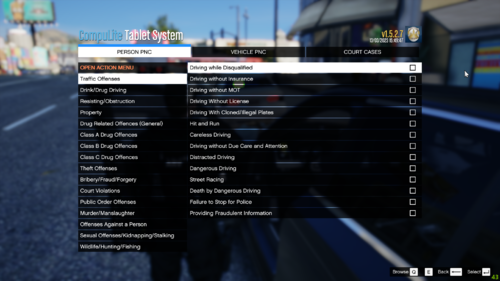 Tired of the basic CompuLite american themed charges? Well no more! I have created a set of charges and citations that are based around the English law. What is included? I have scoured the many acts that we have in the UK to try and decipher some of the laws. They range from Traffic Offenses to Drug Offenses to Firearm as well as everything inbetween and out. On top of this I have included many citations although proper fines may not be included yet for a lot of the traffic offenses. If you wish to contribute or request I add something, please do not hesitate to ask me. Although please keep in mind that I can not add everything under the sun and will not add some of the more touchy subjects. Required Plugins CompuLite (v1.5.2.7) - https://www.bejoijo.com/post/compulite Disclaimer Please do not claim this file as your own work. This took me a lot of my time.
 -
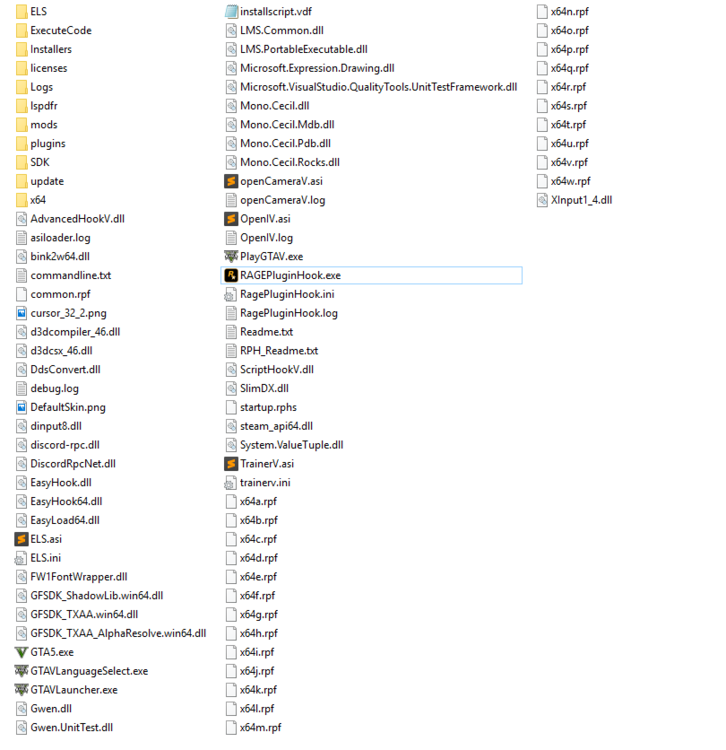
PROBLEM WAS QUICKLY SOLVED - For those who have similar problems, try disabling your antivirus completely rather than adding GTA 5 Folder to exeptions! So, after waiting for openIV to fix its issue, I have ran into another. No matter what I try, reinstalling my game & files, redownloading the latest version of scripthookv (Version 1868), redownloading both ELS and TrainerV, I can't seem to get it to work. After looking at it more, I believe it is the problem of ScriptHookV, so obviously I made sure it matched my game version, and it did. I don't understand if I am doing something wrong, or despite both OpenIV and ScriptHookV recently updating, they are still not working. I have also added the GTA 5 folder to my exceptions on my Kaspersky Anti Virus Software. If any of you have any ideas or know how to fix it, please suggest something, I have posted my GTA 5 Main Directory below.
-
-
Is there a way to make a callout spawn a Ped, This is my Script: using System; using System.Collections.Generic; using System.Linq; using System.Text; using System.Threading.Tasks; using Rage; using LSPD_First_Response.Mod.API; using LSPD_First_Response.Mod.Callouts; using LSPD_First_Response.Engine.Scripting.Entities; namespace Heated_Callouts.Callouts { [CalloutInfo("EscapedPrisoner", CalloutProbability.Low)] public class EscapedPrisoner : Callout { private Ped Suspect; private Vector3 SpawnPoint; private Blip SuspectBlip; private LHandle Pursuit; private bool PursuitCreated = false; public override bool OnBeforeCalloutDisplayed() { SpawnPoint = World.GetNextPositionOnStreet(Game.LocalPlayer.Character.Position.Around(300f)); Suspect = new Ped(SpawnPoint); Suspect.IsPersistent = true; Suspect.BlockPermanentEvents = true; this.ShowCalloutAreaBlipBeforeAccepting(SpawnPoint, 15f); this.AddMinimumDistanceCheck(5f, SpawnPoint); CalloutMessage = "Escaped Convict"; CalloutPosition = SpawnPoint; Functions.PlayScannerAudioUsingPosition("WE_HAVE CRIME_RESIST_ARREST IN_OR_ON_POSITION", SpawnPoint); return base.OnBeforeCalloutDisplayed(); } public override bool OnCalloutAccepted() { SuspectBlip = Suspect.AttachBlip(); return base.OnCalloutAccepted(); } public override void Process() { base.Process(); if (!PursuitCreated && Game.LocalPlayer.Character.DistanceTo(Suspect.Position) < 30f) { Pursuit = Functions.CreatePursuit(); Functions.AddPedToPursuit(Pursuit, Suspect); Functions.SetPursuitIsActiveForPlayer(Pursuit, true); PursuitCreated = true; } if (PursuitCreated && !Functions.IsPursuitStillRunning(Pursuit)) { End(); } } public override void End() { base.End(); if (Suspect.Exists()) { Suspect.Dismiss(); } if (SuspectBlip.Exists()) { SuspectBlip.Delete(); } } } } I would like this part "Suspect = new Ped(SpawnPoint);" to spawn a specific ped instead of a random ped. Thanks for help!