


Chriscrash
Members
-
Joined
-
Last visited
Everything posted by Chriscrash
-
 So installed everything the other week and it worked fine. Speech engine all of a sudden stopped working. Any ideas? UPDATE: I figured out the issue. No help needed.
- 1,346 comments
- 82 reviews
-
So I found if I remove the dinput8.dll and version.dll files while turning off Battleye I can get the game to load. However without these files I'm pretty much playing vanilla. Any ideas? Are these files corrupted is there a way to fix so I can use my cars/Mods
-
Hi, I cannot get my game to load since the update. When I go to launch game via Rockstar Game Launcher the following pops up.... "Blocked loading of file: C:\Program Files (x86)\Steam\steamapps\common\Grand Theft Auto V\dinput8.dll". I also get this as well.... "Blocked Loading of file: C:\Program Files (x86)\Steam\steamapps\common\Grand Theft Auto V\version.dll." Can anyone help point me in the right direction?
-
-
Thanks but I think for what I need to figure out has to do with editing the yft file. The colors are fine it's just where the colors are on the lightbar that need adjustment.
-
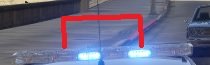
I'm admittedly a newbie when it comes to this. Could someone explain to me how to edit a lightbar from an existing model? In the picture attached I'm trying to figure out how to change two sections of the lightbar marked with the red lines to red as they are currently blue. Thanks
-
Yes
-
I set it "None" in the key ini and made sure it was disabled in the LSPDFR key bindings in game and I still get overlap of Traffic Stop and Stop The Ped menus when beginning interaction during a traffic stop.
-
Just tried the manual install of LSPDFR. Still have overlap with traffic stop and STP. However the issue with overlap with the Pursuit Menu and Ultimate Backup is resolved.
-
I looked at the key bindings for traffic stop interact and pursuit and nothing was selected. I'm truly puzzled. In the past all I had to do was change the key ini and I was good to go.Just tried that and it does not. Also having overlap with the pursuit menu and ultimate backup as well.Thanks its attached RagePluginHook.logIf its not crashing the game and just crashing lspdfr am i still able to get a rage crash report? If so how do I go about this? Sorry I'm a novice.Just tried it that way too. When I go to clear the key it crashes LSPDFR. Tried it twice now.When I perform a traffic stop and walk up to the vehicle when I press the dpad right both the traffic stop menu and Stop the Ped menu come up and overlap each other. I attempted to change the lspdfr keys.ini folder by changing the below line to none as I only want the Stop the Ped menu to come up. TRAFFICSTOP_INTERACT_Key=None However the issue still persists. Anything else I'm missing?That seems to get the game to load but when the game opens I only have access to the vanilla cruisers.Could someone please take a look at the crash log? Game crashes when loading. I changed something in OpenIV and messed things up. I'm hoping someone can save me from having to delete the game and starting all over.
 Is their no longer an accessories tab? In the older version I liked being able to add ranks on the uniform or add a bullet proof vest. I don't see this option anymore in 8.0.
- 2,341 comments
- 236 reviews
-
-

- 1
-
So when I go to move my X64 folder to the mods folder the game wont load and I get social club error 1005 come up. If I pull the folder and place it back in the GTAV folder the game loads. Any ideas?Luckily I made a copy of the game, I took the game config from the original and placed it into the modded copy and I'm back in business.Tried that but no luck. These are my plugins. All of which worked fine before I added a oiv car pack. I removed the pack but I did change the gameconfig. Would that do it?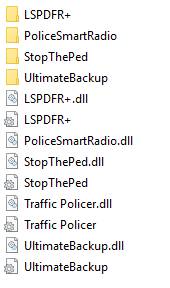 Spike when I found the answer to my issue it was because one of the LSPFR moders admitted there was a known issue with ELS crashing when not on duty. I'm assuming a fix will be in order.I'm having problems getting the game going. It was running fine the other night. Last night I added OIV files to add some cars. Went to start game and it wouldn't load. I started going nuts taking stuff out that I added and still nothing. Then I found out about the social club issue and the game wouldn't load for anyone. Tried it again this morning Rage loads the game fine but as the game starts to load it crashes every time. My guess is in my frustration last night I changed something I shouldn't have. I have attached the crash report from RPH. Can someone help me out?After some searching I found in another post that you need to be on duty. If your not on duty and activate the lights lspdfr will crash. Sure enough I went on duty and no issue.

