Skip to content
View in the app

A better way to browse. Learn more.

LCPDFR.com

A full-screen app on your home screen with push notifications, badges and more.

To install this app on iOS and iPadOS
  1. Tap the Share icon in Safari
  2. Scroll the menu and tap Add to Home Screen.
  3. Tap Add in the top-right corner.
To install this app on Android
  1. Tap the 3-dot menu (⋮) in the top-right corner of the browser.
  2. Tap Add to Home screen or Install app.
  3. Confirm by tapping Install.

Albert75

Members
  • Joined

Everything posted by Albert75

  1. La voici, pour votre français "directory" veut ici dire "Dossier Racine" ;)
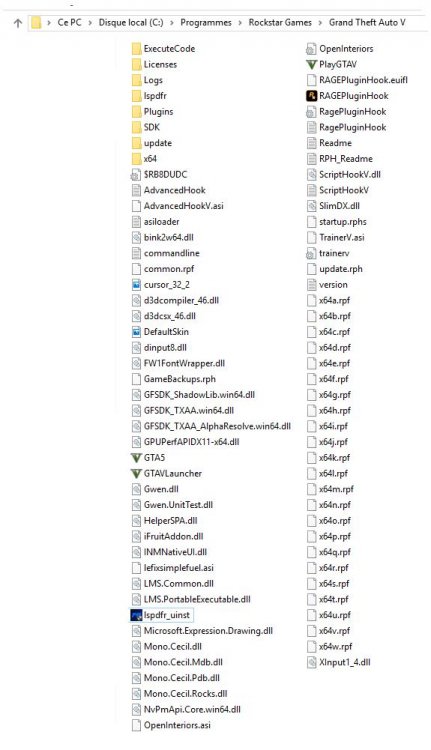
  2. Bonjour, je viens de le faire mais rien n'y change :/
  3. Bonjour, J'ai récemment installer LSPDFR. Il se lance normalement avec RagePluginHook. La prise de service fonctionne ainsi que les arrestations de personne l'appel de renfort, etc ... Seulement voila il est impossible d'accepter les call-out. J'ai beau appuyer frénétiquement sur la touche Y mais rien n'y fait, rien ne se passe. Idem pour la touche J pour allumer seulement les gyrophares. Pourrais-je avoir votre aide merci.

Account

Navigation

Search

Search

Configure browser push notifications

Chrome (Android)
  1. Tap the lock icon next to the address bar.
  2. Tap Permissions → Notifications.
  3. Adjust your preference.
Chrome (Desktop)
  1. Click the padlock icon in the address bar.
  2. Select Site settings.
  3. Find Notifications and adjust your preference.