


Creators: Due to background reprocessing of files, approvals and file security checks may be delayed. Thanks for your patience.
.png.cd47676f7a80e0ab0a371767bf05e5da.png)

Two Triple Zero Six
Members
-
Joined
-
Last visited
Files posted by Two Triple Zero Six
-
Hello, today I am releasing my marked XC90 in the Staffordshire Police Setup. This vehicle is currently used as an ARV within the force and used to be a part of Staffordshire Roleplay's Fleet.
I have decided to release this because of the fact that the community closed and its too nice of a car to be sitting on my desktop 😂
Credits:
- Model From: Squir
- Model Bought By: C.Owens & T.Andrews
- Model Lowered: C.Owens
- Model Converted: C.Owens
- Model Fixes: C.Owens & T.Andrews
- Defender Lightbar: A.Kucinski
- Button Blasts: A.Kucinski
- Whelen Ions: A.Kucinski
- Whelen Vertex Bullet: Unknown [LCPDFR]
- Other Lights: T.Andrews
- ARV Equipment : D.Pease
- Skin: T.Andrews
- Windows: T.Andrews
- Screenshots: C.Ward
DO NOT REUPLOAD OR RIP AT ALL!
Template : https://imgur.com/a/NJXYIIn
- 1,525 Downloads
- 1 Comments
Updated -
NEW RELEASE FROM XENMODS!
Please do not redistribute under any circumstances.
Model - AlexB
Lowered and Converted - JamesR
Model Edits and Fixes - XENMods™ | XENON
RSG Stellar - JamesR
Whelen Ion - JamesR
Button Blast - JamesR
Stellar Edits - XENMods™ | XENON
Interior Equipment - JamesR
Dashcam Modelling - XENMods™ | Inspector Tyler
Dashcam UV Mapping - XENMods™ | Inspector Tyler
Dashcam Texture - HDGamerzPC and XENMods™ | Inspector Tyler
Lighting Setup - XENMods™ | XENON
Interior Setup - XENMods™ | XENON
Skin - XENMods™ | XENON
Plates - XENMods™ | XENON
Screenshots by XENMods™ | Inspector Tyler
Conversion paid for by XENMods™ | Secret
Base idea - XENMods™ | Secret
Thanks to everyone who has waited with us and supported us to continue releasing. Enjoy the model and we look forward to the next one!- 917 Downloads
- 2 Comments
Submitted -
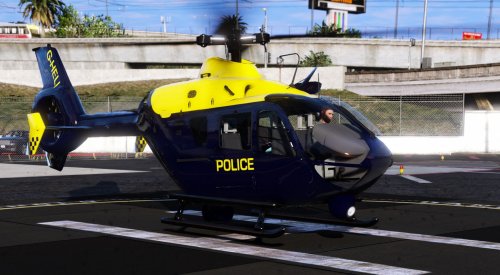
Original Model: https://www.gta5-mods.com/vehicles/ec-135-gendamerie-template
Credits:
Original model from GTA SA by Rasper
Modified and templated by Game68240.
Textures by MattZepol - Improved and fix by Game68240
Spotlight and Camera modelled and UV mapped by EM_Matty
Model editied by EM_Matty
Skin by EM_Matty
Interior modelled and UV mapped by EM_Matty
Thanks to EM_Raven for helping and doing the screenshots.
Join our Discord:
https://discord.gg/54SKVZF
- 3,631 Downloads
- 1 Comments
Submitted -
File Overview:
Hello, so I decided to come back to the modding scene after some time off. But I have come back to the modding scene with a group of people that will help me along the way. So here it is the 2016 Ford Kuga and the first one released. Enjoy!!
Credits:
Bought by RM_Horn
Kuga Provided by Raddz Modding
Edited by Raddz Modding
Converted by Raddz Modding
Whelen justice by James Raddz edited by EM
Light-emissive by James Raddz
Search Light by Double Doppler
Boot equipment from James Raddz
Lights fixed by EM_Matty
Skin by RM_Robert
Windows RM_Robert
Visual settings by Britishgamer88
Thank you:
Horn for the Kuga.
Capener for the screenshots.
To support the team:
Become a patreon: https://www.patreon.com/EmergencyModifications
Join our Discord:
https://discord.gg/54SKVZF
- 1,632 Downloads
Updated


.thumb.png.71e6fb58b05a8743a7f376c86956459f.png)