TheStegosaurus
Members
-
Joined
-
Last visited
Files posted by TheStegosaurus
-
Here are the radio sounds used during F1 broadcasts.
This mod replaces the standard police scanner sounds, when a call comes in and when dispatch stops talking.
Please note, this is my first sound mod, its not anything special, but I just like the sound and figured 'why not'
If you download it, then I hope you enjoy it 🙂
- 151 Downloads
- 5 Comments
Updated -
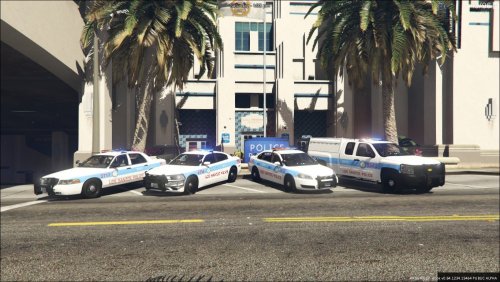
Los Santos Police Department skins in the style of the Chicago Police Department.
Includes skins for CVPI, Impala, Silverado and 2014 Charger from Maurice97's Code 3 pack and its extension pack.
These are my first skins made for GTA V and my first ever mod released, so any C&C is welcome! 🙂
If there is enough demand, I will also add the Taurus and Explorer from Maurice97's pack too (I don't use them in my game, hence I haven't made skins for them).
Please DO NOT reupload these skins without permission - Thank you.
Links to required packs:
Please note: You will have to rename the .ytd files to match the cars in the slots you use.
- 89 Downloads
- 1 Comments
Submitted